Webhook 형식
Webhook으로 구독한 경우 받게 되는 형식은 다음과 같습니다.
인시던트가 추가되거나 업데이트될 때:
{"meta": {"unsubscribe": "","documentation": ""},"page": {"id": "","status_indicator": "","status_description": "","url": ""},"incident": {"backfilled": false,"created_at": "","impact": "","name": "","resolved_at": "","status": "","updated_at": "","id": "","url": "","incident_updates": [{"id": "","incident_id": "","body": "","status": "","created_at": "","updated_at": ""}]}}
유지보수가 추가되거나 업데이트될 때:
{"meta": {"unsubscribe": "","documentation": ""},"page": {"id": "","status_indicator": "","status_description": "","url": ""},"maintenance": {"backfilled": false,"created_at": "","impact": "","name": "","resolved_at": "","status": "","updated_at": "","id": "","url": "","duration": "","maintenance_updates": [{"id": "","maintenance_id": "","body": "","status": "","created_at": "","updated_at": ""}]}}
구성 요소가 업데이트될 때:
{"meta": {"unsubscribe": "https://<status-page-domain>/unsubscribe?id=${subscriber.id}&token=${subscriber.unsubscribeToken}","documentation": ""},"page": {"id": "","status_indicator": "","status_description": "","url": ""},"component_update": {"created_at": "","new_status": "","component_id": ""},"component": {"created_at": "","id": "","name": "","status": ""}}
가능한 상태 페이지 상태:
UPHASISSUESUNDERMAINTENANCE
가능한 구성 요소 상태:
OPERATIONALUNDERMAINTENANCEDEGRADEDPERFORMANCEPARTIALOUTAGEMAJOROUTAGE
가능한 인시던트 상태:
INVESTIGATINGIDENTIFIEDMONITORINGRESOLVED
가능한 유지보수 상태:
NOTSTARTEDYETINPROGRESSCOMPLETED
Webhook 페이로드 검증
Webhook 엔드포인트에서 페이로드를 검증할 것을 강력히 권장합니다.
Instatus는 시크릿으로 Webhook 페이로드에 서명하고, 그 서명을 x-instatus-webhook-signature 헤더에 담아 보냅니다. 이 서명으로 Webhook이 Instatus에서 왔는지 확인할 수 있습니다.
Webhook 검증 단계
- Webhook을 구독할 때 생성한 Webhook 시크릿을 저장해 두세요 (페이지를 Webhook으로 구독할 때 확인할 수 있으며, 그곳에서 직접 지정할 수도 있습니다).
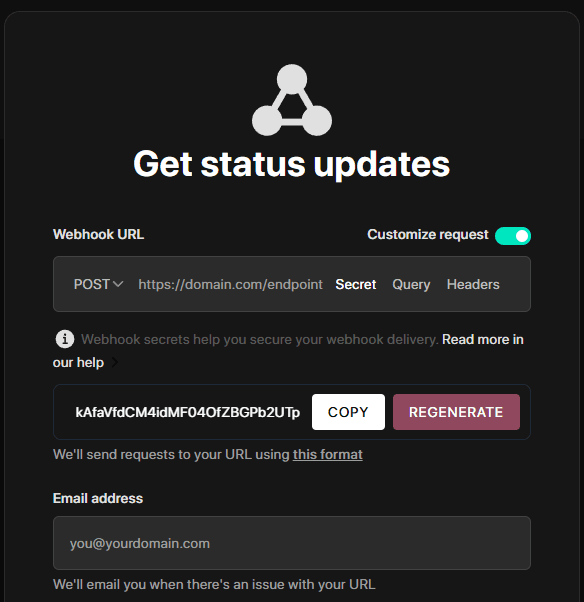
-
Webhook을 수신할 새 엔드포인트를 서버에 만드세요.
-
서버에서 생성한 서명과 전달된 서명을 비교해 검증하세요.
-
서명이 일치하면 Webhook을 처리하세요.
코드 예시
import crypto from 'crypto'import express from 'express'const app = express()app.use(express.json())const WEBHOOK_SECRET = 'your-webhook-secret'function isVerifiedPayload(payload, signature, secret) {const hmac = crypto.createHmac('sha256', secret)const digest = hmac.update(JSON.stringify(payload)).digest('hex')return crypto.timingSafeEqual(Buffer.from(digest), Buffer.from(signature))}app.post('/endpoint/to/webhook', (req, res) => {const payload = req.bodyconst signature = req.header('x-instatus-webhook-signature')if (!signature) {return res.status(400).send('Signature missing')}if (!isVerifiedPayload(payload, signature, WEBHOOK_SECRET)) {return res.status(401).send('Invalid signature')}// Process the valid webhookres.status(200).send('Webhook received')})app.listen(3000, () => console.log('Server running on port 3000'))
검증이 중요한 이유
- 진위 확인: Webhook이 Instatus 플랫폼에서 왔음을 보장합니다.
- 변조 방지: 페이로드가 변경되었는지 감지합니다.
- 보안 강화: 재전송 공격과 무단 접근을 막습니다.