Webhook の形式
Webhook で購読した場合に届くペイロードの形式は次のとおりです。
インシデントが追加または更新されたとき:
{"meta": {"unsubscribe": "","documentation": ""},"page": {"id": "","status_indicator": "","status_description": "","url": ""},"incident": {"backfilled": false,"created_at": "","impact": "","name": "","resolved_at": "","status": "","updated_at": "","id": "","url": "","incident_updates": [{"id": "","incident_id": "","body": "","status": "","created_at": "","updated_at": ""}]}}
メンテナンスが追加または更新されたとき:
{"meta": {"unsubscribe": "","documentation": ""},"page": {"id": "","status_indicator": "","status_description": "","url": ""},"maintenance": {"backfilled": false,"created_at": "","impact": "","name": "","resolved_at": "","status": "","updated_at": "","id": "","url": "","duration": "","maintenance_updates": [{"id": "","maintenance_id": "","body": "","status": "","created_at": "","updated_at": ""}]}}
コンポーネントが更新されたとき:
{"meta": {"unsubscribe": "https://<status-page-domain>/unsubscribe?id=${subscriber.id}&token=${subscriber.unsubscribeToken}","documentation": ""},"page": {"id": "","status_indicator": "","status_description": "","url": ""},"component_update": {"created_at": "","new_status": "","component_id": ""},"component": {"created_at": "","id": "","name": "","status": ""}}
ステータスページのステータスとして返る値:
UPHASISSUESUNDERMAINTENANCE
コンポーネントのステータスとして返る値:
OPERATIONALUNDERMAINTENANCEDEGRADEDPERFORMANCEPARTIALOUTAGEMAJOROUTAGE
インシデントのステータスとして返る値:
INVESTIGATINGIDENTIFIEDMONITORINGRESOLVED
メンテナンスのステータスとして返る値:
NOTSTARTEDYETINPROGRESSCOMPLETED
Webhook のペイロードの検証
Webhook のエンドポイントでペイロードを検証することを強くおすすめします。
Instatus は Webhook のペイロードをシークレットで署名し、その署名を x-instatus-webhook-signature というヘッダーに含めます。この署名によって、Webhook が Instatus から送られたものであることを検証できます。
Webhook を検証する手順
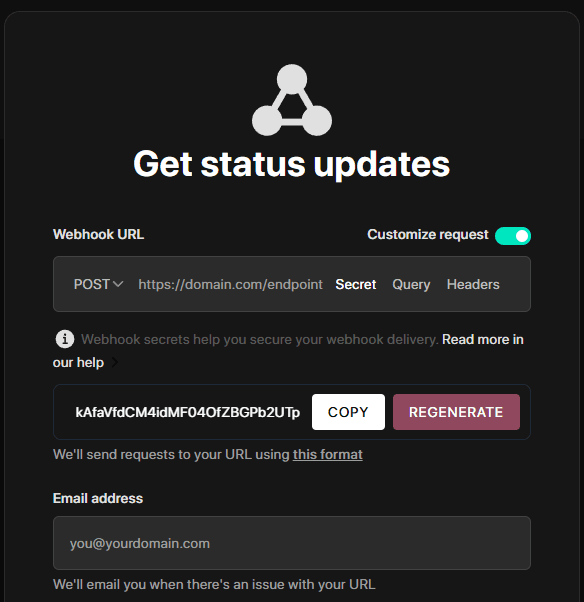
- Webhook を購読するときに生成した Webhook のシークレットを保存しておきます (ページを Webhook で購読する際に確認でき、その場でカスタマイズもできます)。
-
Webhook を受け取るエンドポイントをサーバーに新しく作成します。
-
署名と、サーバー側で生成した署名を比較して検証します。
-
署名が一致したら、Webhook を処理します。
コード例
import crypto from 'crypto'import express from 'express'const app = express()app.use(express.json())const WEBHOOK_SECRET = 'your-webhook-secret'function isVerifiedPayload(payload, signature, secret) {const hmac = crypto.createHmac('sha256', secret)const digest = hmac.update(JSON.stringify(payload)).digest('hex')return crypto.timingSafeEqual(Buffer.from(digest), Buffer.from(signature))}app.post('/endpoint/to/webhook', (req, res) => {const payload = req.bodyconst signature = req.header('x-instatus-webhook-signature')if (!signature) {return res.status(400).send('Signature missing')}if (!isVerifiedPayload(payload, signature, WEBHOOK_SECRET)) {return res.status(401).send('Invalid signature')}// Process the valid webhookres.status(200).send('Webhook received')})app.listen(3000, () => console.log('Server running on port 3000'))
検証が重要な理由
- 真正性の確認: Webhook が Instatus のプラットフォームから送られたものであることを保証します。
- 改ざんの検知: ペイロードが変更されていないかを検出します。
- セキュリティの向上: リプレイ攻撃や不正なアクセスから保護します。