Webhook 格式
如果你透過 webhook 訂閱,會收到以下格式的內容:
新增或更新事件時:
{"meta": {"unsubscribe": "","documentation": ""},"page": {"id": "","status_indicator": "","status_description": "","url": ""},"incident": {"backfilled": false,"created_at": "","impact": "","name": "","resolved_at": "","status": "","updated_at": "","id": "","url": "","incident_updates": [{"id": "","incident_id": "","body": "","status": "","created_at": "","updated_at": ""}]}}
新增或更新維護時:
{"meta": {"unsubscribe": "","documentation": ""},"page": {"id": "","status_indicator": "","status_description": "","url": ""},"maintenance": {"backfilled": false,"created_at": "","impact": "","name": "","resolved_at": "","status": "","updated_at": "","id": "","url": "","duration": "","maintenance_updates": [{"id": "","maintenance_id": "","body": "","status": "","created_at": "","updated_at": ""}]}}
更新元件時:
{"meta": {"unsubscribe": "https://<status-page-domain>/unsubscribe?id=${subscriber.id}&token=${subscriber.unsubscribeToken}","documentation": ""},"page": {"id": "","status_indicator": "","status_description": "","url": ""},"component_update": {"created_at": "","new_status": "","component_id": ""},"component": {"created_at": "","id": "","name": "","status": ""}}
可能的狀態頁狀態:
UPHASISSUESUNDERMAINTENANCE
可能的元件狀態:
OPERATIONALUNDERMAINTENANCEDEGRADEDPERFORMANCEPARTIALOUTAGEMAJOROUTAGE
可能的事件狀態:
INVESTIGATINGIDENTIFIEDMONITORINGRESOLVED
可能的維護狀態:
NOTSTARTEDYETINPROGRESSCOMPLETED
Webhook 內容驗證
強烈建議在 webhook 端點驗證 webhook 內容。
我們會用一組密鑰對 webhook 內容簽章,並把簽章放在名為 x-instatus-webhook-signature 的標頭中。這個簽章讓你可以確認 webhook 確實來自 Instatus。
驗證 Webhook 的步驟
- 保存你在訂閱 webhook 時產生的 Webhook 密鑰(在為某個頁面設定 webhook 訂閱時可以找到,你也可以在那裡自訂它)。
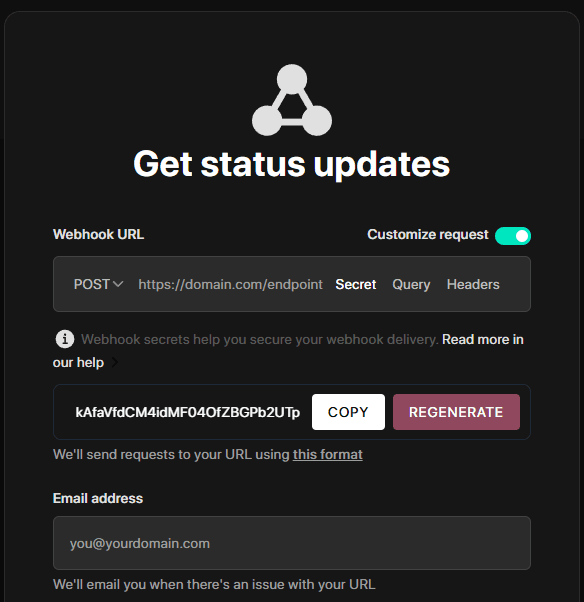
-
在你的伺服器上建立一個新端點來接收 webhook。
-
把簽章與你伺服器產生的簽章比對來驗證。
-
如果兩個簽章相符,就處理這個 webhook。
程式碼範例
import crypto from 'crypto'import express from 'express'const app = express()app.use(express.json())const WEBHOOK_SECRET = 'your-webhook-secret'function isVerifiedPayload(payload, signature, secret) {const hmac = crypto.createHmac('sha256', secret)const digest = hmac.update(JSON.stringify(payload)).digest('hex')return crypto.timingSafeEqual(Buffer.from(digest), Buffer.from(signature))}app.post('/endpoint/to/webhook', (req, res) => {const payload = req.bodyconst signature = req.header('x-instatus-webhook-signature')if (!signature) {return res.status(400).send('Signature missing')}if (!isVerifiedPayload(payload, signature, WEBHOOK_SECRET)) {return res.status(401).send('Invalid signature')}// Process the valid webhookres.status(200).send('Webhook received')})app.listen(3000, () => console.log('Server running on port 3000'))
為什麼驗證很重要
- 確保真實性:保證 webhook 確實來自我們的平台。
- 防止竄改:偵測內容是否被修改。
- 提升安全性:防範重放攻擊與未經授權的存取。