Định dạng webhook
Đây là định dạng của các webhook bạn sẽ nhận nếu đã đăng ký qua webhook:
Khi một sự cố được thêm hoặc cập nhật:
{"meta": {"unsubscribe": "","documentation": ""},"page": {"id": "","status_indicator": "","status_description": "","url": ""},"incident": {"backfilled": false,"created_at": "","impact": "","name": "","resolved_at": "","status": "","updated_at": "","id": "","url": "","incident_updates": [{"id": "","incident_id": "","body": "","status": "","created_at": "","updated_at": ""}]}}
Khi một đợt bảo trì được thêm hoặc cập nhật:
{"meta": {"unsubscribe": "","documentation": ""},"page": {"id": "","status_indicator": "","status_description": "","url": ""},"maintenance": {"backfilled": false,"created_at": "","impact": "","name": "","resolved_at": "","status": "","updated_at": "","id": "","url": "","duration": "","maintenance_updates": [{"id": "","maintenance_id": "","body": "","status": "","created_at": "","updated_at": ""}]}}
Khi một thành phần được cập nhật:
{"meta": {"unsubscribe": "https://<status-page-domain>/unsubscribe?id=${subscriber.id}&token=${subscriber.unsubscribeToken}","documentation": ""},"page": {"id": "","status_indicator": "","status_description": "","url": ""},"component_update": {"created_at": "","new_status": "","component_id": ""},"component": {"created_at": "","id": "","name": "","status": ""}}
Các trạng thái trang trạng thái có thể có:
UPHASISSUESUNDERMAINTENANCE
Các trạng thái thành phần có thể có:
OPERATIONALUNDERMAINTENANCEDEGRADEDPERFORMANCEPARTIALOUTAGEMAJOROUTAGE
Các trạng thái sự cố có thể có:
INVESTIGATINGIDENTIFIEDMONITORINGRESOLVED
Các trạng thái bảo trì có thể có:
NOTSTARTEDYETINPROGRESSCOMPLETED
Xác minh payload của Webhook
Rất khuyến khích xác thực payload của webhook tại endpoint webhook.
Chúng tôi ký payload webhook bằng một secret và đính kèm chữ ký trong một header tên là x-instatus-webhook-signature. Chữ ký này cho phép bạn xác minh rằng webhook đến từ Instatus.
Các bước xác minh Webhook
- Lưu lại Webhook Secret mà bạn đã tạo khi đăng ký webhook (Bạn có thể tìm thấy nó khi đăng ký webhook cho một trang, và cũng có thể tùy chỉnh nó tại đó).
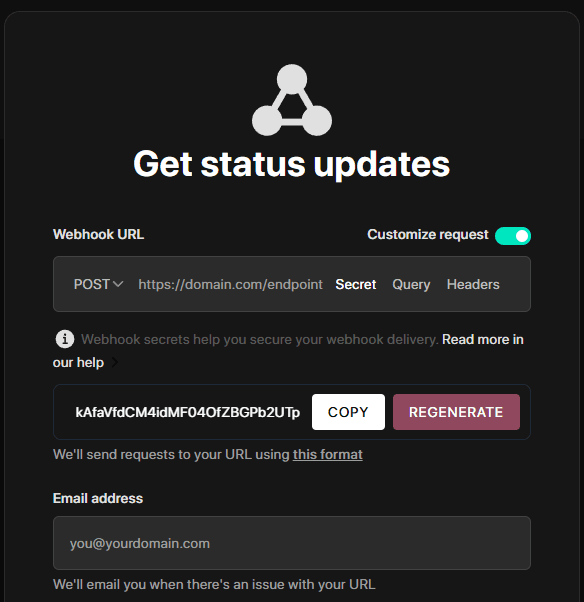
-
Tạo một endpoint mới trên máy chủ của bạn để nhận webhook.
-
So sánh chữ ký với chữ ký do máy chủ của bạn tạo ra để xác thực.
-
Nếu hai chữ ký khớp nhau, hãy xử lý webhook.
Ví dụ mã
import crypto from 'crypto'import express from 'express'const app = express()app.use(express.json())const WEBHOOK_SECRET = 'your-webhook-secret'function isVerifiedPayload(payload, signature, secret) {const hmac = crypto.createHmac('sha256', secret)const digest = hmac.update(JSON.stringify(payload)).digest('hex')return crypto.timingSafeEqual(Buffer.from(digest), Buffer.from(signature))}app.post('/endpoint/to/webhook', (req, res) => {const payload = req.bodyconst signature = req.header('x-instatus-webhook-signature')if (!signature) {return res.status(400).send('Signature missing')}if (!isVerifiedPayload(payload, signature, WEBHOOK_SECRET)) {return res.status(401).send('Invalid signature')}// Process the valid webhookres.status(200).send('Webhook received')})app.listen(3000, () => console.log('Server running on port 3000'))
Vì sao việc xác minh quan trọng
- Đảm bảo tính xác thực: Bảo đảm webhook thực sự đến từ nền tảng của chúng tôi.
- Ngăn chặn giả mạo: Phát hiện các thay đổi trong payload.
- Tăng cường bảo mật: Bảo vệ trước các cuộc tấn công phát lại và truy cập trái phép.