Webhook-format
Her er formatet på de webhooks, du får, hvis du abonnerer via webhooks:
Når en hændelse tilføjes eller opdateres:
{"meta": {"unsubscribe": "","documentation": ""},"page": {"id": "","status_indicator": "","status_description": "","url": ""},"incident": {"backfilled": false,"created_at": "","impact": "","name": "","resolved_at": "","status": "","updated_at": "","id": "","url": "","incident_updates": [{"id": "","incident_id": "","body": "","status": "","created_at": "","updated_at": ""}]}}
Når en vedligeholdelse tilføjes eller opdateres:
{"meta": {"unsubscribe": "","documentation": ""},"page": {"id": "","status_indicator": "","status_description": "","url": ""},"maintenance": {"backfilled": false,"created_at": "","impact": "","name": "","resolved_at": "","status": "","updated_at": "","id": "","url": "","duration": "","maintenance_updates": [{"id": "","maintenance_id": "","body": "","status": "","created_at": "","updated_at": ""}]}}
Når en komponent opdateres:
{"meta": {"unsubscribe": "https://<status-page-domain>/unsubscribe?id=${subscriber.id}&token=${subscriber.unsubscribeToken}","documentation": ""},"page": {"id": "","status_indicator": "","status_description": "","url": ""},"component_update": {"created_at": "","new_status": "","component_id": ""},"component": {"created_at": "","id": "","name": "","status": ""}}
Mulige statusser for statussiden:
UPHASISSUESUNDERMAINTENANCE
Mulige komponentstatusser:
OPERATIONALUNDERMAINTENANCEDEGRADEDPERFORMANCEPARTIALOUTAGEMAJOROUTAGE
Mulige hændelsesstatusser:
INVESTIGATINGIDENTIFIEDMONITORINGRESOLVED
Mulige vedligeholdelsesstatusser:
NOTSTARTEDYETINPROGRESSCOMPLETED
Verificering af webhook-payload
Det anbefales kraftigt at validere webhook-payloaden i dit webhook-endpoint.
Vi signerer webhook-payloads med en hemmelighed og sender signaturen med i en header ved navn x-instatus-webhook-signature. Med signaturen kan du kontrollere, at webhooken kom fra Instatus.
Sådan verificerer du en webhook
- Gem den webhook-hemmelighed, du genererede, da du abonnerede på webhooken (du finder den, når du abonnerer på en side via en webhook, og du kan også tilpasse den der).
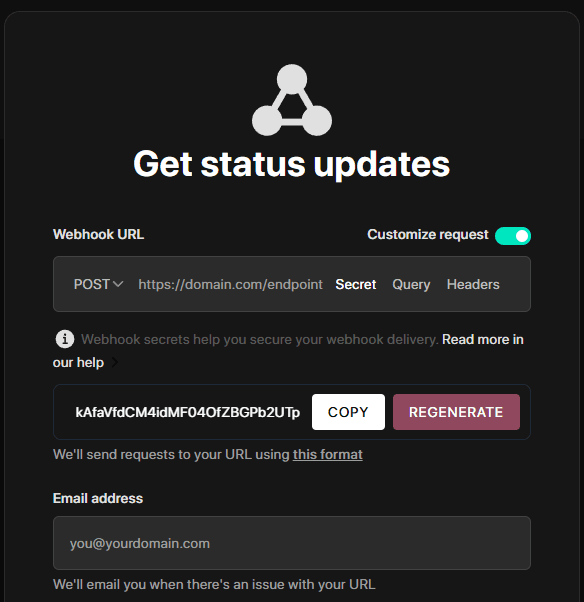
-
Opret et nyt endpoint på din server, som skal modtage webhooken.
-
Sammenlign signaturen med den signatur, din server genererer, for at validere den.
-
Stemmer signaturerne overens, kan du behandle webhooken.
Kodeeksempel
import crypto from 'crypto'import express from 'express'const app = express()app.use(express.json())const WEBHOOK_SECRET = 'your-webhook-secret'function isVerifiedPayload(payload, signature, secret) {const hmac = crypto.createHmac('sha256', secret)const digest = hmac.update(JSON.stringify(payload)).digest('hex')return crypto.timingSafeEqual(Buffer.from(digest), Buffer.from(signature))}app.post('/endpoint/to/webhook', (req, res) => {const payload = req.bodyconst signature = req.header('x-instatus-webhook-signature')if (!signature) {return res.status(400).send('Signature missing')}if (!isVerifiedPayload(payload, signature, WEBHOOK_SECRET)) {return res.status(401).send('Invalid signature')}// Process the valid webhookres.status(200).send('Webhook received')})app.listen(3000, () => console.log('Server running on port 3000'))
Derfor er verificering vigtig
- Sikrer ægthed: Garanterer, at webhooken kommer fra vores platform.
- Forhindrer manipulation: Opdager ændringer i payloaden.
- Øger sikkerheden: Beskytter mod replay-angreb og uautoriseret adgang.