

10 Best AI Incident Management Software in 2026

Quick Summary
This guide compares the 10 best AI incident management software tools in 2026 across pricing, AI features, and on-call workflows to help DevOps and SRE teams choose the right platform for faster incident response. For more insights on incident response, uptime monitoring, and status pages, visit the Instatus blog.
What Is Taking Your Team So Long to Resolve Incidents?
When a production incident hits, the clock starts immediately. Engineers scramble to correlate alerts from multiple systems, identify who owns the affected service, gather context from logs and dashboards, and coordinate a response, all before a single fix is applied. That coordination overhead is where most of the time goes.
AI incident management software reduces that overhead. These platforms use AI, machine learning, and automation to group related alerts, surface root cause context, route incidents to the right responders, and generate structured records for post-incident review. The result is faster triage, lower mean time to resolution, and less manual work during an active outage.
But not every tool solves the same problem. Some are built for enterprise IT operations managing thousands of alerts across hybrid infrastructure. Others are designed for engineering teams running production incidents inside Slack. A few combine uptime monitoring, incident response, and status pages in a single platform. Choosing the wrong tool adds setup overhead without improving response speed.
This Instatus article compares the 10 best AI incident management software tools in 2026 to help DevOps and SRE teams find the right fit.
Why Listen to Us?
Instatus powers uptime monitoring and status pages for thousands of SaaS and DevOps teams across 10,000+ status pages. We built a platform that handles incident detection, on-call alerting, and customer communication at scale, which means we understand how incident tools perform when a real outage is in progress, not just in a demo environment. That operational experience is what we bring to this comparison.
What Is AI Incident Management Software?
AI incident management software helps IT, DevOps, and SRE teams detect, investigate, and resolve incidents faster using machine learning, automation, and advanced analytics. Unlike traditional incident management tools, AI-powered platforms can analyze large volumes of operational data in real time to identify issues, reduce alert noise, and accelerate remediation.
Common capabilities include:
- Detecting anomalies before they become major outages
- Correlating alerts from multiple monitoring tools
- Identifying likely root causes automatically
- Routing incidents to the right on-call team or escalation policy
- Prioritizing incidents based on business impact
- Generating incident summaries and recommendations
- Triggering automated remediation workflows
As infrastructure becomes more complex, organizations use AI incident management software to reduce downtime, improve service reliability, and help engineering teams resolve incidents more efficiently.
Why Use AI Incident Management Software?
- Reduced MTTR: AI-assisted platforms reduce coordination overhead by grouping related signals, surfacing relevant context, and routing incidents to the right responders faster.
- Noise Reduction: AI correlation engines consolidate related alerts into a single incident, reducing duplicate pages and preventing engineers from investigating the same problem multiple times.
- Faster Postmortems: AI-generated timelines automatically assemble key events into a structured incident record, reducing the manual work required for post-incident reviews.
- Lower On-Call Burden: AI-assisted routing and alert correlation reduce unnecessary escalations, improving the signal-to-noise ratio and making on-call schedules more manageable for engineering teams.
- Customer Communication: Status pages and integrated notifications allow teams to publish incident updates automatically as they happen, instead of relying on manual updates across support channels.
10 Best AI Incident Management Software Tools for Faster Incident Response
| Tool | Best For | Key Features | Free Tier | Starting Price |
|---|---|---|---|---|
| Instatus | SaaS and DevOps teams needing flat-rate pricing with native monitoring and a built-in status page | Native uptime monitoring, automated incident creation from integrations, Slack and Microsoft Teams incident response, on-call scheduling, routing rules, escalation policies, branded status pages | ✓ 15 monitors, 1 status page, 200 subscribers | Free / $20/mo (Pro) |
| incident.io | Mid-market engineering teams that live in Slack and run frequent incidents | AI-generated summaries, automated timelines, suggested follow-up actions, AI postmortems | ✓ Basic free plan | $19/user/mo (+ $12 for on-call) |
| PagerDuty | Enterprise teams with complex multi-service on-call requirements | Event Intelligence alert grouping, AIOps noise reduction, AI-assisted triage | ✓ Up to 5 users | $25/user/mo (Professional) |
| Rootly | Fast-growing SaaS and fintech teams running 20+ incidents per month | AI root cause analysis, AI postmortems, automated on-call scheduling, trend analysis | ✗ | $20/user/mo (Incident response) |
| FireHydrant | Engineering teams wanting full-lifecycle management with strong post-mortem tooling | AI incident summaries, AI-enhanced retrospectives, automated runbooks | ✓ Up to 10 responders | $25/responder/mo (Pro) |
| Grafana Cloud IRM | DevOps teams already on Grafana Cloud wanting native observability + on-call | Grafana Assistant AI, alert routing, intelligent filters, context-rich notifications | ✓ Free tier (3 IRM users) | $20/active IRM user/mo (Pro) |
| BigPanda | Enterprise IT operations teams handling high alert volumes across complex infrastructure | Open-box ML event correlation, AI root cause analysis, agentic automation, Level-0 response | ✗ | Contact for pricing |
| Better Stack | Developer-led SaaS teams wanting unified monitoring, incidents, and status pages | AI postmortems, AI SRE assistance, unified incident timeline with logs and metrics | ✓ 10 monitors, 1 status page | $34/license/mo (Responder) |
| Datadog Incident Management | Teams needing full-stack observability with incident management as one unified module | Watchdog AI anomaly detection, AI-powered alert correlation, unified metrics/logs/traces | ✗ | $30/seat/mo (Incident management) |
| Squadcast | SRE and DevOps teams that need a simpler on-call and incident response | AI summaries, alert grouping, on-call scheduling, incident workflows, status pages | ✓ Free plan available | $20/user/mo (Pro) |
1. Instatus
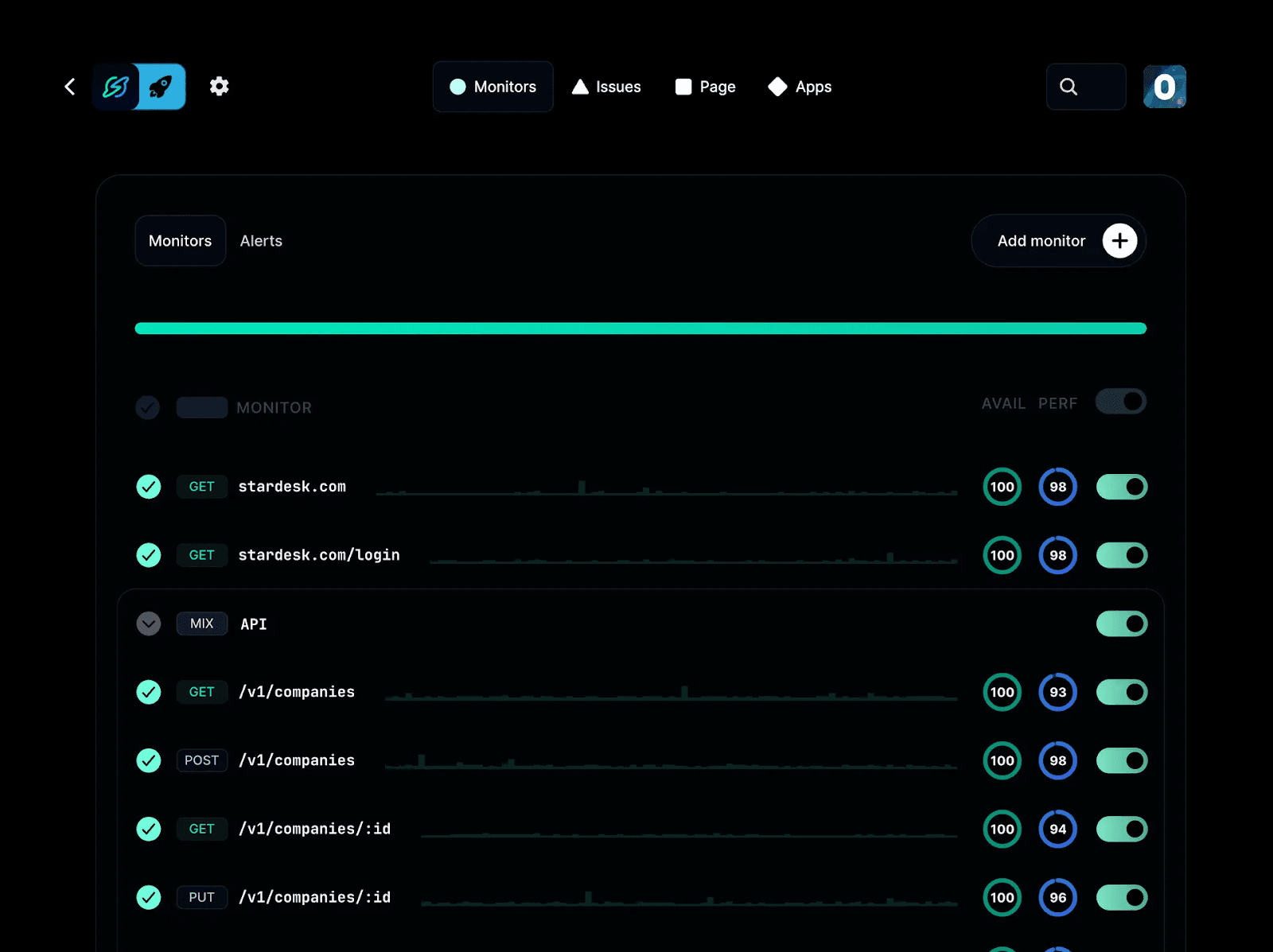
Instatus's monitoring dashboard showing uptime checks across websites, APIs, and endpoints with availability scores
Instatus is an uptime monitoring and status page platform that helps SaaS and DevOps teams track service availability from outside their infrastructure and communicate outages in real time.
It combines monitoring, incident updates, and status pages in a single platform, covering detection through customer-facing communication. Setup is fast, and teams can publish monitoring checks and a status page in minutes without complex configuration.
Key Features
- Native Uptime Monitoring: Monitor websites, APIs, SSL certificates, DNS, TCP, ping, and keywords with 30-second checks from multiple global locations. This helps teams detect external downtime and validate service availability during incidents.
- Slack and Microsoft Teams Notifications: Send incident updates and alerts into Slack or Microsoft Teams channels to keep teams informed and coordinate response activity.
- Branded Status Pages: Create public or private status pages with full customization, including branding and support for 50 languages. This enables clear customer communication during outages.
- Multi-Channel Alerts: Send alerts via email, SMS, phone calls, Slack, Discord, and Microsoft Teams so responders are notified through their preferred channels.
- Flat-Rate Pricing Model: Pricing is not per-seat for status pages and monitoring usage, helping teams avoid scaling costs as users and subscribers grow.
Pricing
- Free: Basic monitoring and a single status page with limited checks and alerts.
- Pro ($20/month): More monitors, faster check intervals, SMS alerts, and expanded capacity.
- Business ($300/month): Higher monitoring limits, phone alerts, SAML SSO, and expanded status page and subscriber capacity.
- Enterprise (Custom): Tailored for large-scale environments with advanced controls and support.
Pros
- Quick setup with monitoring and status pages live in minutes
- Clean, well-designed interface on both desktop and mobile
- Support team is responsive and receptive to user feedback
- Free tier includes core features without feeling artificially restricted
- Integrates easily with existing monitoring and observability tools
Cons
- Best suited to SaaS and DevOps teams rather than large enterprise IT operations
2. incident.io
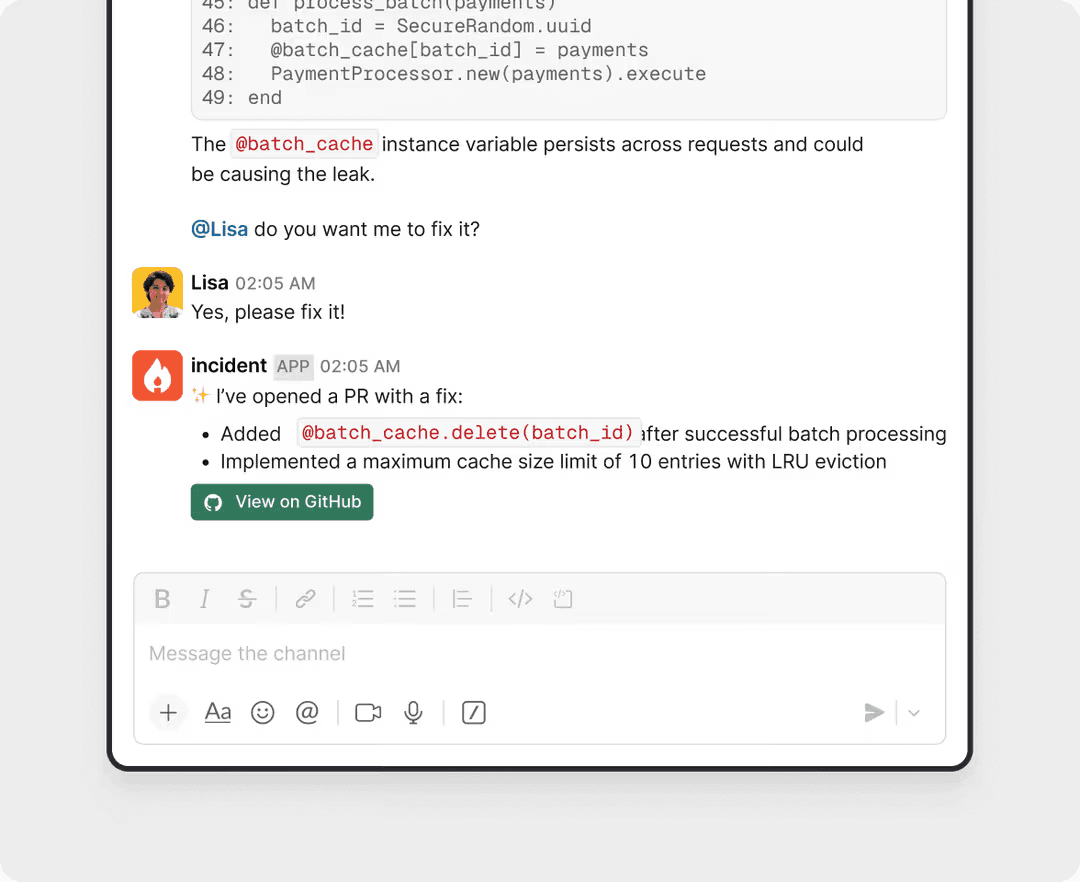
incident.io is a Slack and Microsoft Teams-native incident management platform that handles the full incident lifecycle from coordination to postmortems. It is built for engineering teams that manage production incidents directly inside chat tools.
It runs incident workflows inside Slack or Teams, allowing teams to declare incidents, assign roles, coordinate updates, and manage post-incident reviews without switching tools. It is commonly used by mid-market engineering teams that run frequent production incidents.
Key Features
- Slack and Microsoft Teams Incident Management: Declare and manage incidents directly in Slack or Microsoft Teams with structured workflows for roles, updates, and coordination.
- AI Incident Summaries: Generates incident timelines and postmortems based on real-time incident channel activity, with human review and editing controls.
- On-Call Scheduling: Supports escalation policies and paging via SMS and push notifications (paid add-on).
- Workflow Automation: Automates incident roles, status updates, and post-incident workflows such as retrospectives and follow-ups.
- AI Postmortems: Drafts structured post-incident reports using data captured from the incident channel, reducing the time engineers spend on documentation after resolution.
Pricing
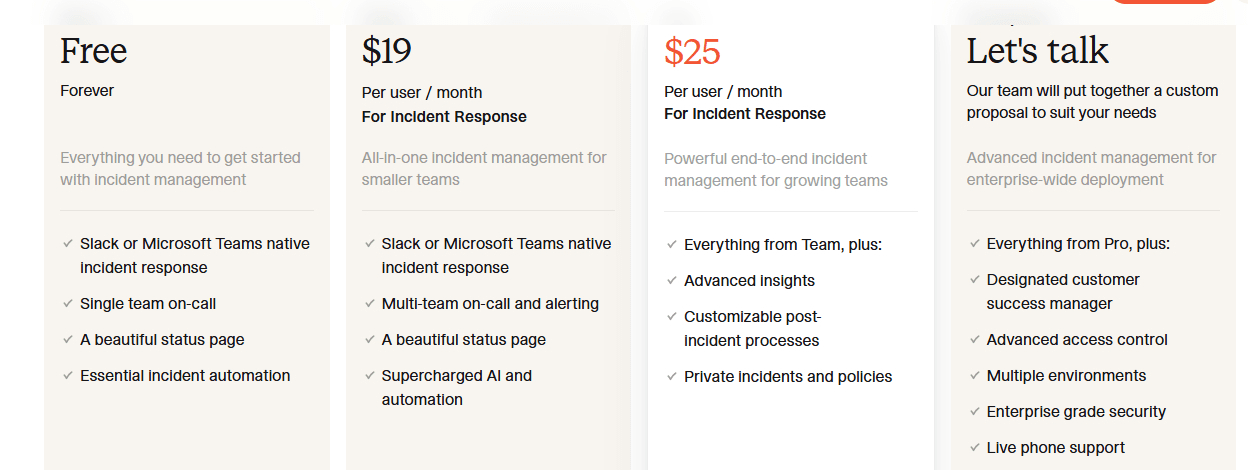
- Basic free plan
- Team: $19/user/month + $12 on-call add-on
- Pro: $25/user/month + $20 on-call add-on
- Enterprise: custom pricing
Pros
- Strong Slack and Microsoft Teams-native workflows reduce context switching during incidents
- AI-generated summaries and postmortems based on real incident activity improve documentation speed
- Mature automation for incident roles, updates, and post-incident workflows
Cons
- On-call functionality is a paid add-on, increasing total cost for active teams
- No built-in uptime monitoring, requiring external tools for incident detection
- Most AI capabilities prioritize summaries, timelines, and documentation over autonomous remediation
3. PagerDuty
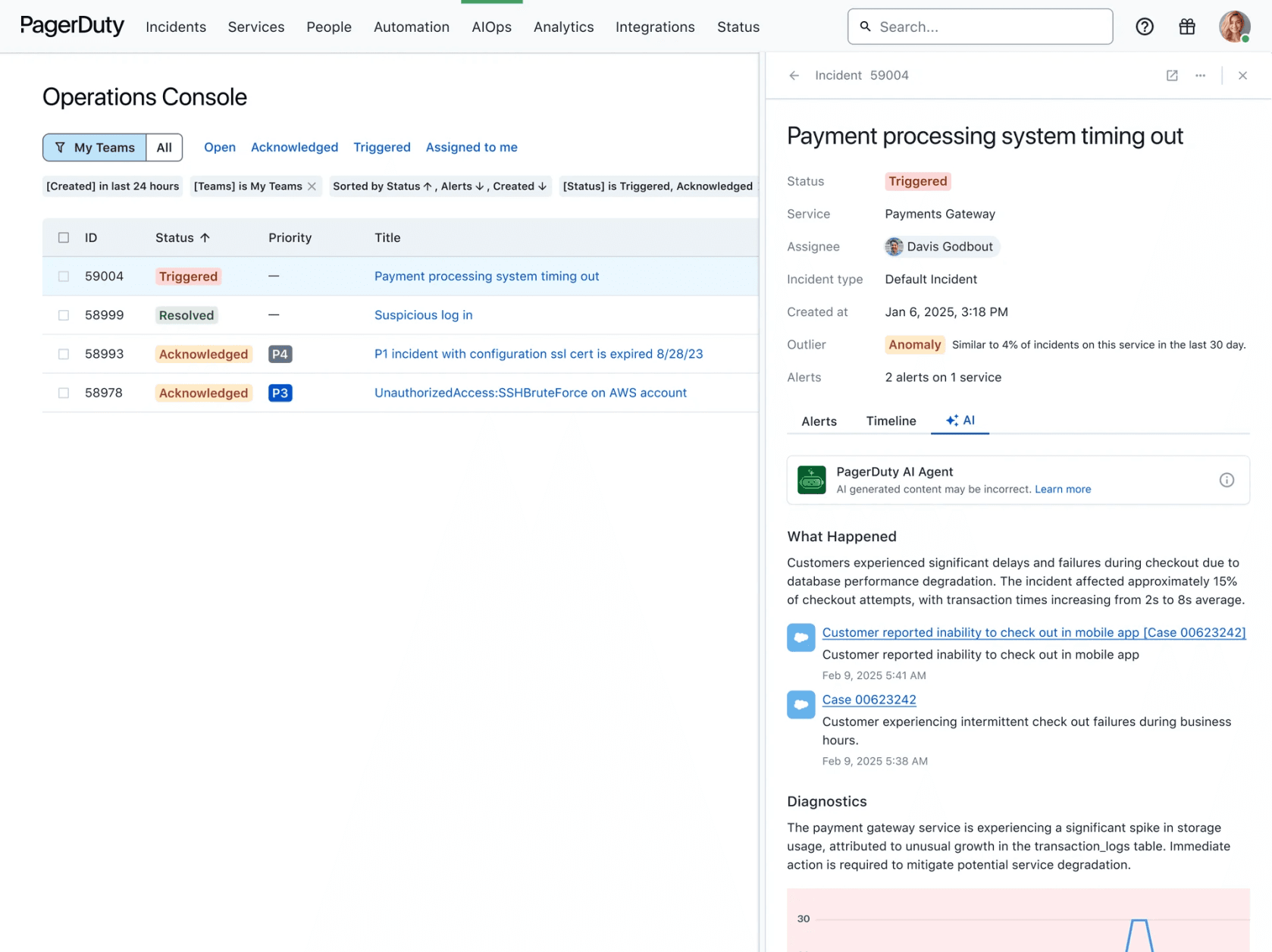
PagerDuty is an enterprise incident management platform designed for large-scale on-call operations across complex infrastructure. It centralizes alerting, escalation, and incident coordination for engineering and IT teams.
It integrates with a wide range of monitoring, observability, and ticketing tools, making it a common choice for organizations running distributed systems. Event Intelligence uses machine learning to group related alerts into incidents and reduce alert noise. AI and AIOps capabilities are available through paid add-ons, providing additional automation and incident insights for enterprise teams. It is widely used where reliability, escalation control, and integration depth are required.
Key Features
- Event Intelligence: Uses machine learning to group related alerts into a single incident and reduce alert noise.
- Integration Ecosystem: Connects with 700+ tools, including AWS, Datadog, New Relic, Slack, and Microsoft Teams.
- Escalation Policies: Supports multi-step on-call scheduling and structured escalation workflows for incident response.
- AIOps and AI Features: Provides anomaly detection, incident insights, and AI-assisted workflows through paid add-ons.
- On-Call Scheduling: Manages on-call rotations, shift coverage, and overrides across teams with visibility into gaps before they cause a missed alert.
Pricing
- Free (5 users)
- Professional: $25/user/month
- Business: $49/user/month
- AIOps add-on: $799/month
- Enterprise: custom pricing
Pros
- Reliable alerting and escalation system used in enterprise environments
- Extensive integration ecosystem across monitoring, cloud, and DevOps tools
- Strong support for complex on-call scheduling and incident routing at scale
Cons
- AI and AIOps features are paid add-ons that increase total cost
- Pricing scales quickly for large on-call teams and advanced features
- Platform complexity can make setup and configuration time-consuming
4. Rootly
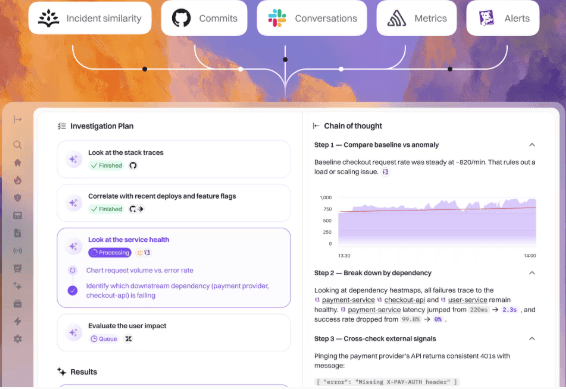
Rootly is a Slack and Microsoft Teams-native incident management platform for SaaS and fintech teams that run frequent production incidents. It automates incident workflows inside chat tools to reduce manual coordination during outages.
It manages incidents through Slack or Teams, including channel creation, role assignment, status updates, and integrations with tools like Jira and monitoring systems. It generates incident summaries, uses historical incident data to surface relevant context, and assists with postmortem creation. These capabilities are designed to support engineers during incident response rather than fully automate diagnosis.
Key Features
- Slack and Microsoft Teams Incident Workflows: Automatically creates incident channels, assigns roles, and manages updates inside Slack or Teams.
- AI-Assisted Incident Summaries: Generates incident summaries and supports post-incident documentation using incident activity and historical context.
- Workflow Automation: Automates steps such as notifications, status updates, and integrations with tools like Jira.
- On-Call Scheduling: Supports on-call rotations, escalation policies, and alert routing across teams.
- Trend Analysis and Insights: Surfaces patterns across historical incidents to help teams identify recurring issues and prioritize reliability improvements over time.
Pricing
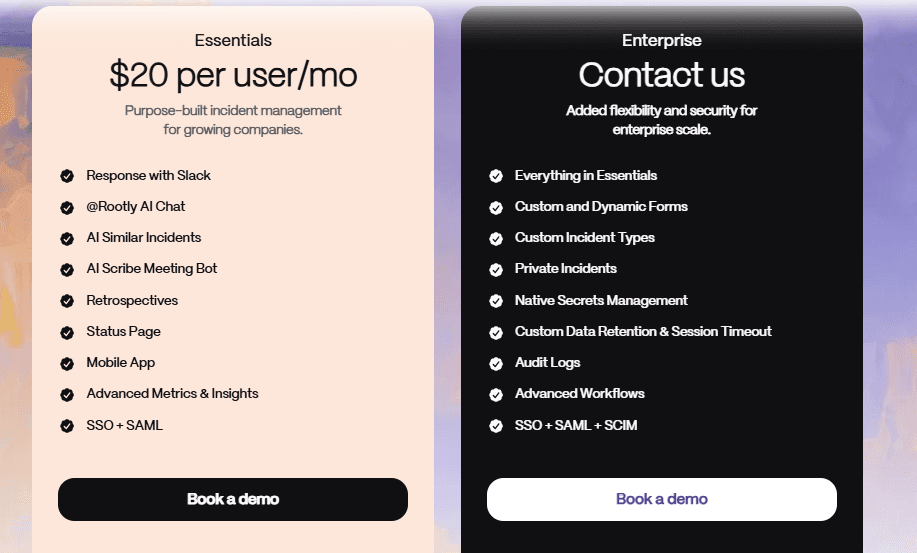
- Essentials: $20/user/month
- Enterprise: custom pricing
- On-call and AI features may vary depending on plan or add-ons
Pros
- Strong Slack and Microsoft Teams-native incident workflows
- Good automation for incident coordination and updates
- Useful AI-assisted summaries and postmortem support
Cons
- No built-in uptime monitoring, requiring external tools for incident detection
- Advanced workflows and enterprise features require higher-tier plans
- On-call and AI features are not included on all plans
5. FireHydrant
FireHydrant is an incident management platform designed for engineering teams that want structured, full-lifecycle incident workflows with strong post-incident review capabilities. It provides guided processes from incident detection through resolution and retrospective.
The platform standardizes incident response using automated runbooks, role-based coordination, and integrations with Slack, Microsoft Teams, and monitoring tools. It gives incident summaries, captures context from meetings and timelines, and assists with drafting retrospectives. These tools support engineers during incident response rather than fully automating diagnosis.
Key Features
- Automated Incident Runbooks: Guides responders through structured workflows from alert to resolution and postmortem.
- AI-Assisted Incident Summaries: Generates summaries and helps structure retrospective reports using incident data and timelines.
- Multi-Channel Incident Management: Supports Slack, Microsoft Teams, and web-based incident coordination.
- Integrations and Compliance: Integrates with monitoring tools and supports compliance features such as SOC 2 and infrastructure-as-code workflows.
- Role-Based Incident Coordination: Assigns responder roles automatically during an incident to ensure clear ownership across triage, communication, and resolution tasks.
Pricing
- From $25/responder/month (billed annually), enterprise pricing available on request
Pros
- Flexible deployment across Slack, Microsoft Teams, and web interfaces
- Strong runbook workflows reduce manual coordination during incidents
- Useful AI-assisted summaries and retrospective drafting from incident data
Cons
- Setup can be time-intensive for complex runbooks
- No public enterprise pricing, requiring a sales conversation
- Advanced features (AI, alerting, scaling) are limited to higher tiers
6. Grafana Cloud IRM (formerly Grafana OnCall)
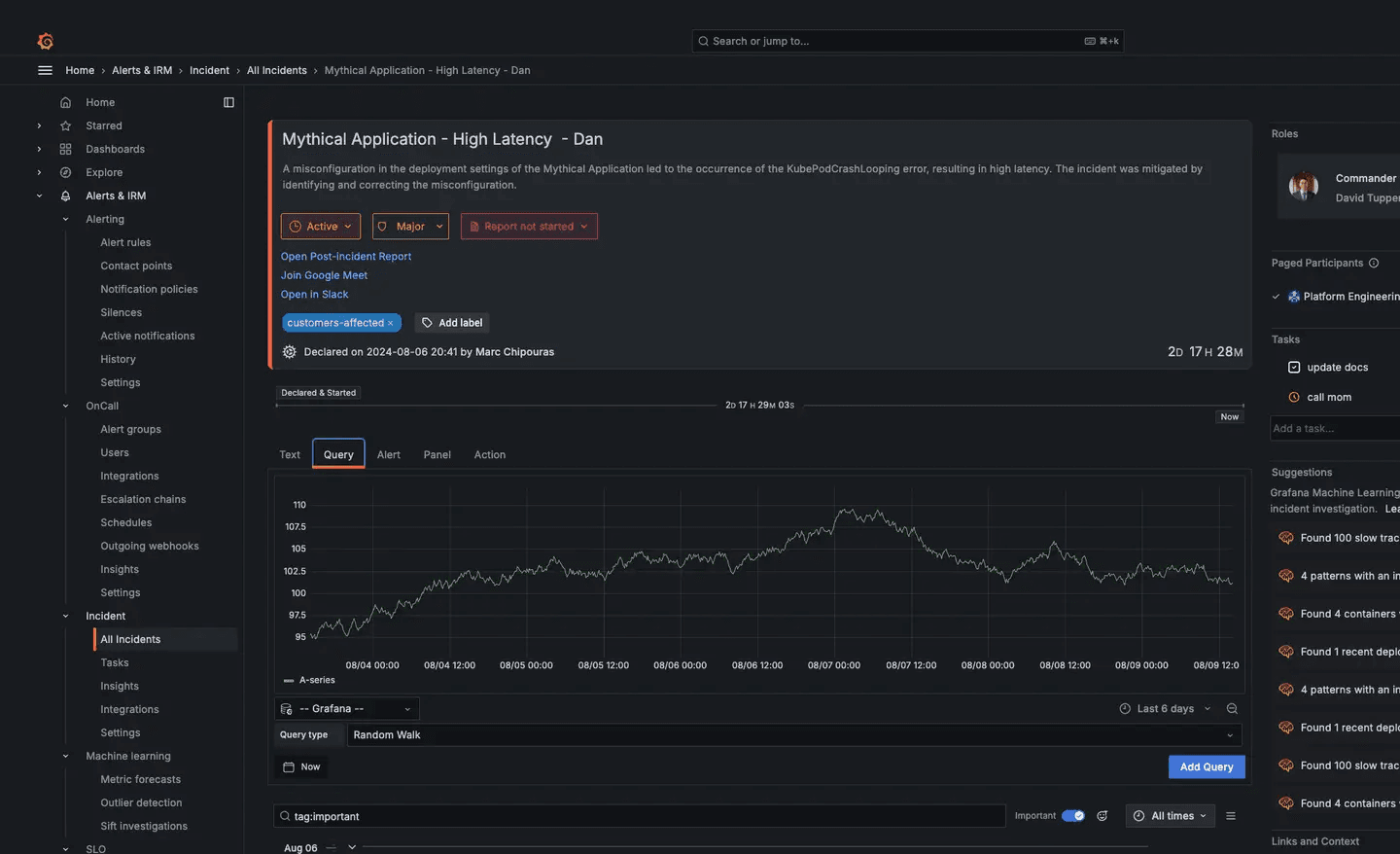
Grafana Cloud IRM is an on-call and incident management tool for DevOps teams already using Grafana Cloud. It connects incident response with dashboards, metrics, logs, and alerting data inside the Grafana ecosystem.
When an alert fires, related context such as dashboards, metrics, and logs is available directly inside the incident workflow without switching tools. Grafana Cloud IRM handles alert routing and filtering, while Grafana Assistant surfaces investigation context during response. The tool is designed for teams that already use Grafana Cloud for observability.
Key Features
- On-Call Scheduling and Incident Response: Manage on-call rotations, alerting, and incidents within Grafana Cloud.
- AI-Assisted Alert Routing: Helps route alerts and surface relevant incident context.
- Multi-Channel Notifications: Supports Slack, Microsoft Teams, Telegram, SMS, phone, and mobile alerts.
- Deep Observability Integration: Direct access to dashboards, logs, and metrics during incident response.
- Intelligent Alert Filtering: Reduces alert noise by applying contextual filters that prioritize signals most relevant to the active incident across connected data sources.
Pricing
- Free tier (3 IRM users)
- Paid: $19/month platform fee + $20/active user/month
- Enterprise: custom pricing with minimum commit of $25,000/year
Pros
- Usage-based pricing that scales with active users
- Deep integration with Grafana dashboards, logs, and metrics
- Strong observability-to-incident workflow inside Grafana Cloud
Cons
- Enterprise pricing requires sales engagement
- Requires Grafana Cloud, limiting standalone use
- Best suited for teams already using the Grafana observability stack
7. BigPanda
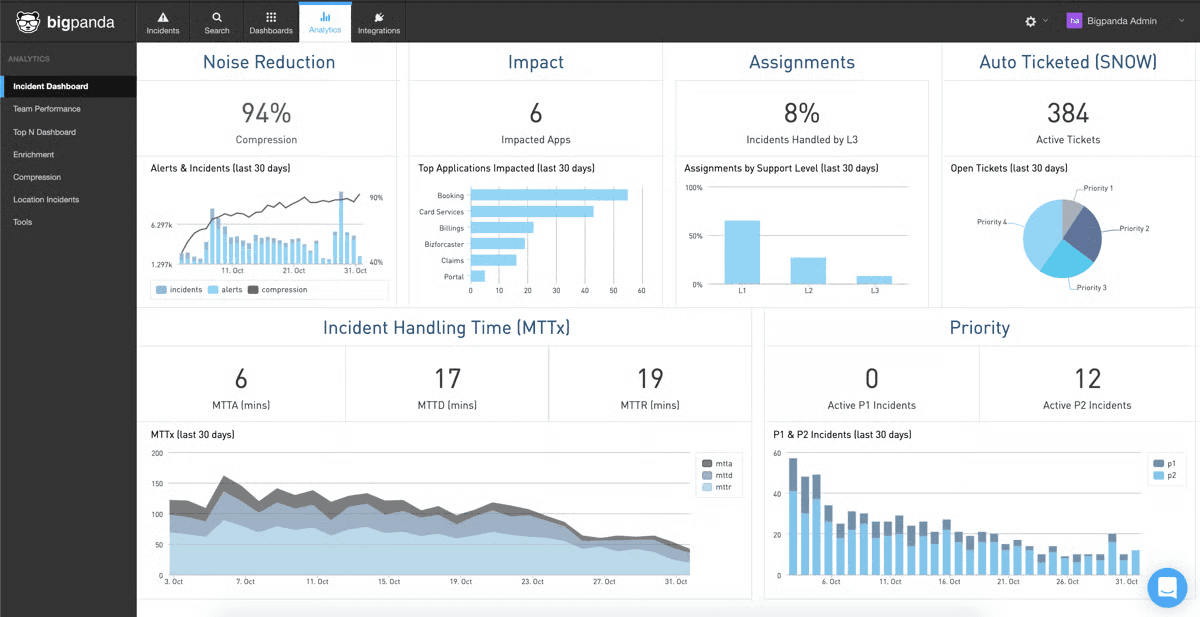
BigPanda is an enterprise AIOps platform designed for IT operations teams managing large volumes of alerts across complex hybrid and cloud environments. It ingests events from monitoring, observability, and ITSM tools and uses machine learning to correlate them into actionable incidents before engineers are paged.
The platform focuses on reducing alert noise by grouping related signals, enriching them with service context such as topology and CMDB data, and automating parts of incident detection and triage. It is commonly used in large enterprise environments where multiple monitoring tools create fragmented alert streams.
Key Features
- AI-Based Event Correlation: Uses machine learning to group and deduplicate alerts into unified incidents.
- Alert Noise Reduction: Filters and correlates events from multiple systems to reduce alert fatigue.
- Context Enrichment: Adds service, topology, and CMDB data to improve incident understanding.
- Broad Integrations: Connects with a wide range of monitoring, observability, and ITSM tools.
- Level-0 Automation: Automates response workflows such as notifications, tickets, and war rooms before engineers are paged.
Pricing
Custom enterprise pricing only (contact sales).
Pros
- Deep integration with monitoring, observability, and ITSM tools
- Strong AI-based correlation reduces alert noise in large environments
- Adds service and dependency context to help identify and prioritize issues faster
Cons
- No public pricing or self-serve trial
- Designed primarily for enterprise-scale environments, not smaller teams
- Implementation and setup can be complex in multi-tool infrastructures
8. Better Stack
Better Stack is an observability and incident management platform that combines monitoring, logging, on-call, incident response, and status pages in one system. It is built for SaaS teams and startups that want to reduce tool fragmentation.
The platform brings logs, metrics, alerts, and incident timelines into a single workflow so engineers can investigate issues without switching tools. When an alert fires, relevant logs and monitoring context are surfaced in the incident view. It includes an AI SRE agent that helps investigate incidents and generate summaries using telemetry data.
Better Stack is positioned as an all-in-one alternative to separate monitoring and incident tools.
Key Features
- Unified Observability Stack: Combines monitoring, logs, on-call, incidents, and status pages in one platform.
- Incident Timeline: Connects alerts, logs, and metrics into a single incident view.
- AI SRE Agent: Helps investigate incidents and generate summaries using telemetry data.
- Built-in Status Pages: Provides public status pages for incident communication.
- On-Call Scheduling and Alerting: Supports on-call rotations, escalation policies, and multi-channel alert delivery so the right engineer is reached when a monitor fires.
Pricing
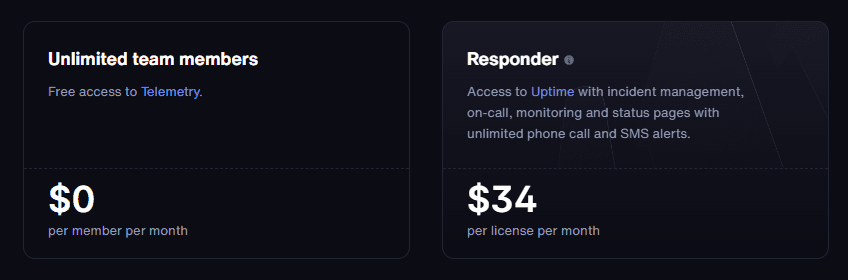
- Free tier (10 monitors, 1 status page)
- Paid plans start at around $34/month, with usage-based scaling based on monitors, responders, and usage levels
Pros
- All-in-one platform reduces the need for multiple separate tools
- Fast setup with monitoring, logs, and incidents in a single workflow
- Unified incident timeline improves investigation and response speed
Cons
- Pricing scales with usage such as monitors, responders, and data volume
- Less suitable for large enterprises requiring deep customization and complex governance controls
- Observability depth may be lighter compared to dedicated enterprise monitoring platforms
9. Datadog Incident Management
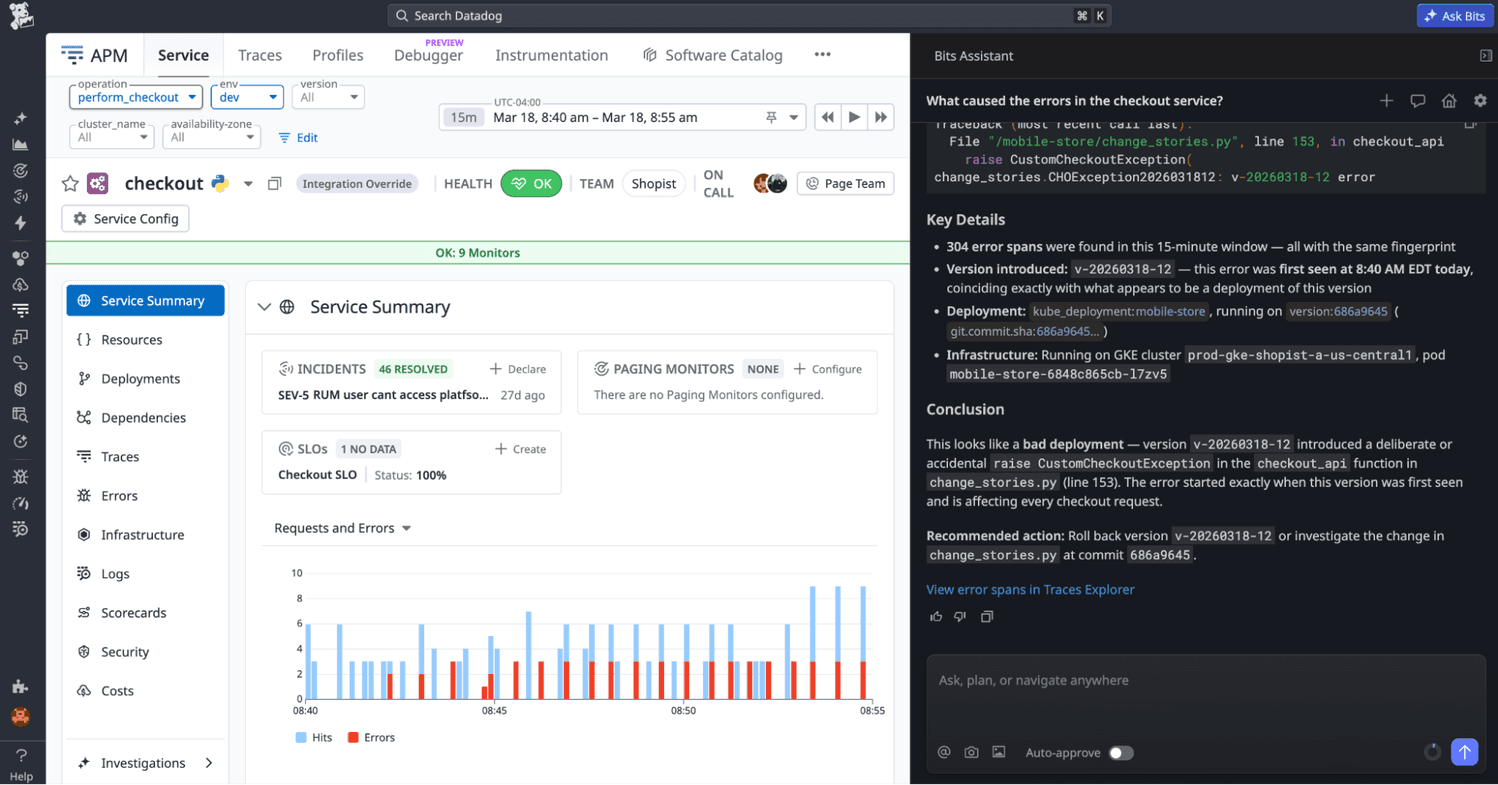
Datadog Incident Management is part of the broader Datadog observability platform, designed for teams that already use Datadog for metrics, logs, traces, and APM. It allows incidents to be created, tracked, and managed within the same environment where monitoring data lives.
The key advantage is fast navigation across telemetry. Engineers can move from alerts to related metrics, traces, and logs within a single workflow. Datadog Watchdog uses machine learning to surface anomalies and potential issues across systems. The platform is built for teams that want observability and incident response tightly integrated into one system.
Key Features
- Watchdog Anomaly Detection: Uses machine learning to detect unusual behavior across metrics, logs, and traces.
- Unified Observability Workflow: Connects metrics, logs, and traces for faster incident investigation.
- Bits AI Root Cause Analysis: Surfaces likely root causes by analyzing correlated signals across metrics, logs, and traces, and can recommend investigation and remediation steps.
- 1,000+ Integrations: Includes AWS, Azure, GCP, Kubernetes, and many third-party tools.
- Incident Management Module: Provides incident tracking, timelines, and collaboration tools within Datadog.
Pricing
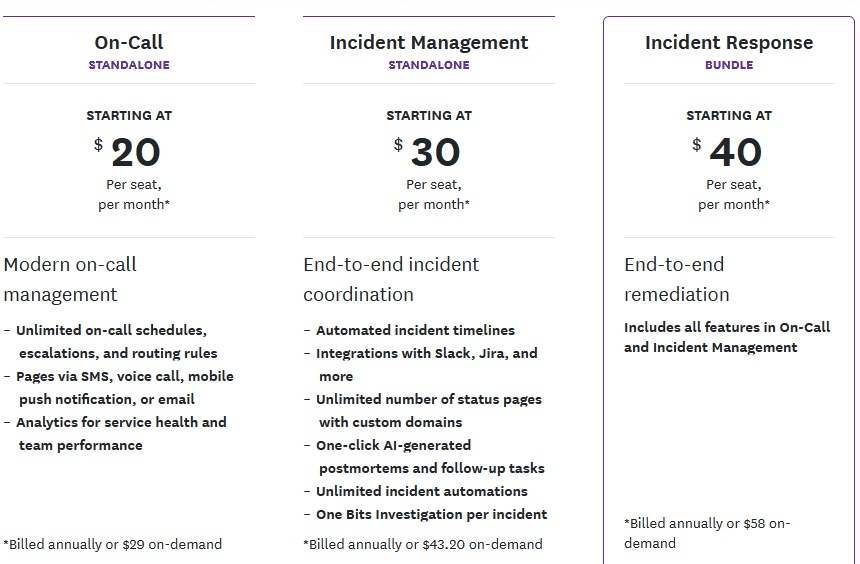
- No standalone free Incident Management tier listed
- Incident Management: from $30/seat/month
- Incident Response: from $40/seat/month
- Additional Datadog costs may apply for observability products such as infrastructure monitoring, logs, metrics, traces, and add-ons.
Pros
- Automatic anomaly detection across metrics, logs, and traces
- Fast incident investigation through unified telemetry access
- Deep integration with Datadog observability (metrics, logs, traces, APM)
Cons
- Best value for teams already using the Datadog ecosystem
- Costs can scale significantly with logs, metrics, and usage volume
- Can be complex due to the breadth of features and configuration options
10. Squadcast
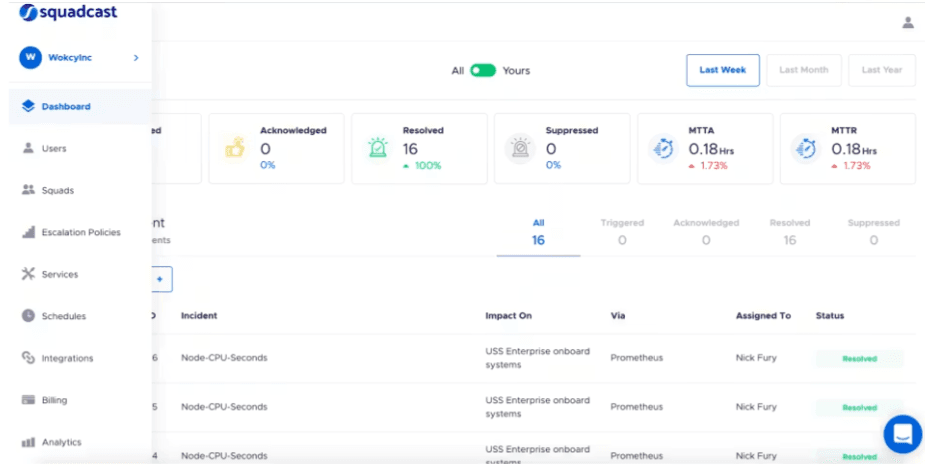
Squadcast is an incident management platform for SRE and DevOps teams that combines on-call scheduling, alert routing, incident response, and workflow automation in a single system. It reduces alert noise through grouping, deduplication, and routing rules before alerts reach engineers, and supports on-call rotations with escalation policies and coverage management. It is commonly used by teams migrating from PagerDuty or Opsgenie looking for a simpler alternative for on-call operations and incident coordination.
Key Features
- Alert Grouping and Noise Reduction: Groups and deduplicates alerts to reduce unnecessary paging.
- On-Call Scheduling: Supports rotations, overrides, and escalation policies with coverage gap visibility.
- Incident Automation: Automates Slack channels, status page updates, and ticket creation when incidents are declared.
- Integrations: Connects with monitoring, chat, and ITSM tools across the incident workflow.
- Incident Timeline and Workspace: Provides a centralized incident view with a structured timeline for coordination, visibility, and post-incident review across the response team.
Pricing
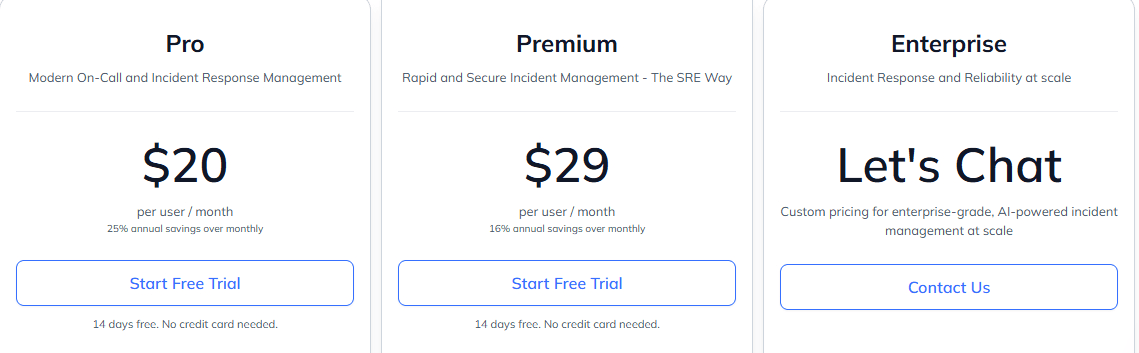
- Free plan available
- Pro: from $20/user/month
- Premium: from $29/user/month
- Enterprise: custom pricing
Pros
- Alert grouping reduces noisy or duplicate alerts
- Strong on-call scheduling with rotations and escalations
- Automated incident workflows (Slack, notifications, status updates)
Cons
- Less depth in enterprise-grade customization
- Complex scheduling for large or overlapping rotations
- Some advanced features are locked to higher-tier plans
Ready to Improve Your Incident Response?
No incident management tool fits every team. Enterprise IT teams with high alert volumes use BigPanda or PagerDuty for alert correlation, routing, and on-call coordination. SRE teams running incidents in Slack use incident.io or Rootly for structured workflows. Teams needing full-stack observability use Datadog or Grafana Cloud IRM, where metrics, logs, and traces connect to incident response.
Instatus is the best option for teams that want this incident communication layer in one place. As an incident management app built for SaaS and DevOps teams, it provides external uptime monitoring, on-call routing, status pages, and customer-facing incident updates on a single platform.
Start using Instatus today to simplify incident communication and see how it fits your workflow.

Get ready for downtime
Monitor your services
Fix incidents with your team
Share your status with customers