

Instatus vs incident.io
Compare Instatus and incident.io on pricing, native monitoring, status pages, and incident workflows — and see which tool fits your team.
Already on incident.io?Import in a minute
Start for free
Already on incident.io?Import in a minute
Quick Summary
This guide compares Instatus and incident.io on pricing, native uptime monitoring, status pages, and incident response workflows to help teams choose the right fit. For teams weighing more options, see our full guide to incident.io alternatives.
Is incident.io Enough for Your Incident Workflow?
incident.io is a chat-native incident management platform built for Slack and Microsoft Teams. It handles on-call scheduling, incident coordination, stakeholder updates, and postmortems within a single workflow and is used by engineering teams that manage incidents inside chat tools.
But there are limitations. Pricing is per user, so costs increase as teams add engineers and on-call roles. It does not include native uptime monitoring, making teams rely on separate tools to detect issues before incident workflows begin. Status page coverage is also limited on lower plans, which adds another tool for customer communication.
This Instatus article compares Instatus and incident.io across pricing, uptime monitoring, status pages, and incident workflows to help teams decide which platform fits their needs.
Why Listen to Us?
We work closely with SaaS teams, DevOps engineers, and developers managing uptime and incident communication every day, supporting over 1,000 teams. Our experience with real incident workflows shows where toolchains perform well and where per-user pricing or missing monitoring can quietly add up. That is the perspective we use in this comparison.
incident.io vs Instatus: Key Differences
Built-In Monitoring
Instatus includes built-in uptime monitoring with website, API, SSL, TCP, ping, DNS, and keyword checks running at 30-second intervals from multiple global locations. incident.io does not include native uptime monitoring, so teams rely on external tools like Datadog or Pingdom to detect issues before incident workflows begin.
Status Page Scope
Instatus includes status pages across all plans with custom code, full branding control, and support for 50 languages. incident.io includes one public status page on Basic, Team, and Pro plans, with more flexibility reserved for Enterprise, and offers fewer status page customization and localization options than Instatus.
Incident Communication
Instatus covers both internal coordination and external communication through automated alerts and status page updates, keeping customers informed while internal responders coordinate the incident. incident.io is primarily focused on internal incident coordination inside Slack and Microsoft Teams, so external customer communication requires a separate tool or workflow.
Setup and Time to Value
Instatus is designed for fast deployment, with teams able to publish monitoring checks and a live status page in minutes without complex configuration. incident.io requires more setup to get workflows, escalation policies, and integrations running, which adds lead time before the platform is fully operational.
What is Instatus?
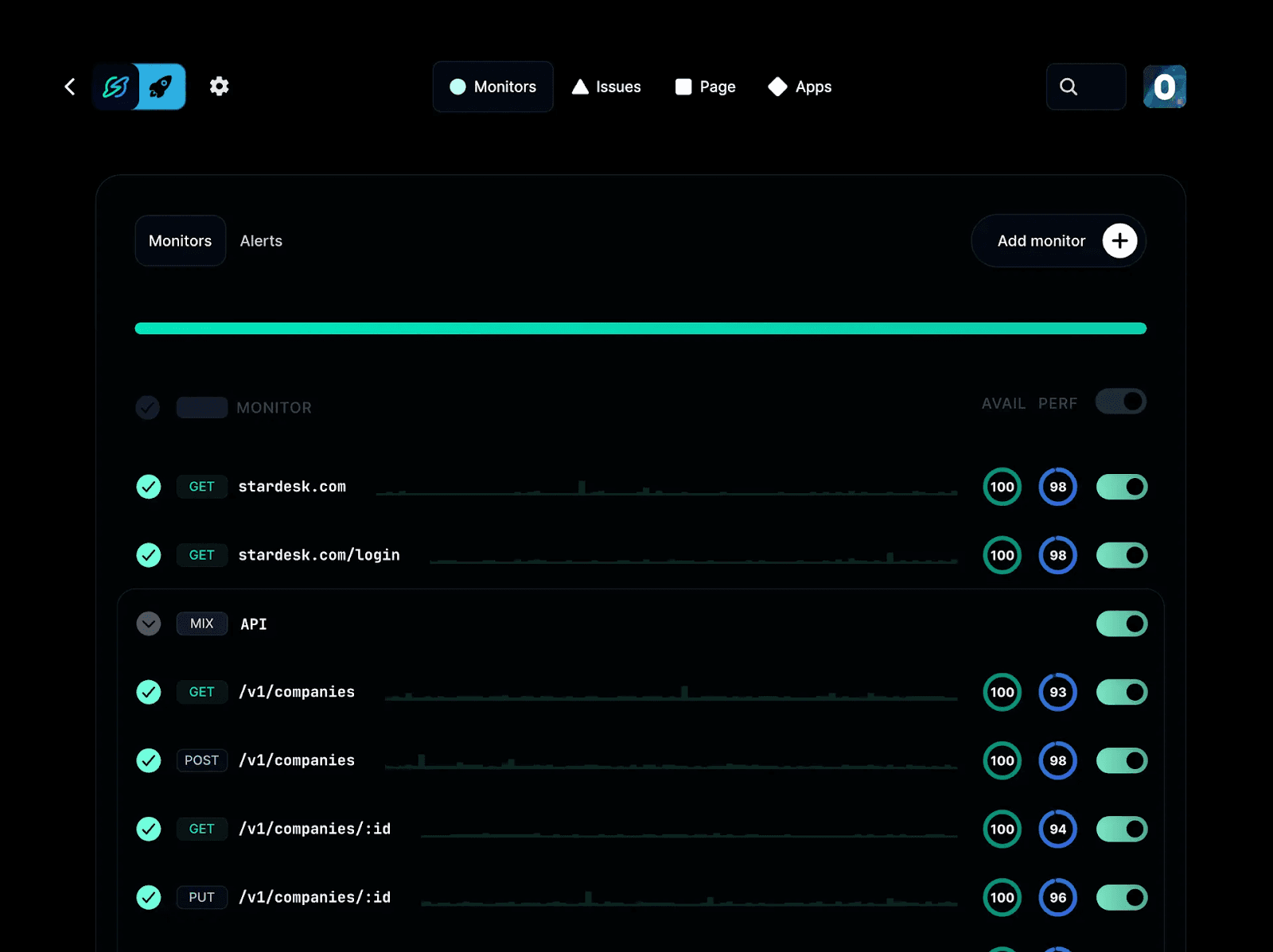
Instatus is an uptime monitoring and status page platform that combines monitoring, alerting, incident response, and customer communication in a single workflow. Unlike incident.io, which begins once an issue is detected, Instatus also covers detection through built-in uptime monitoring, so teams can identify problems before users report them. It is built for SaaS and DevOps teams that want monitoring and status pages alongside incident response, without stitching together multiple tools.
Key Features
- Native Uptime Monitoring: Monitors websites, APIs, SSL certificates, TCP, ping, DNS, and keywords at 30-second intervals from multiple global locations.
- Branded Status Pages: Creates public or private status pages with custom domains, full branding control, and support for 50 languages.
- Slack and Microsoft Teams Incident Response: Manages incident coordination and updates directly inside Slack and Microsoft Teams workflows.
- Multi-Channel Alerts: Sends alerts via email, SMS, phone calls, Slack, Discord, and Microsoft Teams so the right responder is reached through their preferred channel.
- On-Call Scheduling and Escalation: Routes incidents to the right responder based on severity and escalation rules, with overrides and coverage management.
Pricing
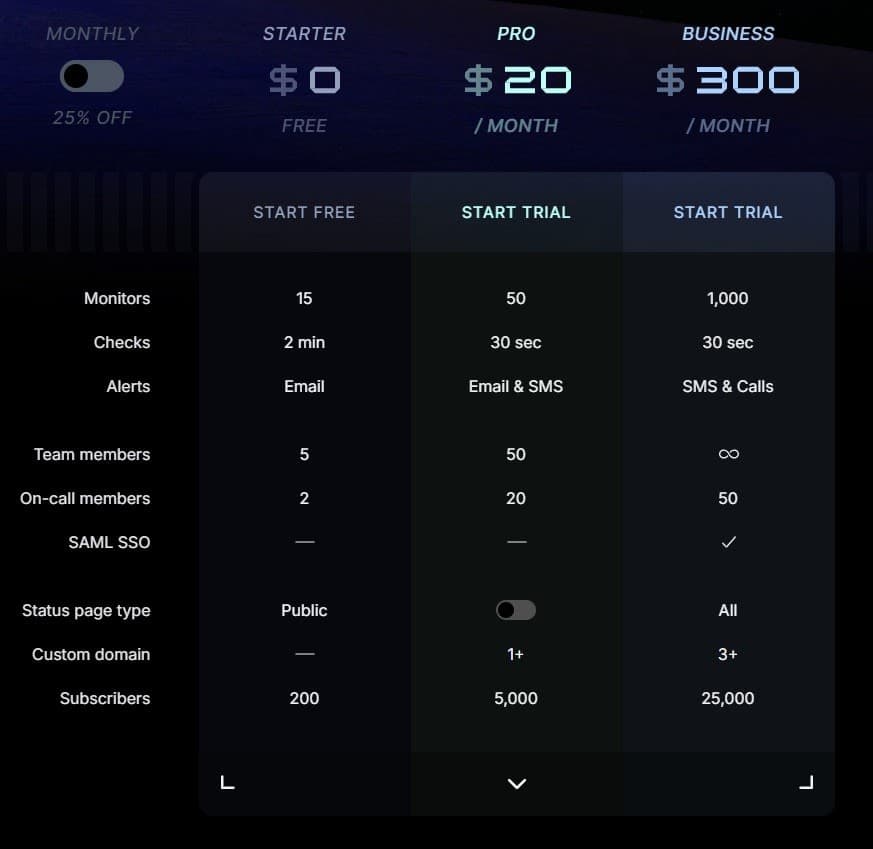
- Free: Up to 15 monitors, 1 status page, 5 team members
- Pro ($20/month): 50 monitors, 50 team members, 5,000 subscribers
- Business ($300/month): 1,000 monitors, unlimited team members, SAML SSO, 25,000 subscribers
- Enterprise: custom pricing with 25% annual billing discount
Pros
- Monitoring, incident response, and status pages in one platform
- Flat-rate pricing stays predictable as team size grows
- Fast setup with teams able to go live in minutes
Cons
- Best suited for SaaS and DevOps teams rather than large enterprise IT operations
- Less depth for complex multi-stage postmortem workflows compared to purpose-built tools
What is incident.io?
incident.io is a chat-native incident management platform built for Slack and Microsoft Teams. It manages the full incident lifecycle, including on-call scheduling, alert routing, incident coordination, stakeholder communication, and post-incident reviews, all without leaving the communication tools teams already use. It is commonly used by mid-market and enterprise engineering teams that run frequent production incidents.
Key Features
- Slack and Teams-Native Incident Response: Declares and manages incidents directly inside Slack or Microsoft Teams with structured workflows for roles, updates, and coordination.
- On-Call Scheduling: Supports multi-team on-call rotations, escalation policies, and paging via SMS and push notifications.
- AI Incident Summaries: Generates incident timelines and postmortems from real-time incident channel activity, with human review and editing controls.
- Workflow Automation: Automates incident roles, status updates, and post-incident workflows such as retrospectives and follow-ups.
- Stakeholder Updates: Sends automated updates to stakeholders outside the incident channel during active incidents.
Pricing
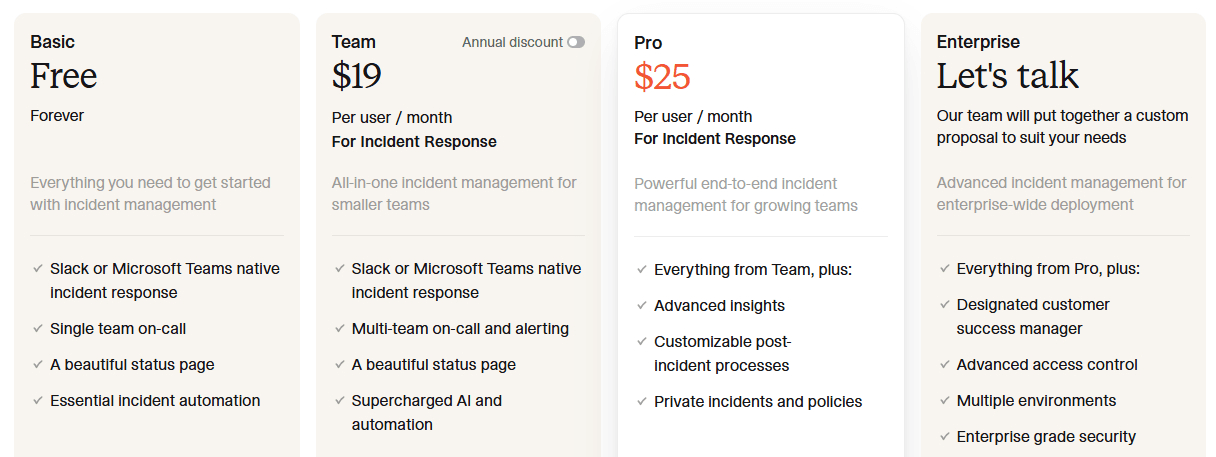
- Free: Basic
- Team: $19/user/month + $12/user/month on-call add-on
- Pro: $25/user/month + $20/user/month on-call add-on
- Enterprise: custom pricing
Pros
- Strong Slack and Microsoft Teams-native workflows reduce context switching during incidents
- AI-generated summaries and postmortems improve post-incident documentation speed
- Mature automation for incident roles, updates, and post-incident workflows
Cons
- No built-in uptime monitoring, requiring external tools for incident detection
- Per-user pricing scales quickly and becomes expensive for larger teams
- On-call functionality is a paid add-on, increasing total cost for active teams
incident.io vs Instatus: Feature Comparison
| Feature | Instatus | incident.io |
| Pricing model | Flat-rate | Per user/month |
| Free plan | 15 monitors | |
| Native uptime monitoring | ||
| Status pages included | All plans | Limited on lower plans |
| Multi-language status pages | 50 languages | Limited |
| Slack integration | ||
| Microsoft Teams integration | ||
| On-call scheduling | Paid add-on | |
| Alert channels | Email, SMS, calls, Slack, Discord, Teams | Mobile app, phone calls, SMS, Slack, email |
| Custom domain support | Pro and above | Pro and above |
| Fast setup | Requires more setup |
Why Do People Choose Instatus?
Detection, response, and communication in one workflow
SaaS and DevOps teams often rely on separate tools for monitoring, incident coordination, and status pages. Instatus brings these together so alerts, detection, and customer updates happen in the same place. During outages, this reduces context switching and keeps incident response moving without handoffs between systems.
Predictable costs that do not scale per seat
Flat-rate pricing keeps costs stable as headcount grows. Whether a team has five engineers or fifty, the monthly cost stays the same, which matters when incident access and on-call responsibilities are shared across an engineering team, and per-user pricing would otherwise compound quickly.
Faster setup without tool chaining
Instatus provides uptime monitoring, alerting, and status pages out of the box. This removes the need to connect separate systems before teams can respond to incidents and reduces dependency complexity during active outages, where every additional integration adds another potential point of failure.
Customer communication is included by default
Status pages are available across all plans, so teams can communicate outages to customers immediately without adding a separate tool. This closes the gap between internal detection and external updates, which is critical during high-severity incidents where customer trust depends on timely, accurate communication.
Broad alert coverage across channels
Instatus sends alerts via email, SMS, phone calls, Slack, Discord, and Microsoft Teams, so responders are reached through whichever channel they rely on. Teams that use multiple communication tools do not need a separate alerting layer to ensure the right person is notified when a monitor fires.
Take Control of Incident Response with Instatus
incident.io runs incident response inside Slack and Microsoft Teams. It handles on-call scheduling, escalations, coordination, and post-incident workflows after an issue is detected, but it does not provide native uptime monitoring, and status page flexibility is limited on lower plans. Teams typically rely on separate tools for detection and customer updates.
Instatus includes native uptime monitoring, status pages, and incident communication in one platform. It monitors websites, APIs, SSL, TCP, ping, and DNS at 30-second intervals and can trigger incidents and update status pages automatically from the same workflow.
Start using Instatus today to handle detection, incident response, and customer communication in one workflow.

Get ready for downtime
Monitor your services
Fix incidents with your team
Share your status with customers