

We Reviewed the Best On-Call Management Software for Faster Incident Response

Quick Summary
This guide reviews the best on-call management software for teams that need reliable schedules, smarter alert routing, escalations, and faster incident response.
Our top picks:
- Instatus: Best for SaaS teams combining monitoring, on-call, and status pages.
- PagerDuty: Best for enterprise-scale coverage.
- Rootly: Best for AI-assisted scheduling and coverage management.
Read on to compare features, pricing, pros, and cons.
Compare all seven below to find the right fit for your team.
Can Your Team Route, Own, and Resolve Incidents Fast Enough?
A weak on-call setup creates the worst kind of downtime: everyone gets alerted, but nobody knows who owns the fix. Good on-call management software should route alerts clearly, escalate missed acknowledgements, support clean handoffs, and help responders work from Slack or Microsoft Teams.
In this Instatus guide, we'll review the best tools for on-call management, what each one does best, and how to choose the right fit for your incident response workflow.
But first…
Why Listen to Us?
We built Instatus to help teams turn incidents into clear, customer-facing communication instead of scattered internal panic. Our platform is rated 4.8 out of 5 on Capterra and 4.9 on G2, with teams like Sketch, Airbyte, Harvard, Deno, Wistia, and Modern Treasury using it to monitor services and share status updates. That puts us close to the real on-call problem, getting the right person to own and resolve an issue fast.

What Is On-Call Management Software?
On-call management software helps teams decide who gets alerted when something breaks, how they are notified, and what happens if nobody responds.
A good tool does more than wake up an engineer at 2 a.m. It routes alerts to the right person, confirms who owns the incident, escalates if the first responder does not acknowledge, and helps teams communicate during the fix.
For SaaS and DevOps teams, this usually means managing:
- On-call schedules
- Alert routing
- Escalation policies
- Acknowledgements
- Backup responders
- Shift handoffs
- Slack or Microsoft Teams response
- Customer status updates
There are many tools out there with the capability to handle the on-call management needs of most teams. We shortlisted seven of the best options below.
Top 7 On-Call Management Software to Consider
| On-Call Management Software | Best fit | Main strength | Pricing |
|---|---|---|---|
| Instatus | SaaS teams needing on-call, monitoring, and status pages together. | Combines schedules, routing, escalation, alerts, Slack/Teams, and customer updates. | Free plan, paid plans from $20/month. |
| PagerDuty | Large DevOps, SRE, and IT teams with complex 24/7 coverage. | Mature scheduling, escalation, mobile response, live call routing, API/Terraform. | Free up to 5 users, paid plans from $25/user/month. |
| incident.io | Teams wanting modern on-call tied to incident response and Slack/Teams. | Flexible schedules, AI noise reduction, alert routing, mobile app, status pages. | Free plan, standalone on-call from $20/user/month. |
| Rootly | Teams needing AI-assisted on-call and strong coverage management. | Handles PTO, overrides, shadow rotations, smart routing, and reliable paging. | On-call plan from $20/user/month. |
| Better Stack | Teams wanting on-call inside monitoring and incident alerting. | Simple schedules, escalations, overrides, backup schedules, follow-the-sun. | Free plan, paid incident management from $34/month. |
| Grafana Cloud IRM | Grafana-heavy teams needing observability-connected on-call. | Context-rich alerts, rotations, escalations, mobile response, Terraform/iCal. | Free up to 3 active IRM users, Pro includes a platform fee plus active IRM user pricing. |
| Splunk On-Call | Splunk-oriented IT, DevOps, and SRE teams. | Incident context, rules engine, mobile actions, reporting, responder suggestions. | Custom quote-based pricing. |
1. Instatus
Instatus is a strong fit when on-call response is tied directly to uptime and customer trust. It helps teams monitor services, route incidents to the right responders, manage escalations when incidents are not acknowledged, and keep customers informed through branded status pages.
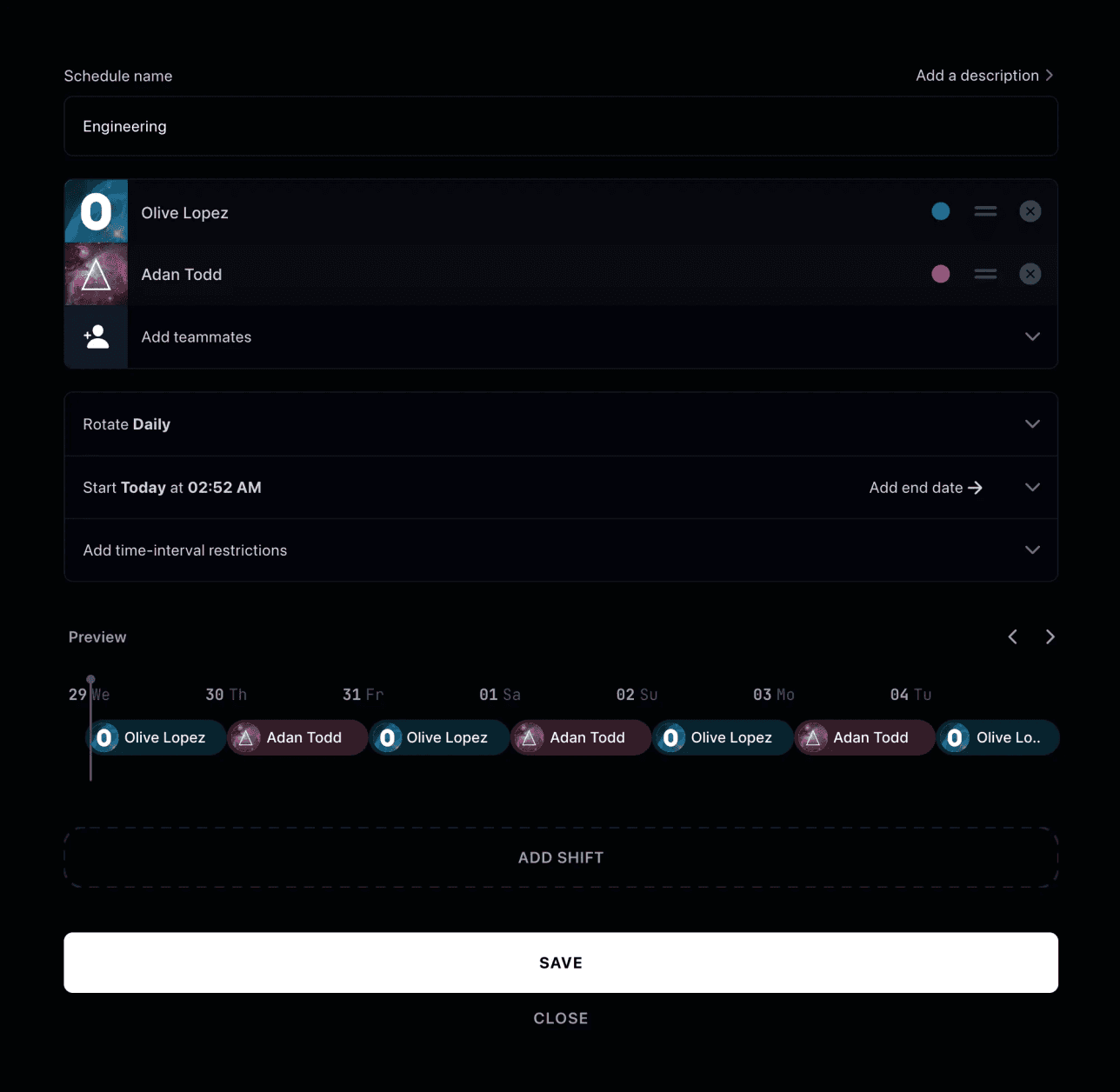
A typical workflow looks like this: an API monitor detects a failure, Instatus creates or triggers an incident, a routing rule sends it to the right on-call schedule or escalation policy, the responder acknowledges it, and escalation kicks in if nobody responds.
From there, the team can resolve the incident and update the status page so customers are not left guessing. That is why Instatus works well for SaaS teams, because on-call does not live in a vacuum. It sits between monitoring, incident ownership, team response, and customer communication.
Key Features
- On-call Schedules: Create team schedules, set rotations, and apply restrictions so there is always a clear responder.
- Routing Rules: Send incidents to the right on-call schedule or escalation policy based on impact, content, or other conditions.
- Escalation Policies: Escalate incidents when the first responder does not acknowledge them in time.
- Native Monitoring: Monitor websites, APIs, SSL, TCP/UDP, ping, DNS, cron jobs, and keyword-based conditions from one place.
- Multi-Channel Alerts: Notify teams through email, SMS, phone calls, Slack, Discord, Microsoft Teams, webhooks, and push notifications.
- Slack and Microsoft Teams Incident Response: Manage and collaborate on incident response from the dashboard, Slack, or Microsoft Teams.
- Status Pages: Keep users updated with public, private, or selected-audience status pages.
Pricing
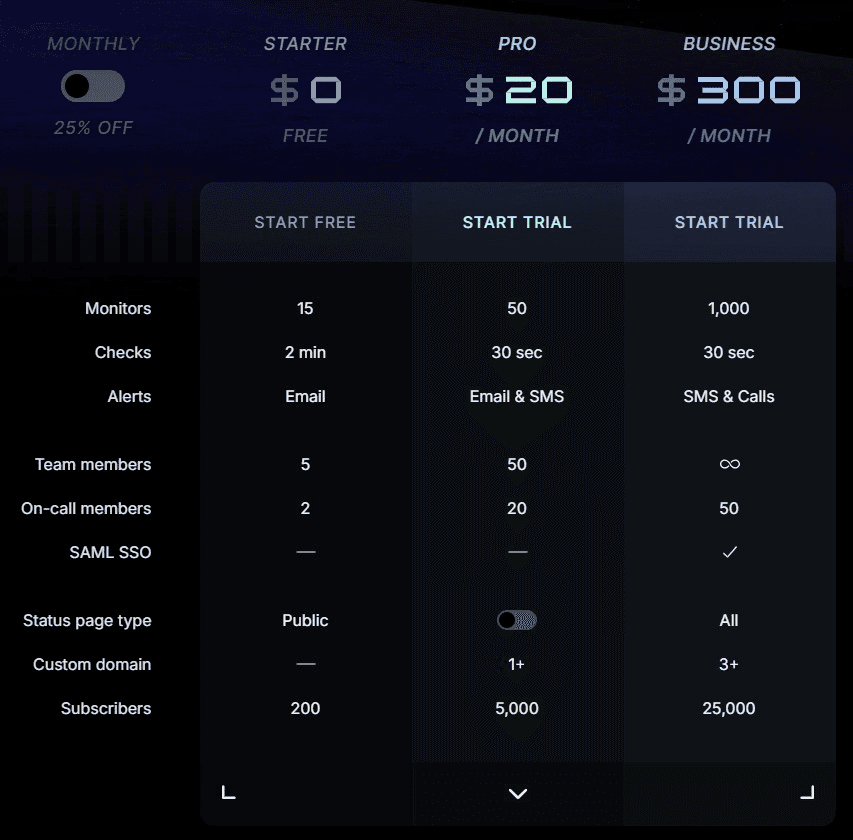
Instatus uses flat monthly plans, which makes costs easier to predict. Plans include:
- Starter (free) plan with 15 monitors, email alerts, 5 team members, 2 on-call members, and 200 subscribers.
- Pro at $20/month with 50 monitors, 30-second checks, SMS alerts, 20 on-call members, and 5,000 subscribers.
- Business at $300/month with 1,000 monitors, calls, SAML SSO, all status page types, and 25,000 subscribers. Enterprise adds advanced security and support.
Larger SaaS teams can also opt for our customizable Enterprise Plan.
Pros
- Monitoring, on-call, and status pages together
- Flat pricing keeps monthly planning simpler
- Strong fit for SaaS incident communication
- Supports Slack, Teams, SMS, and calls
Cons
- Not built for advanced observability
2. PagerDuty
PagerDuty is one of the strongest options for organizations that need reliable 24/7 coverage at scale. It is built around flexible scheduling, automated escalations, multi-channel notifications, and mobile incident management, helping teams reach the right responder quickly when urgent issues happen.
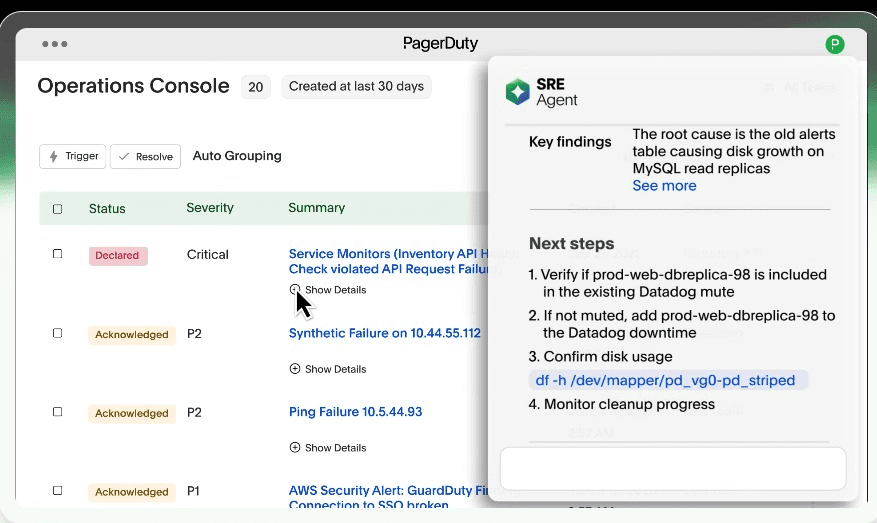
It also supports shift-based schedules, live call routing, time-zone coverage, schedule overrides, and programmatic management through API and Terraform, making it a good fit for teams with complex operations.
Key Features
- On-call Scheduling: Build rotations, shift-based schedules, custom shifts, and multi-responder coverage.
- Escalation Policies: Escalate alerts until they are acknowledged or resolved.
- Multi-Channel Alerts: Notify users by phone, SMS, email, push, and messaging tools.
- Live Call Routing: Route inbound incident calls to on-call teams.
- Mobile Incident Management: Acknowledge, escalate, and resolve incidents from mobile.
Pricing
PagerDuty Incident Management has a Free Plan for up to 5 users, alongside three paid plans:
- Professional at $25/user/month for structured incident response.
- Business at $49/user/month for advanced workflows and admin controls.
- Enterprise with custom pricing for full-lifecycle incident management.
Pros
- Deep escalation controls for large teams
- Strong ecosystem of monitoring integrations
- Mature mobile and acknowledgement workflows
Cons
- Can be too much for small teams
- Status communication often need extra packaging
- Setup requires careful service ownership mapping
3. incident.io
incident.io is built for teams that want a cleaner, less painful on-call experience. Its strength is not just paging the right person, but reducing alert noise, enriching alerts with context, and fitting schedules around how teams actually work.
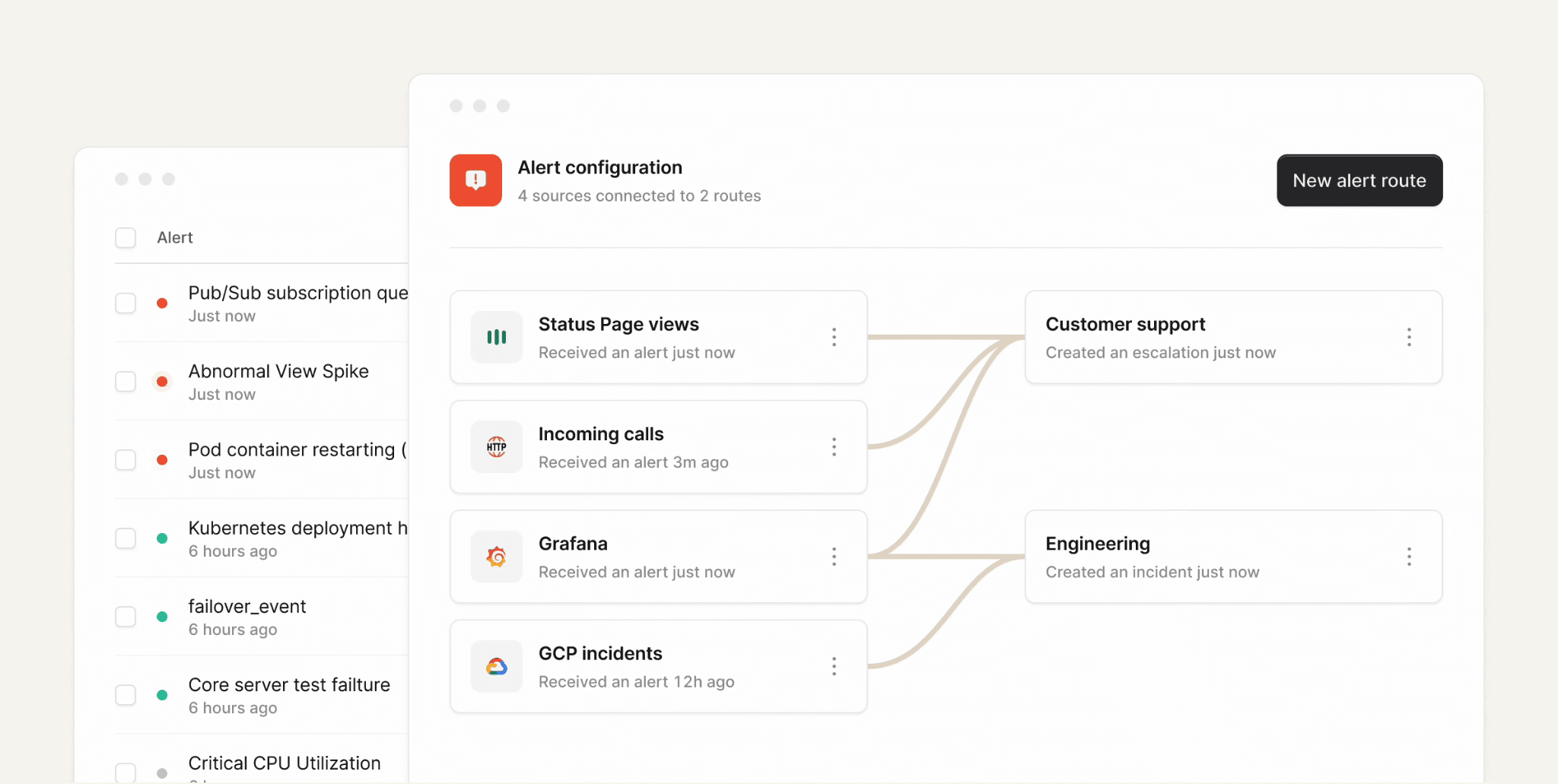
It is especially useful for teams migrating from PagerDuty or Opsgenie, since it supports schedule imports, dual-running, API access, and Terraform.
Looking to compare incident.io with alternatives? Check our review of the top alternatives here.
Key Features
- Flexible On-call Scheduling: Supports simple rotations, shadow schedules, follow-the-sun coverage, holidays, overrides, and cover requests.
- Alert Routing: Route alerts by team, service, source, or custom rules.
- AI Alert Intelligence: Deduplicate, group, and suppress noisy alerts.
- Integrations: Connect 40+ alert sources, including Datadog, Grafana, New Relic, Prometheus, Sentry, and Zendesk.
- Mobile App: Manage on-call response from iOS or Android.
- Reliability: Built for dependable paging with 99.99% alert delivery reliability.
Pricing
incident.io has a Free Basic plan with Slack or Microsoft Teams incident response, single-team on-call, a status page, and essential automation.
Paid plans include:
- Team at $19/user/month, with on-call as a $12/user/month add-on.
- Pro costs $25/user/month, with on-call at $20/user/month.
- Enterprise is custom.
On-call is also sold standalone at $20/user/month, so teams can buy it without a full plan.
Pros
- Strong Slack and Teams-native workflow
- Clear path from alert to incident
- Useful free plan for small teams
Cons
- On-call pricing needs close review
- Less ideal outside Slack or Teams
- Can overlap existing incident tooling
4. Rootly
Rootly focuses on making on-call easier to run and less disruptive for responders. It routes alerts by team, service, or other custom structures, while helping teams manage real-life coverage needs like PTO, holidays, shift swaps, and peak-event schedules.
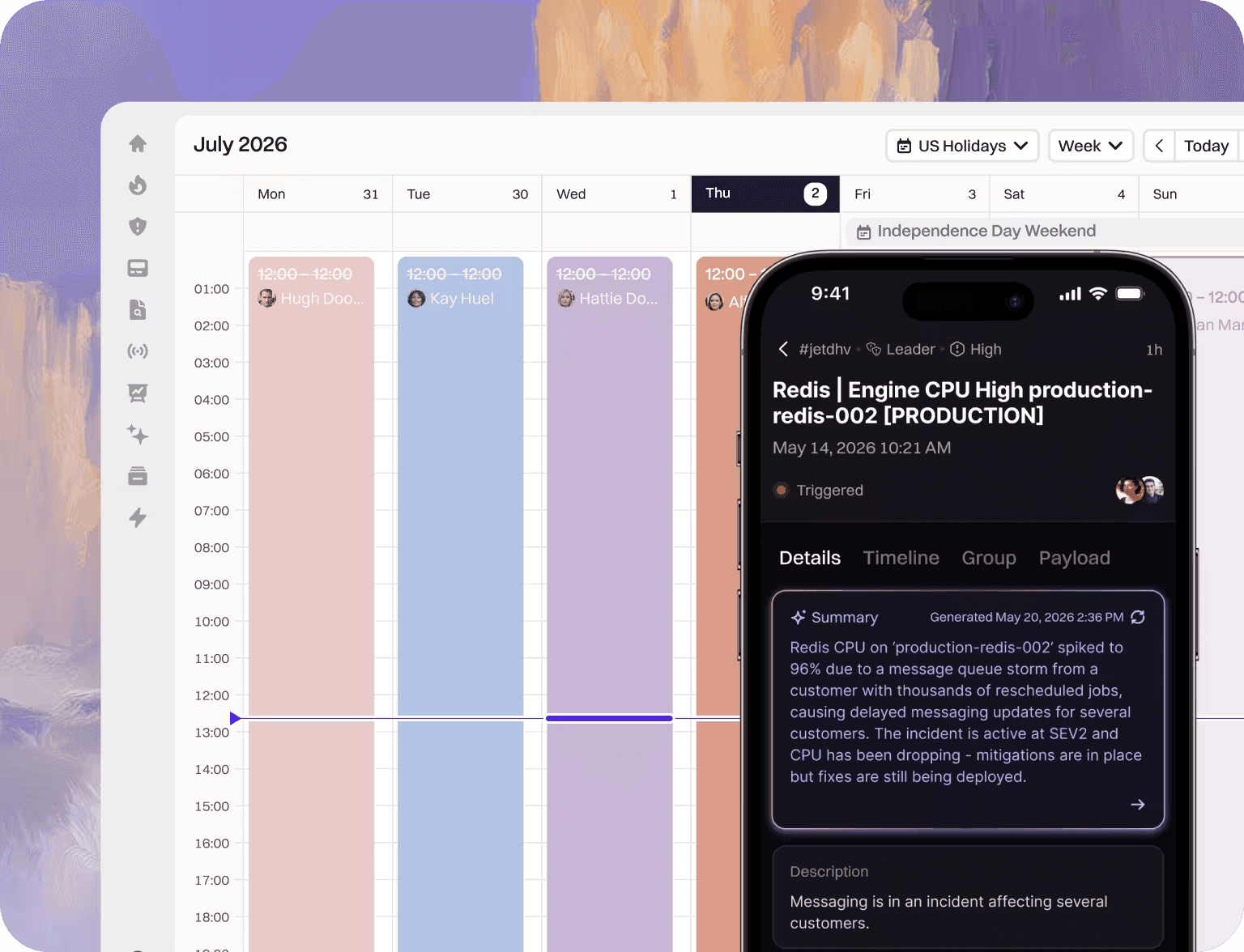
Its AI features, mobile app, automated gap detection, and reporting make it a strong fit for teams that want more than basic schedules and escalations.
Key Features
- On-call Scheduling: Build intuitive schedules, shadow rotations, round-robin rotations, and peak-event coverage.
- Smart Alert Routing: Page the right person by team, service, or custom rules.
- Coverage Management: Request cover, handle overrides, and route around PTO or holidays.
- Reliable Paging: Send alerts by voice, SMS, push, Slack, and email with fallbacks.
- Integrations: Connect monitoring tools through integrations, API, Terraform, or MCP.
Pricing
Rootly has a single On-Call Plan, which is the Essentials Plan starting at $20/user/month. It includes alert grouping, alert routes, schedules, escalation policies, shadow rotations, PTO, etc. There is also a customizable Enterprise Plan for larger teams.
Pros
- Strong coverage controls for on-call teams
- Useful alert grouping and noise reduction
- Handles PTO, overrides, and schedule gaps
Cons
- May be too advanced for small teams
- Status communication may need packaging review
- Heavy automation requires careful governance
5. Better Stack
Better Stack is a good fit for teams that want on-call management built directly into their monitoring and incident response setup. When a monitor or integration triggers an incident, Better Stack notifies the current primary on-call responder and can escalate if the alert is not acknowledged.
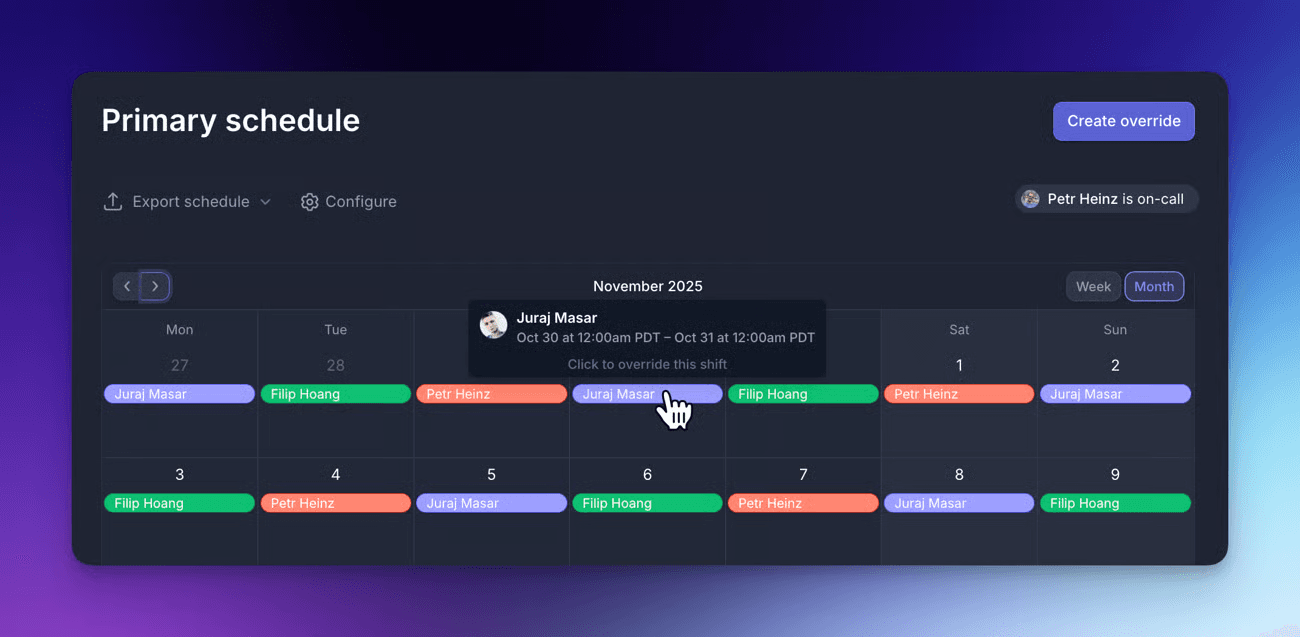
It is useful for teams that need simple schedule setup, clear shift visibility, one-off overrides, and more advanced escalation logic as they grow.
Key Features
- On-call Schedules: Create rotating schedules for engineers or support specialists.
- Primary Schedule: Notify the current primary on-call person when new incidents occur.
- Escalation Policies: Build custom flows with delays, fallback steps, time-based rules, and conditional metadata.
- Overrides: Temporarily replace an on-call person without changing the main schedule.
- Advanced Coverage: Support backup schedules and follow-the-sun rotations.
Pricing
On-call is included as a feature in Better Stack's Incident Management Plans:
- Free Plan, with 10 monitors and heartbeats, Slack and email alerts, and 100,000 exceptions per month.
- Paid Plan starts at $34/month, with a single responder and unlimited phone call alerts.
Additional responder costs $34 per license per month.
Pros
- Good support for escalation customization
- Useful status page and uptime pairing
- Works well for external service checks
Cons
- Responder licensing can make costs too high
- Less focused on pure on-call operations
- Telemetry features can widen scope fast
6. Grafana Cloud IRM
Grafana Cloud IRM fits teams already using Grafana or those that want on-call workflows tied directly to metrics, logs, alerts, and related system signals. Its main advantage is context. Responders can get rich notifications that help them understand what is happening before they jump into investigation.
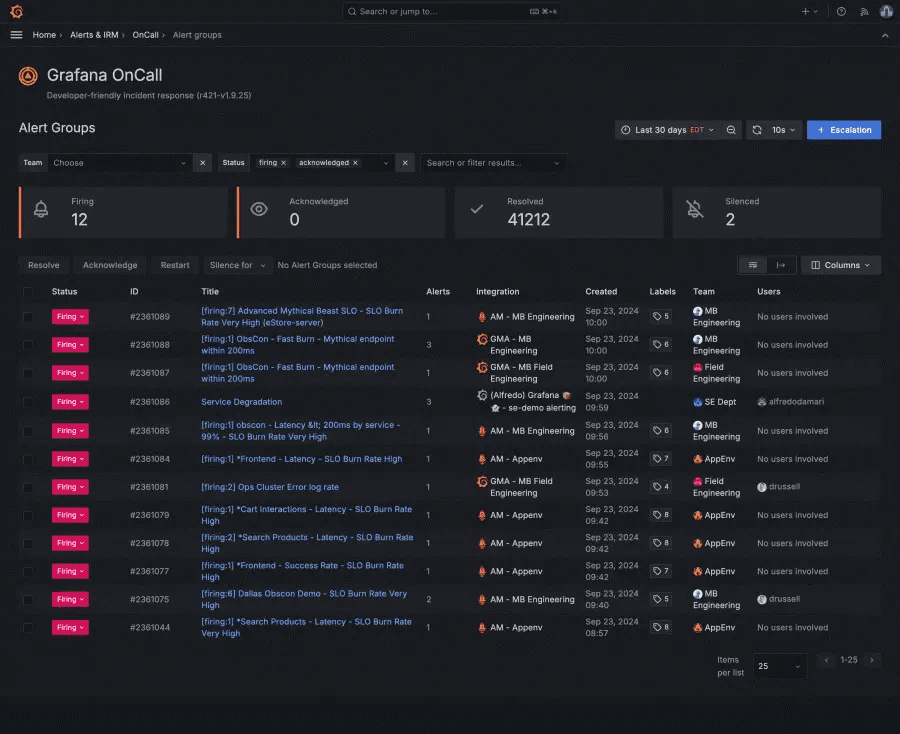
It also supports flexible scheduling, escalation chains, mobile response, and integrations with observability, ITSM, and collaboration tools.
Key Features
- On-call Scheduling: Manage rotations, layers, time zones, working hours, overrides, and shift swaps.
- Escalation Chains: Build multi-step notification workflows for critical alerts.
- Context-Rich Alerts: Include metrics, logs, and related signals in notifications.
- Multi-Channel Notifications: Alert teams through Slack, Microsoft Teams, Telegram, SMS, phone, and email.
- Mobile Response: Acknowledge, resolve, or escalate incidents from mobile.
- Integrations: Connect with Prometheus, AWS, Jira, ServiceNow, Zendesk, webhooks, and more.
Pricing
On-call management is included in Grafana Cloud. Plans include:
- Free with up to 3 active IRM users per month.
- Pro at $19/month for 3 IRM users, then $20 for each additional active IRM user.
- Enterprise uses custom pricing.
Pros
- Keeps alerts near observability context
- Transparent active-user IRM pricing
- Useful free tier for small teams
Cons
- Less useful outside Grafana ecosystem
- Migration from OSS needs planning
- Advanced workflows depend on Cloud IRM
7. Splunk On-Call
Splunk On-Call is built for teams that need to respond faster while reducing alert noise and burnout. Its strength is combining on-call scheduling with incident context, automated escalation, mobile response, and reporting.
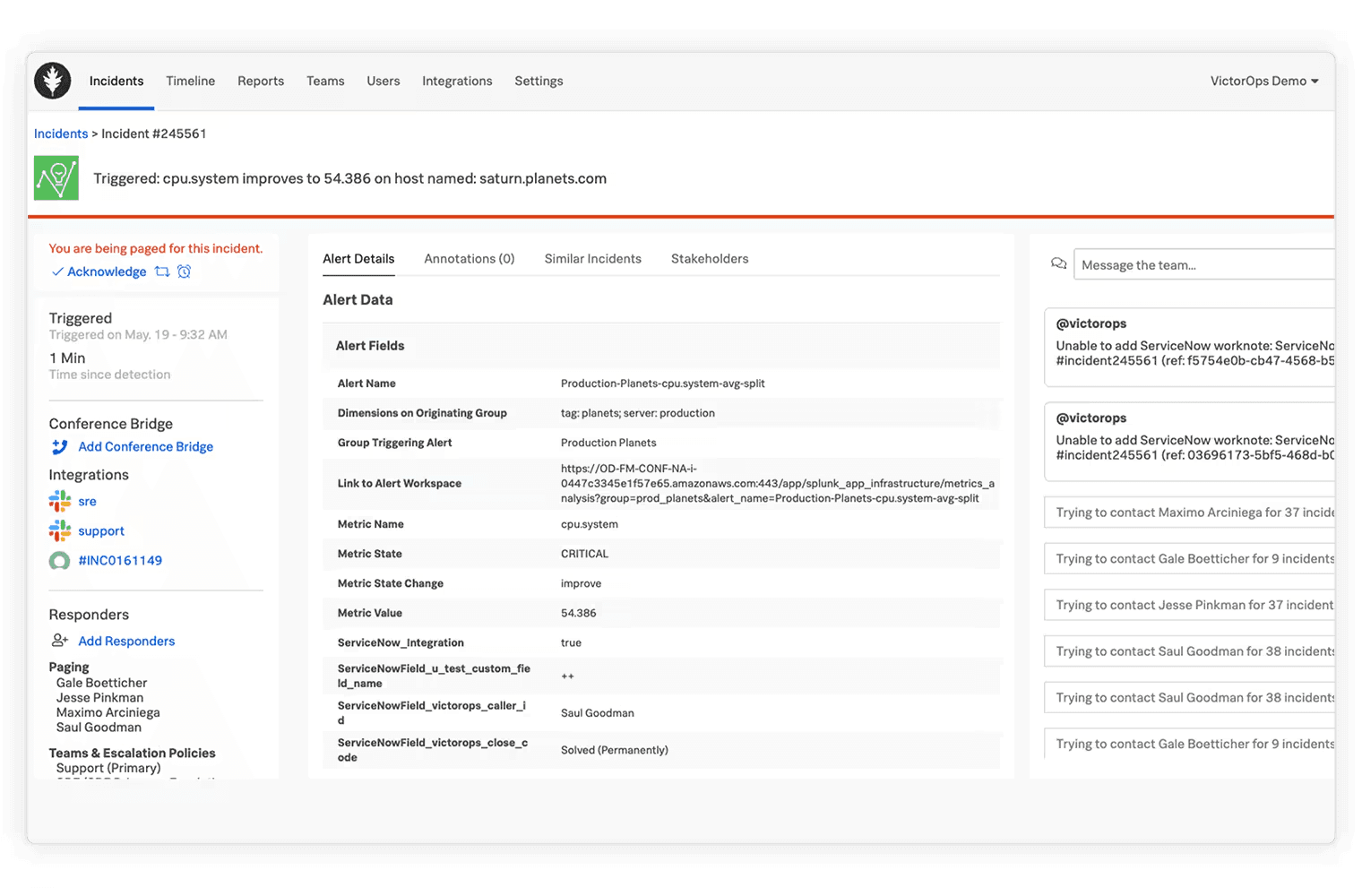
It is ideal for teams that want responders to receive metadata-rich alerts, take action from mobile, and use historical incident data to improve future response.
For more tools like Splunk, see our review of the best Splunk alternatives.
Key Features
- On-call Scheduling: Manage rotations, overrides, and escalation policies.
- Mobile Incident Response: Acknowledge, resolve, reroute, or snooze alerts from iOS and Android.
- Rules Engine: Add context, runbooks, dashboards, and resources to alerts.
- Incident Context: Use audit trails and similar-incident history during response.
- Responder Recommendations: Use machine learning to suggest the right experts.
- Reporting: Track incident frequency, MTTA, MTTR, and post-incident reviews.
Pricing
Splunk On-Call costs $5 per user/month for up to 10 seats, billed annually. Teams with larger or custom requirements can contact Splunk for pricing.
Pros
- Useful escalation and routing workflow
- Keeps incident context near observability data
- Good for established DevOps operations teams
Cons
- Public pricing is not very transparent
- Less attractive outside Splunk environments
What to Look for in On-Call Management Software
The right on-call tool should match how your team actually responds during an incident. A long feature list is not enough. Look for the workflow underneath it.
- Alert Routing: Alerts should route by service, severity, component, source, or customer impact. A database alert should not wake the frontend owner unless they are actually needed.
- Escalation Policies: If the first responder misses an alert, the tool should automatically notify the next person or team. Time to acknowledge is one of the clearest signals that your response process is working.
- Acknowledgements: Responders should be able to acknowledge alerts from the channels they already use, such as mobile, email, SMS, Slack, or Microsoft Teams.
- Handoffs and Overrides: Real life happens. People go on PTO, switch shifts, get sick, or need backup coverage. Good software makes those changes easy without breaking the rotation.
- Slack and Microsoft Teams Response: The response should happen where the team works. If engineers live in Slack or Teams, the on-call tool should support that flow.
- Status Communication: Internal response is only half the job. SaaS teams also need public, private, or audience-specific status pages so customers know what is happening.
- Pricing Packaging: Check whether on-call is included or sold as a separate add-on. This is where tools that look affordable can become expensive.
Build a Clearer On-Call Workflow With Instatus
The best on-call management software does more than send alerts. It routes the issue to the right person, confirms ownership, escalates missed acknowledgements, supports handoff, and helps teams coordinate where they already work.
For SaaS teams, the response is not complete until customers know what is happening. That is why Instatus is the best first choice for teams that want monitoring, on-call schedules, escalation rules, incident response, and status pages together.
Start free with Instatus and get your monitoring, on-call, and status communication workflow ready before your next outage.

Get ready for downtime
Monitor your services
Fix incidents with your team
Share your status with customers