Webhook biçimi
Webhook ile abone olduysanız alacağınız webhook'ların biçimi şöyledir:
Bir olay eklendiğinde veya güncellendiğinde:
{"meta": {"unsubscribe": "","documentation": ""},"page": {"id": "","status_indicator": "","status_description": "","url": ""},"incident": {"backfilled": false,"created_at": "","impact": "","name": "","resolved_at": "","status": "","updated_at": "","id": "","url": "","incident_updates": [{"id": "","incident_id": "","body": "","status": "","created_at": "","updated_at": ""}]}}
Bir bakım eklendiğinde veya güncellendiğinde:
{"meta": {"unsubscribe": "","documentation": ""},"page": {"id": "","status_indicator": "","status_description": "","url": ""},"maintenance": {"backfilled": false,"created_at": "","impact": "","name": "","resolved_at": "","status": "","updated_at": "","id": "","url": "","duration": "","maintenance_updates": [{"id": "","maintenance_id": "","body": "","status": "","created_at": "","updated_at": ""}]}}
Bir bileşen güncellendiğinde:
{"meta": {"unsubscribe": "https://<status-page-domain>/unsubscribe?id=${subscriber.id}&token=${subscriber.unsubscribeToken}","documentation": ""},"page": {"id": "","status_indicator": "","status_description": "","url": ""},"component_update": {"created_at": "","new_status": "","component_id": ""},"component": {"created_at": "","id": "","name": "","status": ""}}
Olası durum sayfası durumları:
UPHASISSUESUNDERMAINTENANCE
Olası bileşen durumları:
OPERATIONALUNDERMAINTENANCEDEGRADEDPERFORMANCEPARTIALOUTAGEMAJOROUTAGE
Olası olay durumları:
INVESTIGATINGIDENTIFIEDMONITORINGRESOLVED
Olası bakım durumları:
NOTSTARTEDYETINPROGRESSCOMPLETED
Webhook yükünün doğrulanması
Webhook uç noktanızda webhook yükünü doğrulamanız kesinlikle önerilir.
Webhook yüklerini bir gizli anahtarla imzalar ve imzayı x-instatus-webhook-signature adlı bir başlıkta göndeririz. Bu imza, webhook'un Instatus'tan geldiğini doğrulamanızı sağlar.
Webhook'u doğrulama adımları
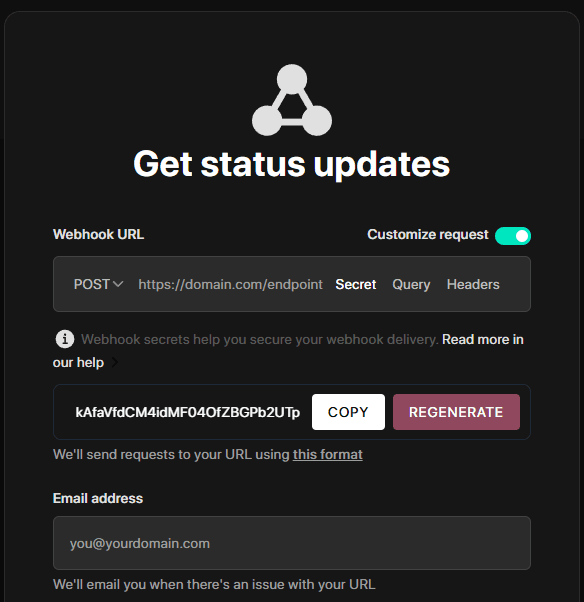
- Webhook'a abone olurken oluşturduğunuz Webhook Gizli Anahtarı'nı saklayın (bir sayfaya webhook ile abone olurken bulabilir, orada özelleştirebilirsiniz de).
-
Sunucunuzda webhook'u alacak yeni bir uç nokta oluşturun.
-
Doğrulamak için imzayı sunucunuzun ürettiği imzayla karşılaştırın.
-
İmzalar eşleşiyorsa webhook'u işleyin.
Kod örneği
import crypto from 'crypto'import express from 'express'const app = express()app.use(express.json())const WEBHOOK_SECRET = 'your-webhook-secret'function isVerifiedPayload(payload, signature, secret) {const hmac = crypto.createHmac('sha256', secret)const digest = hmac.update(JSON.stringify(payload)).digest('hex')return crypto.timingSafeEqual(Buffer.from(digest), Buffer.from(signature))}app.post('/endpoint/to/webhook', (req, res) => {const payload = req.bodyconst signature = req.header('x-instatus-webhook-signature')if (!signature) {return res.status(400).send('Signature missing')}if (!isVerifiedPayload(payload, signature, WEBHOOK_SECRET)) {return res.status(401).send('Invalid signature')}// Process the valid webhookres.status(200).send('Webhook received')})app.listen(3000, () => console.log('Server running on port 3000'))
Doğrulama neden önemli?
- Gerçekliği güvence altına alır: Webhook'un platformumuzdan geldiğini garanti eder.
- Kurcalamayı önler: Yükte yapılan değişiklikleri tespit eder.
- Güvenliği artırır: Tekrar saldırılarına ve yetkisiz erişime karşı korur.