
UptimeRobot Pricing (2026): Plans, Costs, & What You Should Know
Quick Summary
This guide breaks down UptimeRobot pricing, hidden costs, and plan differences so you can choose the right tier without surprises. It highlights when costs rise with add-ons and seats, and why that matters for growing teams. You'll also see how Instatus offers simpler, predictable pricing. For deeper comparisons and cost-saving strategies, explore the Instatus blog.
Is UptimeRobot Pricing Actually Worth It?
Pricing pages are designed to look straightforward. But with uptime monitoring tools, the sticker price rarely tells the full story. Seat add-ons stack up. Data retention limits can quietly disqualify a tool for teams with SLA obligations. And if you're running a business on the free tier, you may be violating the terms of service without knowing it.
UptimeRobot is one of the most popular uptime monitoring tools out there, and for good reason. It's reliable, easy to set up, and genuinely affordable compared to most alternatives. But before you commit, it's worth understanding exactly what you're paying for and what you'll need to add on.
Many teams start on the free plan and only discover its commercial restrictions, or its 5-minute check interval, after they're already dependent on it.
In this Instatus article, we break down UptimeRobot's pricing plans, the value each offers, and how to select the best option for your team. We also highlight key considerations to help you avoid overpaying.
Why Listen to Us?
At Instatus, we have extensive experience in uptime monitoring, supporting over 1,000 SaaS and DevOps teams. Our hands-on work with monitoring tools and incident communication gives us a clear view of where costs catch teams off guard and what actually matters when evaluating your options. With this knowledge, we provide a practical, experience-based breakdown of UptimeRobot pricing to help you make the most informed decision for your team.
What Is UptimeRobot?
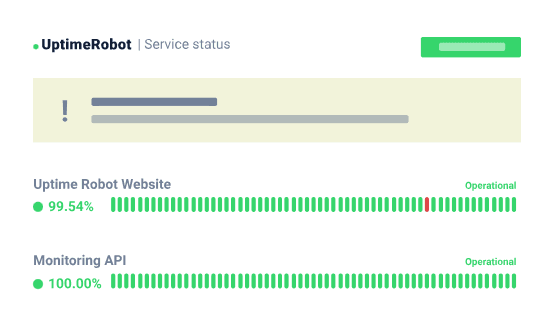
UptimeRobot is a website and server monitoring tool that checks your services at regular intervals and alerts you when something goes down. It monitors websites, APIs, ping targets, SSL certificates, DNS, cron jobs, and more. When it detects an issue, it notifies your team via email, SMS, phone call, Slack, Discord, Microsoft Teams, or webhook.
Over 2.7 million users trust UptimeRobot worldwide, and it's widely seen as a budget-friendly alternative to tools like Pingdom and BetterStack. The core product is straightforward: set up a monitor, choose your alert contacts, and get notified when things break.
Built for developers, freelancers, and small SaaS teams, UptimeRobot keeps things simple by design. It does one job: detecting downtime. And it does it reliably.
Key Features
- Multi-Type Monitoring: Covers HTTP/S, keyword, ping, port, and cron job monitoring on all plans. API, SSL, and DNS monitoring are available on paid plans only.
- Monitoring Interval: Free checks every 5 minutes. Paid plans run at 60-second intervals. Enterprise drops to 30 seconds, which matters for catching brief outages before customers notice.
- Alert Channels: Email on all plans. SMS and voice require purchasing credits separately on the free plan. Paid plans include a starter credit bundle. Slack, Mattermost, Telegram, and Teams are available on Solo and above. PagerDuty, webhooks, and Zapier require Team or higher.
- Status Pages: One page on free, three on Solo, 100 on Team, and unlimited on Enterprise. Custom domain, password protection, and custom design are available from Solo upward. Status page analytics and subscriber management unlock at Team.
- Team Seats: Login seats first appear on Team at $15 to $19 per seat per month extra. Notify-only seats aren't included by default on any plan below Team.
Use Cases of UptimeRobot
- Website and API Monitoring: Receive real-time alerts for downtime or performance issues to keep your website and APIs running. UptimeRobot helps teams detect problems early and minimize service interruptions.
- SSL and Domain Expiry Alerts: Set up automated checks so you're notified before certificates or domains expire. This prevents outages caused by overlooked renewals.
- Cron Job and Heartbeat Tracking: Monitor scheduled jobs and system processes to ensure they run as expected. Get notified immediately if a task fails or is delayed.
- Client Infrastructure Management: Agencies and freelancers can use UptimeRobot to track uptime across multiple client websites from a single dashboard with separate status pages per client.
- Team Incident Alerting: Route alerts to the right channels, Slack, PagerDuty, or webhooks, so the right person is notified the moment something breaks.
UptimeRobot Pricing Structure
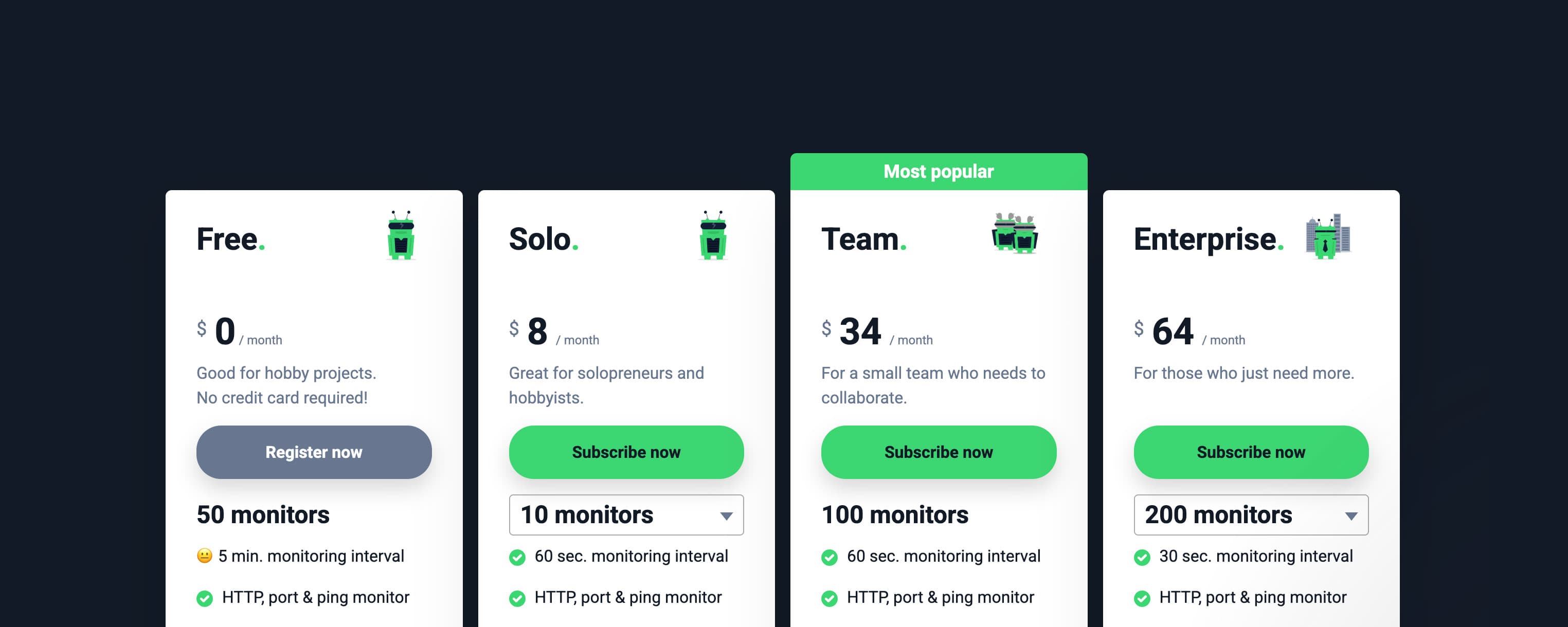
UptimeRobot offers a free tier and a flexible paid model. Here's what each plan actually includes:
| Feature/Plan | Free | Solo | Team | Enterprise |
|---|---|---|---|---|
| Pricing (Monthly) | $0 | $8 | $34 | $64 |
| Pricing (Annual) | $0 | $7 | $29 | $54 |
| Monitors | 50 (limited) | 10 - 50 (better features) | 100 | 200 - 1,000+ |
| Check Interval | 5 min | 60 sec | 60 sec | 30 sec |
| HTTP / Ping / Port / Keyword | ✓ | ✓ | ✓ | ✓ |
| API Monitoring | – | ✓ | ✓ | ✓ |
| UDP Monitoring | – | ✓ | ✓ | ✓ |
| DNS Monitoring | – | ✓ | ✓ | ✓ |
| SSL & Domain Monitoring | – | ✓ | ✓ | ✓ |
| Heartbeat / Cron Monitoring | – | ✓ | ✓ | ✓ |
| Integrations | 5 | 9 | 12 | 12 |
| Advanced Integrations (Zapier, PagerDuty) | – | – | ✓ | ✓ |
| Status Pages | 1 (basic) | 3 (basic) | 100 (full) | Unlimited |
| Custom Domain (Status Page) | – | ✓ | ✓ | ✓ |
| Subscribers & Analytics | – | – | ✓ | ✓ |
| Notify Seats Included | 0 | 0 | 3 | 5 |
| Login Seats Included | 0 | 0 | 3 | 5 |
| Extra Login Seats | – | – | $19/mo | $19/mo |
| SMS Credits Included | – | 10 - 20 | 30 | 50 - 200 |
| Data Retention | 3 months | 12 months | 24 months | 24 months |
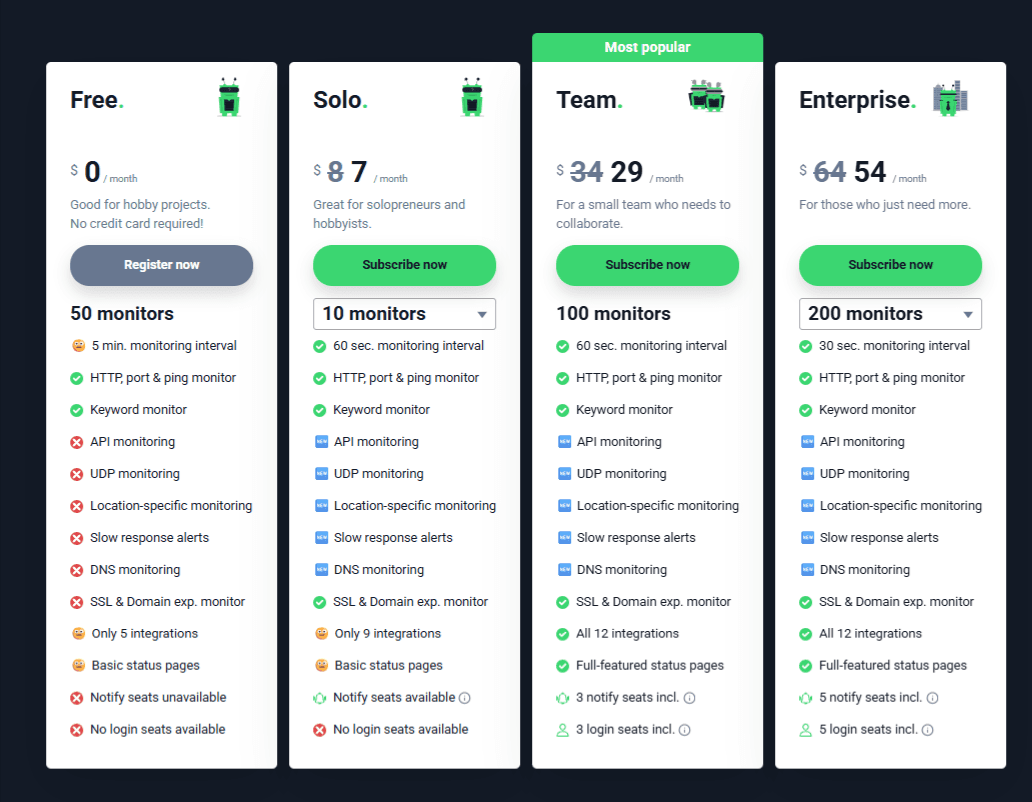
1. Free Plan ($0/month)
For individuals or very small projects, starting with uptime monitoring.
Features:
- 50 monitors
- 5-minute check interval
- HTTP/Ping/Port/Keyword monitoring
- 5 integrations
- 1 basic status page
- 3 months of data retention
Limitations:
- No API, UDP, DNS, SSL, Domain, Heartbeat/Cron monitoring
- No advanced integrations (Zapier, PagerDuty)
- No notify or login seats
- Status pages have no custom domain or subscriber analytics
2. Solo Plan
For freelancers, individual developers, and small teams.
Features:
- 10–50 monitors, 60-sec check interval
- Full monitoring (HTTP/Ping/Port/Keyword/API/UDP/DNS/SSL/Domain/Heartbeat/Cron)
- 9 integrations, 3 basic status pages with custom domain
- 12 months data retention, 10–20 SMS credits
Limitations:
- No advanced integrations (Zapier, PagerDuty)
- No notify or login seats
Pricing: $8 per month, $7 annually
3. Team Plan
For small SaaS or DevOps teams.
Features:
- 100 monitors, 60-sec check interval
- Full monitoring types
- 12 integrations including Zapier & PagerDuty
- 100 status pages with custom domain, subscribers & analytics
- 3 notify seats, 3 login seats
- 30 SMS credits, 24 months data retention
Limitations:
- Extra login seats $19/mo
Pricing: $34 per month, $29 annually
4. Enterprise Plan
For large enterprises or teams needing custom configurations.
Features:
- 200–1,000+ monitors, 30-sec check interval
- Full monitoring types
- 12 integrations including Zapier & PagerDuty
- Unlimited status pages with custom domain, subscribers & analytics
- 5 notify seats, 5 login seats (extra login seats $19/mo)
- 50–200 SMS credits, 24 months data retention
Pricing: $64 per month, $54 annually
Pros and Cons
We analyzed user reviews of UptimeRobot on G2 and Capterra. Here's a summary of the key takeaways:
Pros
- Fifty monitors on the free plan with no credit card required
- Affordable per-monitor cost compared to BetterStack and Pingdom
- Fast setup; most monitors are running in under a minute
Cons
- Free Plan is for personal, non‑commercial use; commercial use without a paid plan violates the terms
- SMS credits don't renew with your subscription; high-alert-volume teams will need to purchase top-ups
- Login seat costs scale unpredictably for growing teams
Understanding UptimeRobot's Cost vs Value
UptimeRobot delivers strong value for individuals and small teams that need reliable up/down monitoring at a low price. Its free tier is genuinely generous. Fifty monitors with no credit card is a rare offer in this category. And the paid plans are competitively priced for what they cover.
But costs can creep up as your team grows. SMS credits don't renew automatically, so high-rotation teams will top up more frequently than expected. Login seats on Team and Enterprise add $15 to $19 per person per month on top of the base plan. A team of five needing login access is looking at $75 to $95 extra per month before you've touched integrations or additional monitors.
The 5-minute check interval on the free plan is also too slow for production SaaS. If a service goes down and comes back up within that window, you may never know it happened.
Multiple Capterra reviewers note that while UptimeRobot's base plan pricing is competitive, costs can climb quickly once teams need additional login seats or faster check intervals. For growing teams, the per-seat model can feel unpredictable. Tools with flat, predictable pricing can give you the same reliability without the bill shock.
Best UptimeRobot Alternative: Instatus
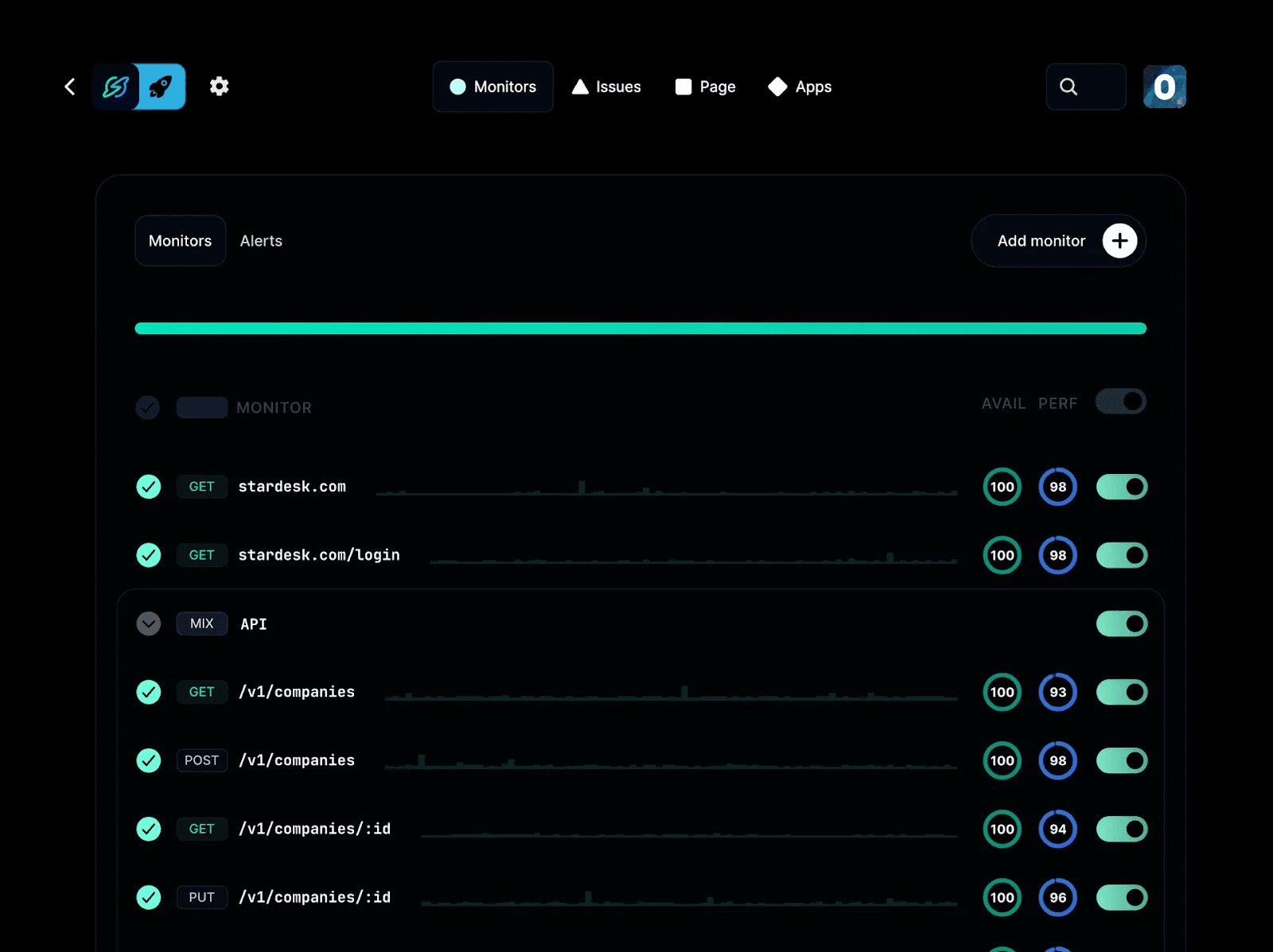
Instatus isn't just a monitoring tool, it's designed to handle the full uptime and incident communication workflow in one platform, so you don't need to stitch together multiple tools. Unlike tools that focus mainly on alerts, Instatus puts status pages, incident updates, and team coordination at the center of reliability operations, helping you keep customers informed and your team aligned.
With fully customizable status pages that load fast and support multiple languages, you can present clear incident timelines, historical uptime, and real‑time service health in a way that builds trust with your audience.
Instatus also offers flat, predictable pricing that doesn't increase per seat or subscriber as your team scales, making costs easier to forecast and removing surprises as your needs grow.
Key Features
- Real-Time Uptime Monitoring: Instatus continuously checks your website, API, and other critical services so you can detect downtime quickly. Regular 30-second checks on paid plans give teams immediate visibility into outages, helping you fix issues before customers notice.
- Custom Alerts and Notifications: Receive instant alerts via email, SMS, or tools like Slack and Microsoft Teams when issues occur. Tailor notification rules so the right people are informed at the right time, reducing response delays.
- Branded Status Pages: Create public or private status pages with custom colors, logos, and domains that reflect your brand. These pages show users current system status and incident details, so customers know what's happening without having to email your support team to find out.
- Monitoring Integrations: Connect Instatus with tools you already use like Datadog, Pingdom, or Site24x7, so everything feeds into one place. No switching between dashboards to get the full picture.
- Multi-Language Support: Instatus supports status pages in 21 languages, allowing users anywhere in the world to read updates in their own language. Useful if your product has users outside English-speaking markets.
- Incident Management: Set up on-call calendars, configure escalation rules, manage incidents directly from Slack, and track progress with team comments. No separate tool required.
Pricing
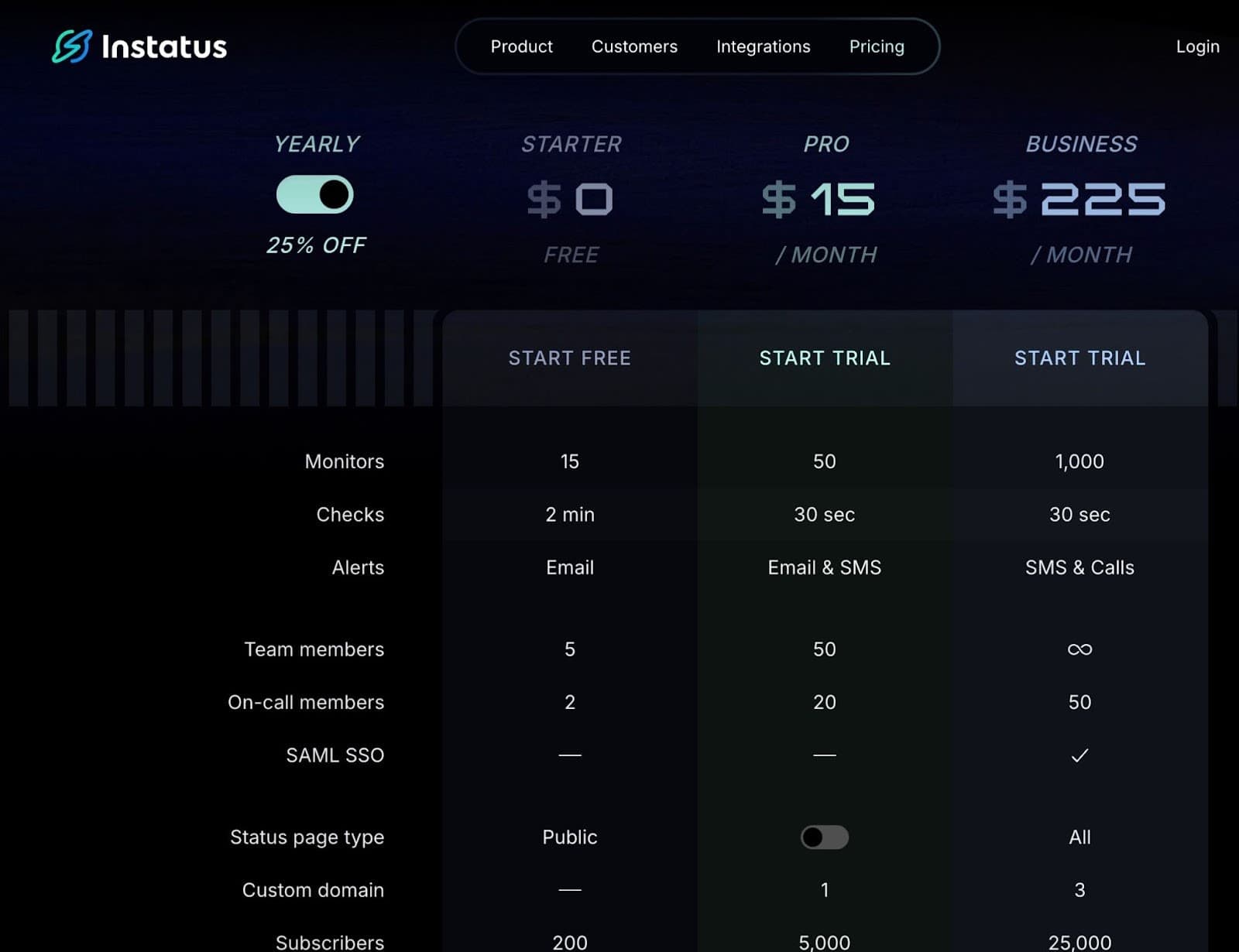
Here's our pricing breakdown:
- Starter (Free): 15 monitors, 2-minute check intervals, email alerts, up to 5 team members, one public status page, and support for 200 subscribers. Ideal for small projects or early-stage teams.
- Pro ($15/month): 50 monitors with 30-second check intervals, email and SMS alerts, up to 25 team members, and additional monitoring and status page features.
- Business ($225/month): Up to 1,000 monitors, SMS and phone alerts, SAML SSO, all status page types, 25,000 subscribers, and up to 50 on-call members.
- Enterprise (Custom pricing): Tailored for complex environments with custom monitor limits, advanced logs and screenshots, flexible on-call configurations, and additional enterprise-grade features based on specific requirements.
Pros
- Fast, clean status pages that stay available during outages
- Full customization on paid plans without extra per-feature costs
- Flat monthly pricing that doesn't punish team growth
- Incident management is built in, not bolted on
Cons
- Native monitoring is more basic compared to dedicated monitoring-only tools
- SAML SSO requires the Business tier

Why Choose Instatus?
If UptimeRobot is doing everything you need, it's a solid tool. But if you've hit the seat cost wall, found the 5-minute free interval too slow, or realized you're stitching together a separate status page on top of your monitoring tool, those are signs the monitoring tool has hit its ceiling.
Instatus is designed for exactly that next stage. You get monitoring, incident response, and customer-facing status pages in one place, without paying per seat every time your on-call rotation expands. Teams that have made the switch most often cite two reasons: the pricing doesn't punish growth, and their customers can always find a status page that's actually up when their service isn't.
Start free and see how it fits your workflow. No credit card required, and your first status page is live in minutes.
Manage Uptime Confidently with Instatus
Instatus gives you a complete uptime and incident communication platform with predictable, flat pricing that won't spike as your team grows. Its integrated status pages and transparent, branded incident updates help you keep customers informed and trusted during downtime.
Ready for a better, simpler reliability workflow? Start with Instatus today — no credit card required.

Get ready for downtime
Monitor your services
Fix incidents with your team
Share your status with customers