

Best On-Call Scheduling Software Tools for DevOps Teams

Quick Summary
This guide compares the best on-call scheduling software for SaaS, DevOps, and engineering teams that need clear rotations, shift coverage, overrides, calendar visibility, time-zone support, and escalation handoffs.
Our top picks:
- Instatus: Best for combining on-call scheduling, native monitoring, and status pages.
- PagerDuty: Best for complex enterprise rotations.
- Rootly: Best for shadow rotations and coverage management.
Read on to compare features, pricing, pros, and cons.
Is Your On-Call Schedule Clear When It Matters Most?
At 2 a.m., an alert fires. The schedule names an engineer who swapped shifts yesterday. Their replacement never saw the update, while the backup assumes someone else has it. The problem is not the alert. It is that nobody knows who owns it.
That confusion is costly. Nearly 40% of organizations experienced a major outage caused by human error over the previous three years, according to Uptime Institute. Most of those incidents involved people not following procedures or gaps in the procedures themselves. Clear schedules, handoffs, and escalation paths reduce that risk.
Spreadsheets and shared calendars can handle a simple rotation, but they become harder to trust once you add PTO, public holidays, last-minute overrides, and teams working across time zones.
In this Instatus article, we compare seven on-call scheduling software tools based on rotations, shift coverage, overrides, calendar access, time zones, escalation handoffs, and pricing.
Why Listen to Us?
At Instatus, we help SaaS, DevOps, and engineering teams monitor services, manage incidents, and keep customers informed when something breaks. Teams including Sketch, Dovetail, Airbyte, Deno, and Modern Treasury use Instatus, and it holds a 4.9 out of 5 rating on G2. This gives us a practical view of on-call schedules, escalations, incident ownership, and customer communication.

What Is On-Call Scheduling Software?
On-call scheduling software helps SaaS, DevOps, and engineering teams plan who responds when something breaks. Instead of checking spreadsheets, Slack threads, or shared calendars, teams can see who is on call now, who takes over next, and who handles backup coverage.
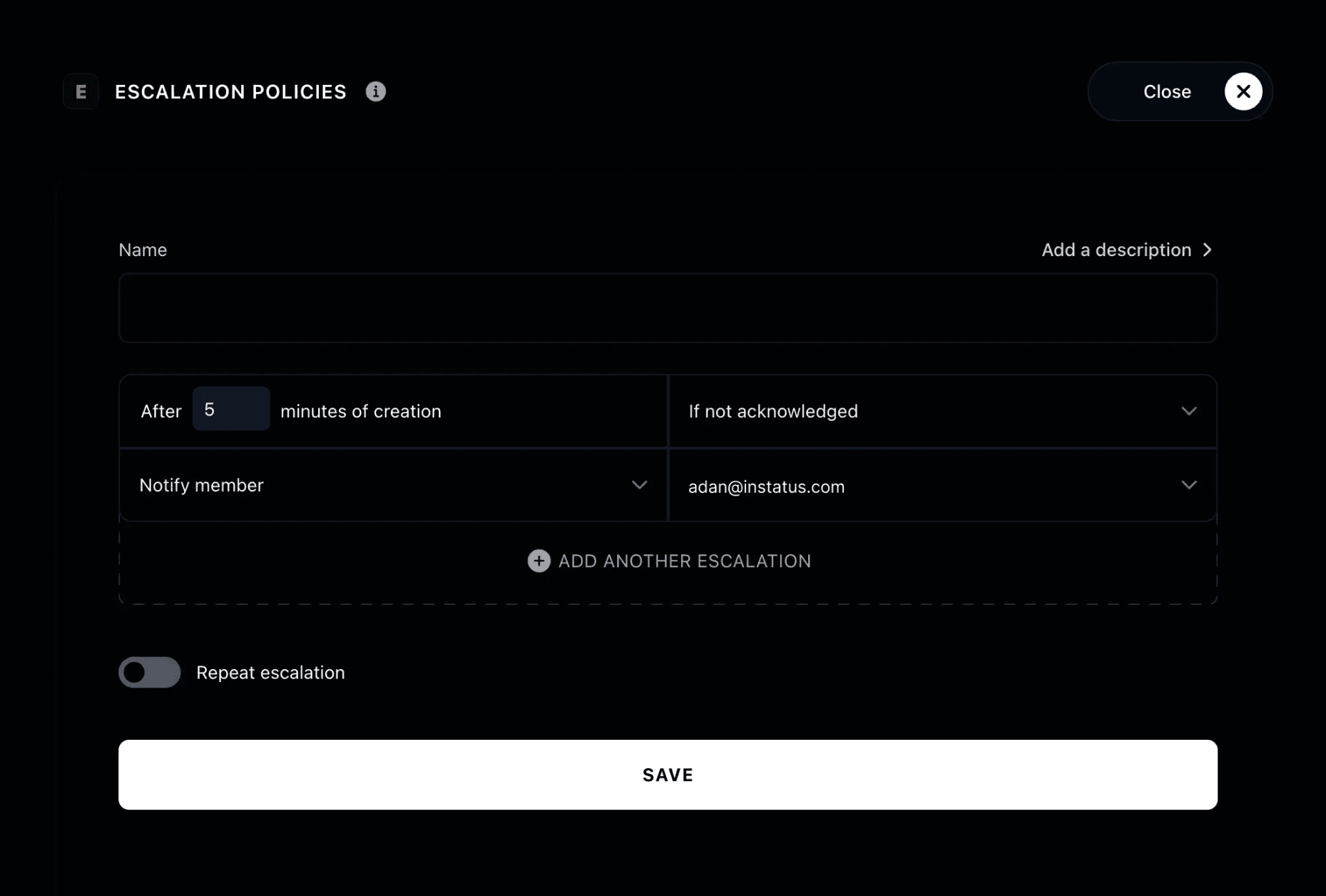
Teams use these tools to build recurring rotations, assign backup responders, manage shift swaps and temporary overrides, and coordinate coverage across time zones. Schedules can also connect to escalation policies, so an alert moves to the next responder when the first person does not acknowledge it.
The goal is simple: remove doubt before an incident starts. A good schedule should also connect to on-call routing, alerts, and incident response, so the right person gets notified when a service fails.
On-Call Scheduling Software vs On-Call Management Software
On-call scheduling software and on-call management software overlap, but they solve different parts of the incident workflow:
- On-call scheduling software decides who is responsible and when. It covers rotations, backup responders, shift changes, and time-zone coverage.
- On-call management software handles the wider response process. It connects schedules to alert routing, acknowledgments, escalation policies, incident coordination, and reporting.
Instatus shows the difference clearly. Its on-call schedules organize shifts and show current and upcoming responsibilities. Routing rules then send incidents to the right schedule or escalation policy, so an unacknowledged incident can move to the next responder.
That connection between scheduling and response turns a rota into a working on-call system.
Best On-Call Scheduling Software to Consider
The table below compares each tool by best fit, scheduling strength, and current starting price.
| Tool | Best Fit | Scheduling Strength | Pricing |
|---|---|---|---|
| Instatus | SaaS and DevOps teams wanting scheduling, monitoring, and status pages together | Custom rotations, live previews, incident routing, repeatable escalations, and customer updates | Free, Pro $20/month, Business $300/month |
| PagerDuty | Large teams with complex global coverage | Layered schedules, overrides, time zones, and calendar exports | Free for 5 users, Professional $21/user/month annually, Business $41/user/month annually |
| incident.io | Slack or Microsoft Teams-based teams | Cover requests, overrides, shadow schedules, and holiday calendars | Free, Team $15/user/month annually plus $10 for on-call, standalone on-call $20/user/month |
| Rootly | Teams managing PTO and coverage gaps | Shadow rotations, gap detection, and round-robin coverage | From $20/user/month |
| ilert | Teams needing detailed schedule controls | Rotations, overrides, calendar sync, and reminders | Free for five users, Pro from $19/user/month annually, Scale from $39/user/month annually |
| Better Stack | Teams connecting schedules to monitoring | Overrides, backup schedules, and follow-the-sun coverage | Free personal plan, responder licenses from $29/month annually |
| SolarWinds Incident Response | Teams wanting lower-cost schedules and escalations | Flexible rotations, overrides, and reusable escalation paths | Pro from $15/user/month annually, Premium from $24/user/month annually |
1. Instatus
Instatus combines straightforward on-call scheduling with routing and escalation rules. Teams can build rotations, set on-call periods and restrictions, preview coverage, and see current and upcoming shifts before connecting each schedule to incident routing.
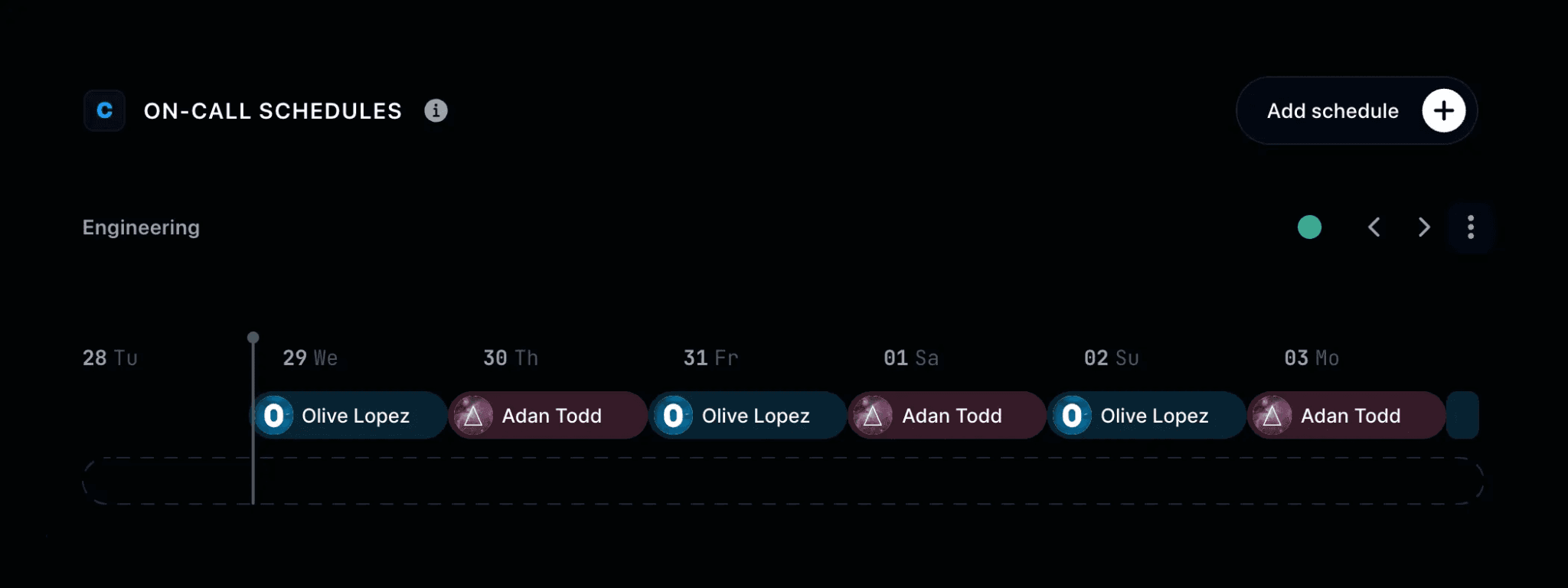
Teams can add schedule members, choose the rotation and on-call period, set restrictions, and preview the finished schedule before saving it. When an incident occurs, routing rules send it to the right schedule or escalation policy. If the assigned responder does not acknowledge it in time, Instatus can notify the next person.
The team can then manage the incident from the dashboard, Slack, or Microsoft Teams and publish an update to its status page.
Key Features
- On-Call Schedules: Build team schedules with members, rotation periods, restrictions, and a real-time preview.
- Shift Visibility: See whether you are currently on call and review your upcoming shifts.
- Routing Rules: Send incidents to a schedule or escalation policy based on impact, content, or other conditions.
- Escalation Policies: Notify the current responder, the next responder, or everyone on call when an incident is not acknowledged.
- Native Monitoring: Check websites, APIs, ping, TCP, UDP, and DNS from multiple locations, with intervals as short as 30 seconds. Instatus can also alert teams and connect incidents to status page updates from the same workflow.
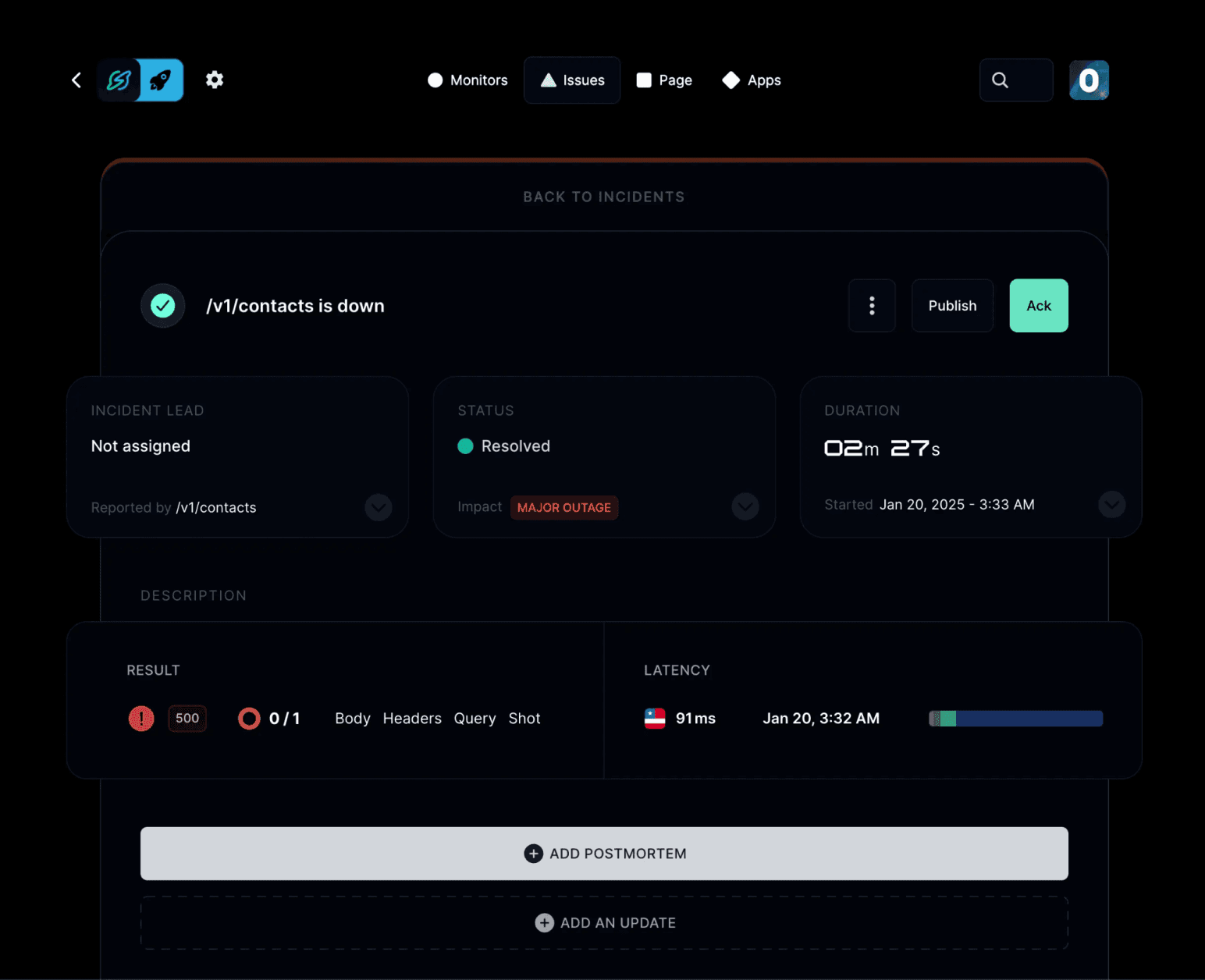
- Incident Communication: Respond from the dashboard, Slack, or Microsoft Teams, then publish incident updates to a status page.
Pricing
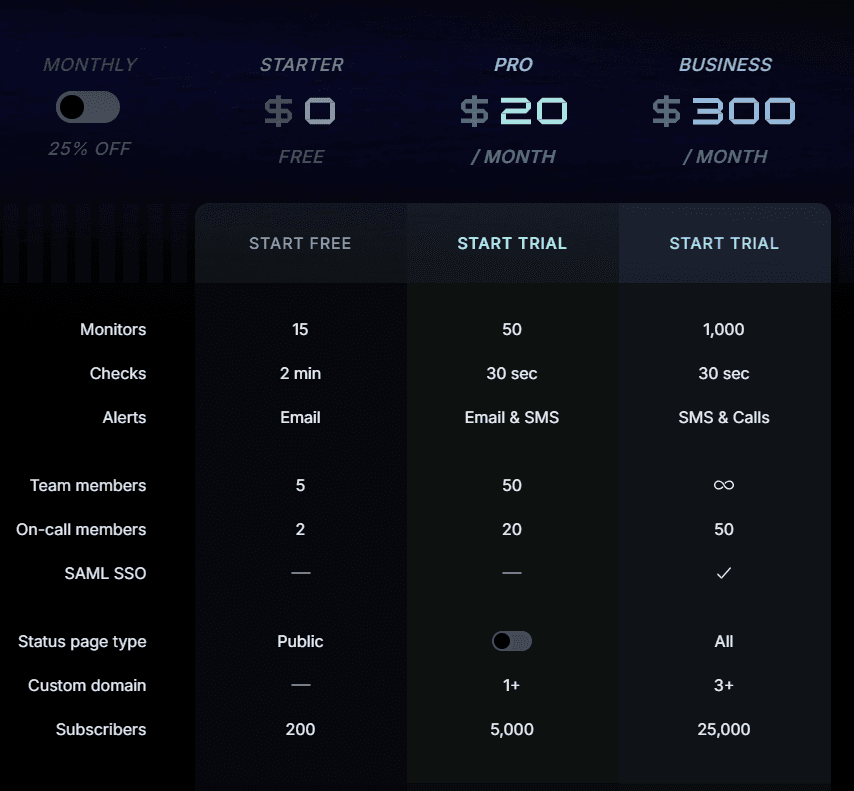
Instatus pricing uses flat plans with set on-call member allowances:
- Starter, Free: 15 monitors, 2-minute checks, email alerts, 5 members, 2 on-call, public page, 200 subscribers.
- Pro, $20/month: 50 monitors, 30-second checks, email/SMS alerts, 50 members, 20 on-call, 1+ custom domain, 5,000 subscribers.
- Business, $300/month: 1,000 monitors, 30-second checks, SMS/call alerts, 50 on-call, SAML SSO, all page types, 3+ custom domains, 25,000 subscribers.
- Enterprise, Custom: SCIM sync, priority support, 99.99% uptime SLA, multiple SSO, custom contracts, custom policies.
Annual billing saves 25%.
Pros
- Scheduling connects directly to native monitoring
- Flat plans avoid a separate responder fee
- Current and upcoming shifts are easy to check
- Status updates stay in the same workflow
Cons
- Its public on-call documentation does not list calendar sync, PTO calendars, or shadow rotations
2. PagerDuty
PagerDuty fits large teams that manage several services, regions, and coverage layers. Its schedule builder can combine weekday, overnight, weekend, and backup rotations in one final schedule.
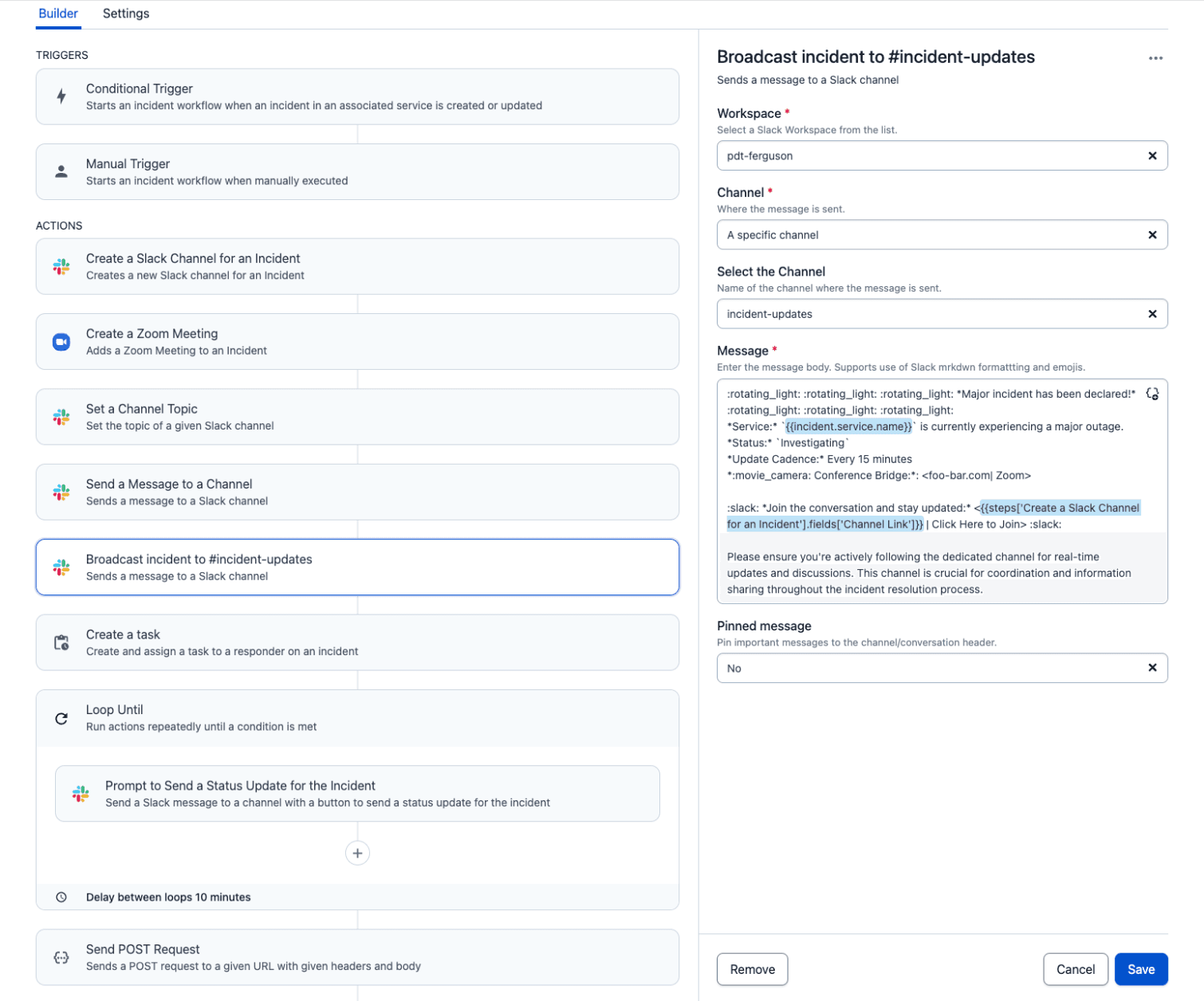
Teams can also set schedule-specific time zones, create temporary overrides, export shifts to external calendars, and connect primary and backup schedules to different escalation levels.
Key Features
- Layered Schedules: Combine multiple rotations and coverage windows.
- Schedule Overrides: Replace a responder without changing the recurring rotation.
- Time-Zone Support: Set a scheduled time zone while users view shifts in local time.
- Calendar Export: Add schedules to Google Calendar, Outlook, Apple Calendar, or Confluence.
- Escalation Handoffs: Assign primary and backup schedules to separate escalation levels.
Pricing
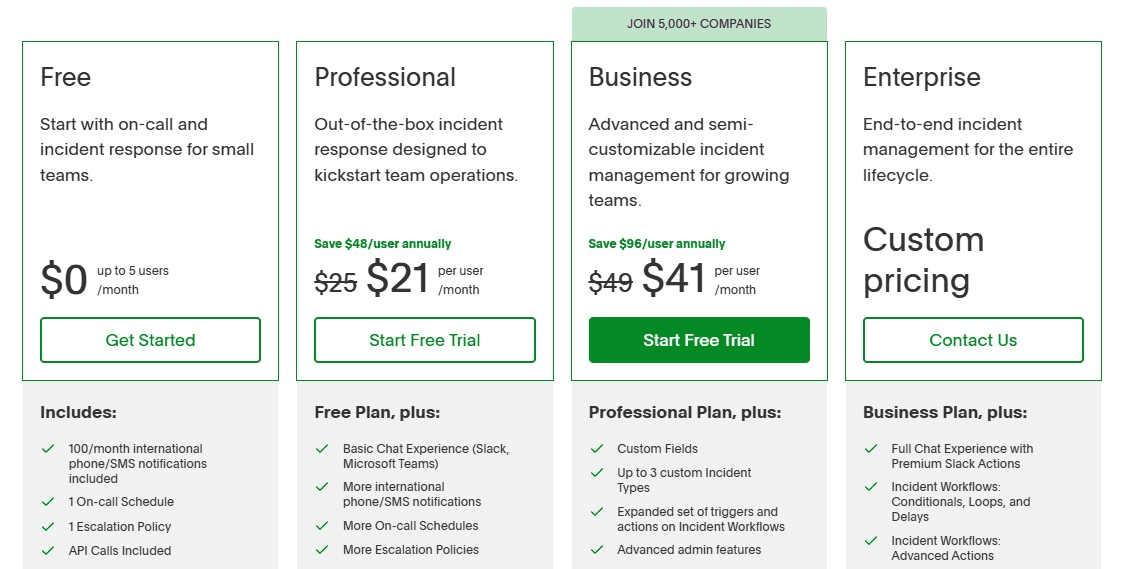
- Free: Up to five users, one schedule, and one escalation policy.
- Professional: $21 per user per month billed annually, or $25 monthly.
- Business: $41 per user per month billed annually, or $49 monthly.
- Enterprise: Custom pricing.
Pros
- Handles layered global coverage
- Strong override and time-zone controls
- Supports external calendar feeds
Cons
- Costs increase with every user
- Complex schedules require careful setup
3. incident.io
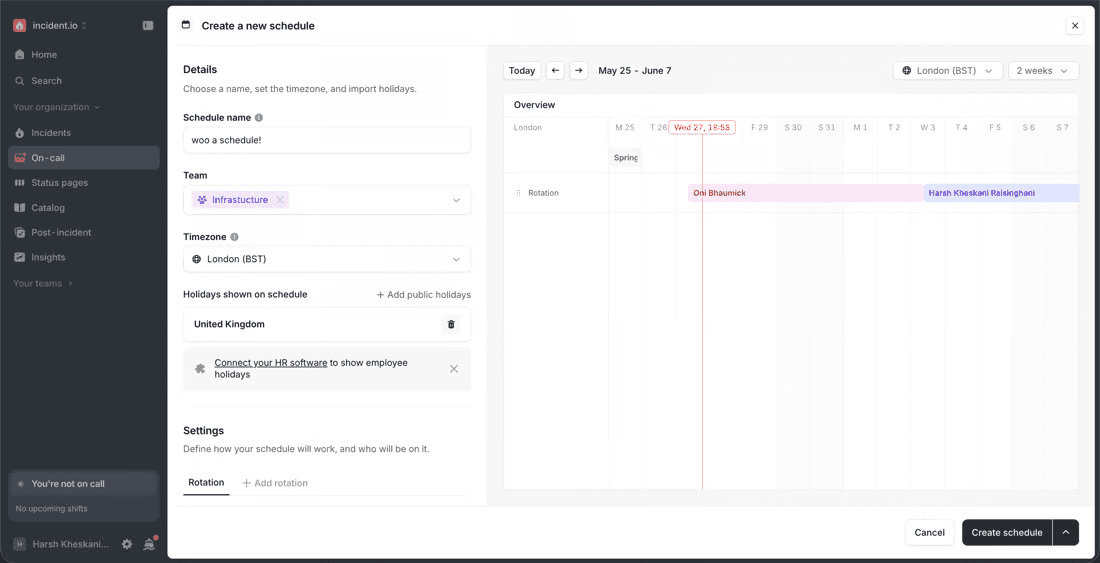
incident.io handles common schedule changes such as holidays, appointments, last-minute cover, and shadow shifts. Teams can build standard, uneven, or follow-the-sun rotations and preview changes before publishing them.
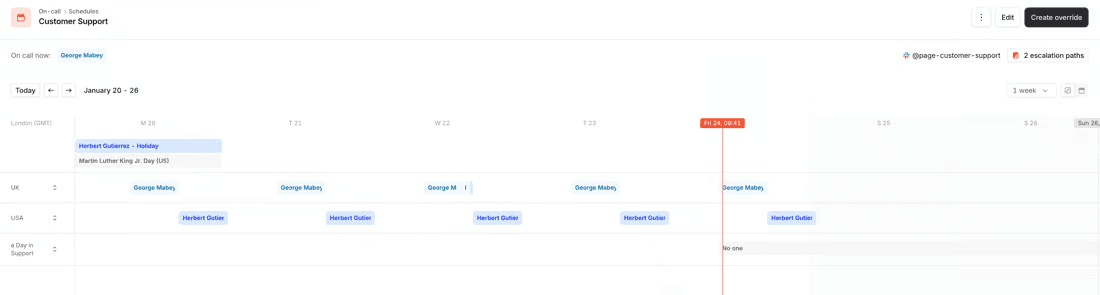
Responders can request cover from Slack, mobile, or the dashboard. Once a teammate accepts, incident.io creates the override automatically. Schedules also sync with Google Calendar or Outlook for the next three months.
Key Features
- Flexible Rotations: Build standard, uneven, shadow, and follow-the-sun schedules.
- Cover Requests: Ask a teammate to cover part or all of a shift.
- Automatic Overrides: Apply the temporary change once someone accepts a cover request.
- Holiday Calendars: Display relevant public holidays alongside scheduled shifts.
- Calendar Sync: Add on-call schedules to Google Calendar.
Pricing
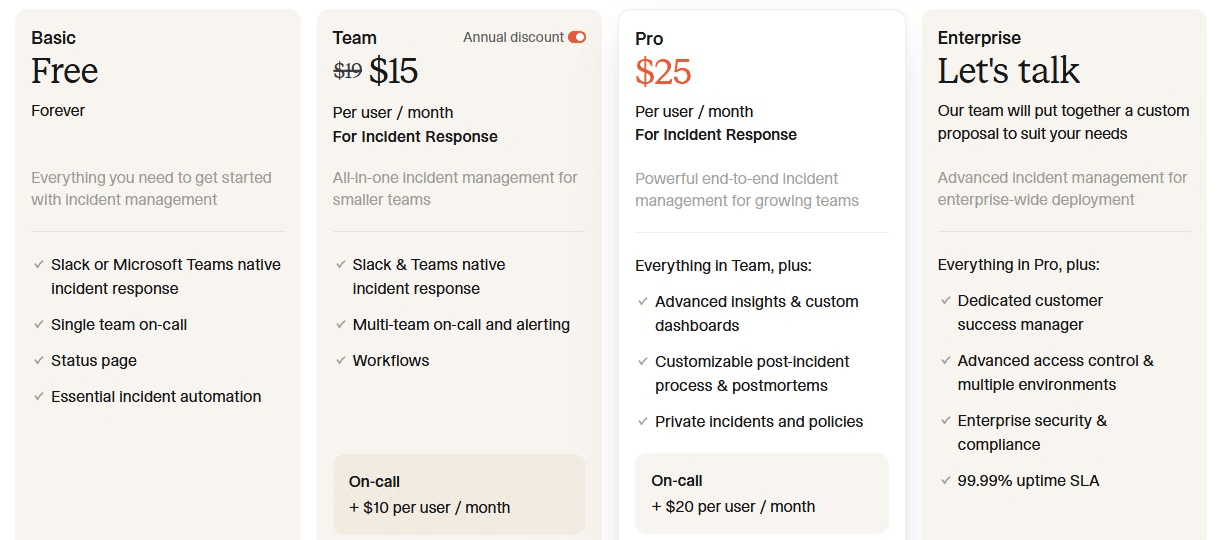
- Basic: Free with single-team on-call and one schedule.
- Team: $15 per user per month annually, plus $10 for on-call.
- Pro: $25 per user per month, plus $20 for on-call.
- Standalone On-Call: $20 per user per month.
Pros
- Cover requests create overrides automatically
- Supports shadow and follow-the-sun rotations
- Shift changes work from Slack and mobile
Cons
- On-call costs extra on paid response plans
- Separate schedules cannot sync automatically
4. Rootly
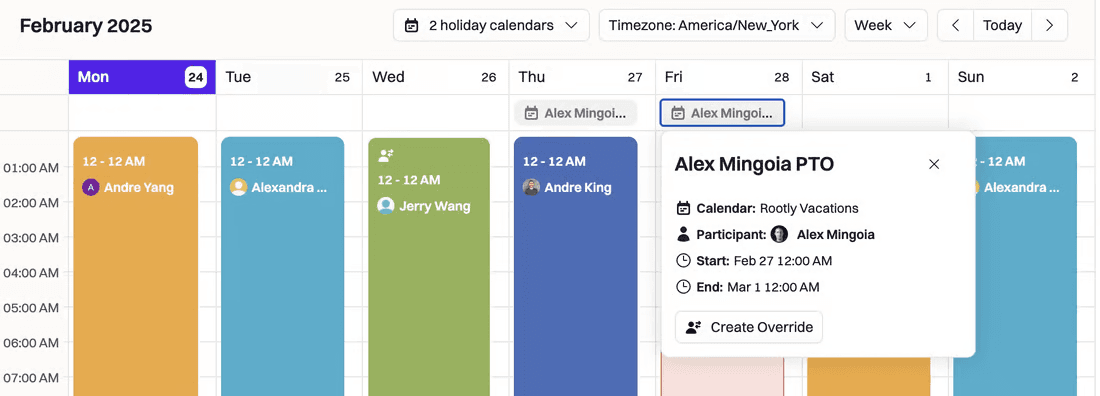
Rootly works well for teams where coverage changes often because of PTO, holidays, training, or unfilled shifts. Its schedule view shows who is on call now, who is next, and where a gap could leave an alert without a responder.
Key Features
- Flexible Schedules: Build rotations with multiple layers, restrictions, overrides, and a preview of the final coverage.
- Shadow Rotations: Add trainees to an existing schedule without creating a separate rotation. The primary responder keeps ownership while the shadow receives the same pages.
- Coverage Requests: Find a replacement for a shift and account for PTO or public holidays.
- Gap Detection: Flag periods with no assigned responder and add fallback coverage.
- Round-Robin Paging: Distribute alerts across several responders instead of paging the same person repeatedly.
Pricing
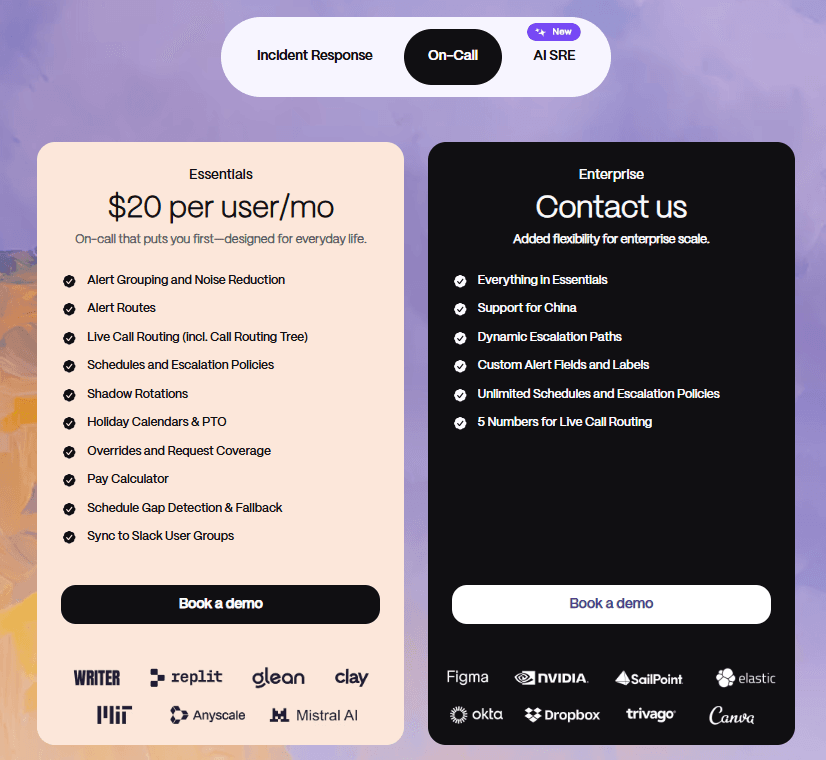
- On-Call Essentials: $20 per user per month with up to 20 schedules and escalation policies.
- Enterprise: Custom pricing with unlimited schedules and escalation policies.
Pros
- Detects uncovered shifts before alerts fire
- Supports shadowing without duplicate schedules
- Handles PTO and temporary cover changes
Cons
- Costs increase with each on-call user
- Unlimited schedules require Enterprise
5. ilert
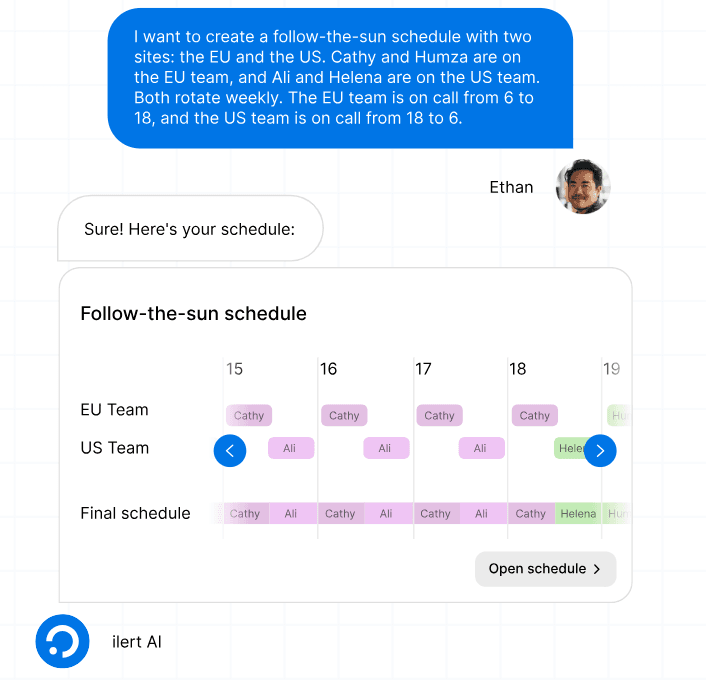
ilert gives teams detailed control over how schedules are built, shared, and changed. It supports rotating and follow-the-sun coverage, while letting responders swap shifts or apply one-time overrides from the mobile app.
Key Features
- Flexible Schedules: Create rotating, non-rotating, or follow-the-sun schedules.
- Shift Swaps and Overrides: Replace a responder without changing the base rotation.
- Live Calendar Sync: Publish schedules to Google Calendar, Outlook, or any iCal-compatible app.
- Shift Reminders: Notify responders by SMS, email, or push before duty begins.
- AI Schedule Assistant: Describe the rotation in plain language and generate a ready-to-use schedule.
Pricing
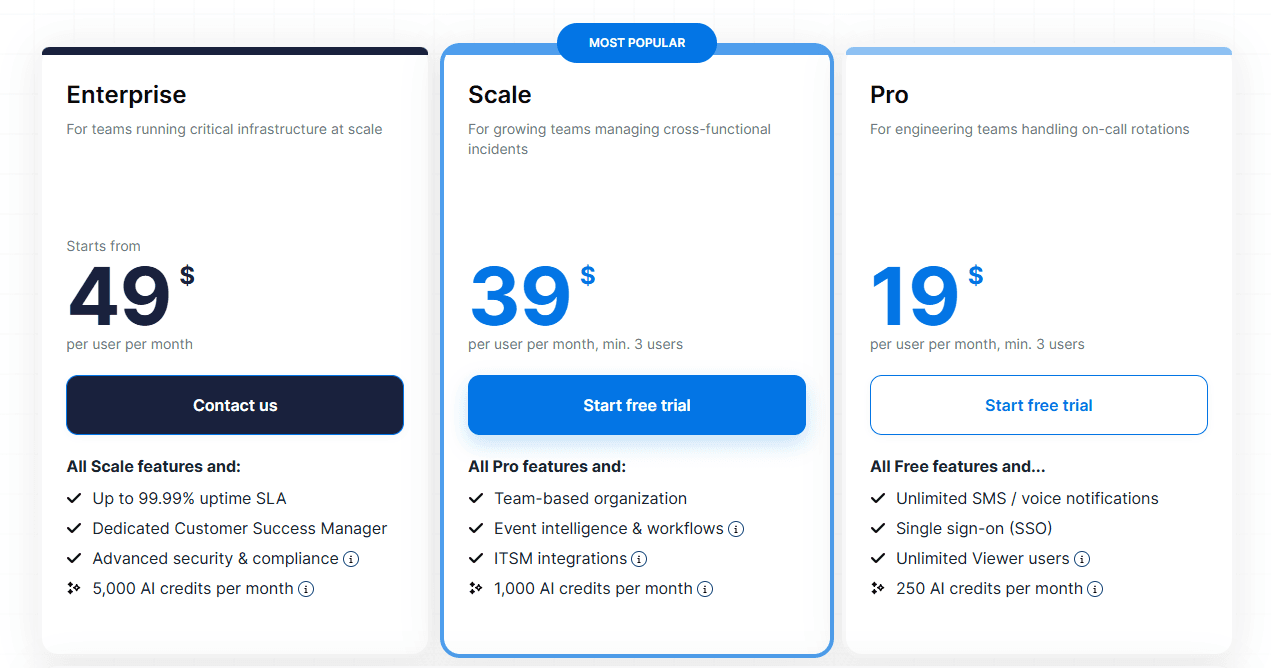
- Free: $0 for up to five users, with one on-call schedule, one escalation policy, and 100 account-wide SMS or voice notifications per month.
- Pro: $24 per user per month, or $19 per user per month billed annually.
- Scale: $49 per user per month, or $39 per user per month billed annually.
- Enterprise: Custom pricing.
ilert also offers a 14-day free trial, and annual billing saves 20%.
Pros
- Strong calendar and mobile controls
- Shift reminders reduce missed handoffs
- Generates schedules from plain-language requirements
Cons
- Paid prices require using the live pricing configurator
- The feature set can feel heavy for a basic rotation
6. Better Stack
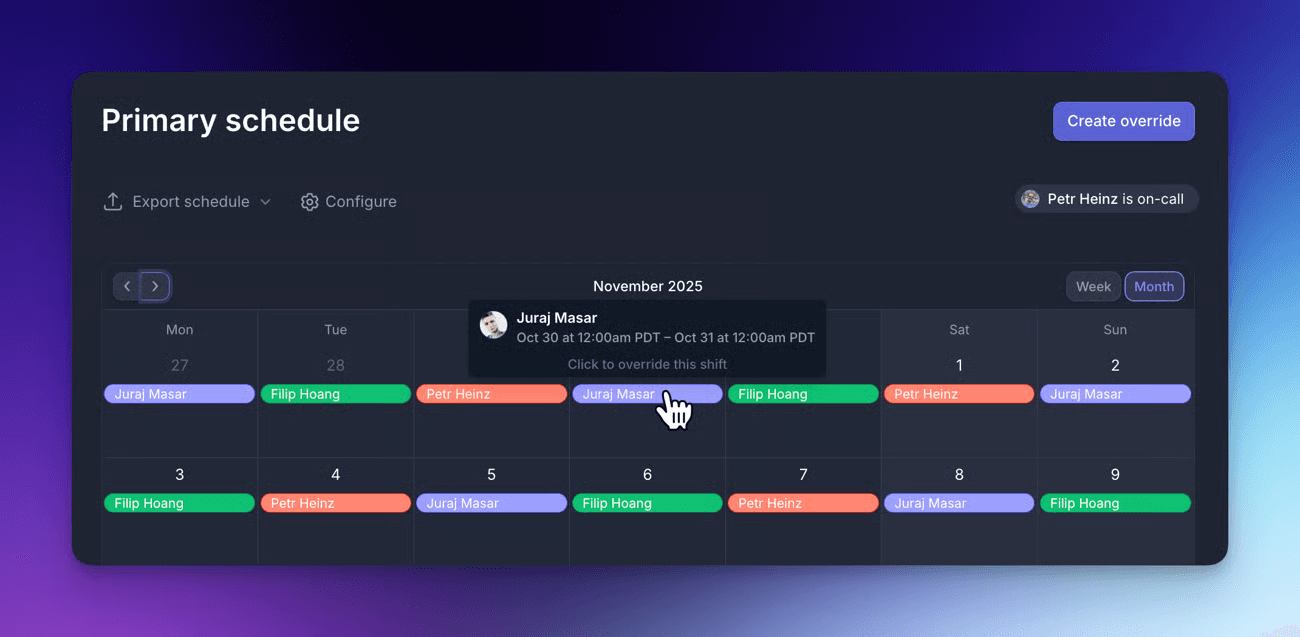
Better Stack connects on-call schedules directly to uptime and infrastructure monitoring. Teams can build recurring rotations, check future coverage, and add temporary overrides without changing the base schedule.
Key Features
- Live Schedule View: See who is on call today and review upcoming shifts.
- One-Time Overrides: Replace a responder temporarily without editing the recurring rotation.
- Backup Schedules: Add fallback coverage when the primary responder misses an alert.
- Follow-the-Sun Rotations: Combine schedules to cover teams across different time zones.
- Calendar Integration: Connect Google Calendar, Outlook, iCloud, or another service that provides an ICS feed.
Pricing
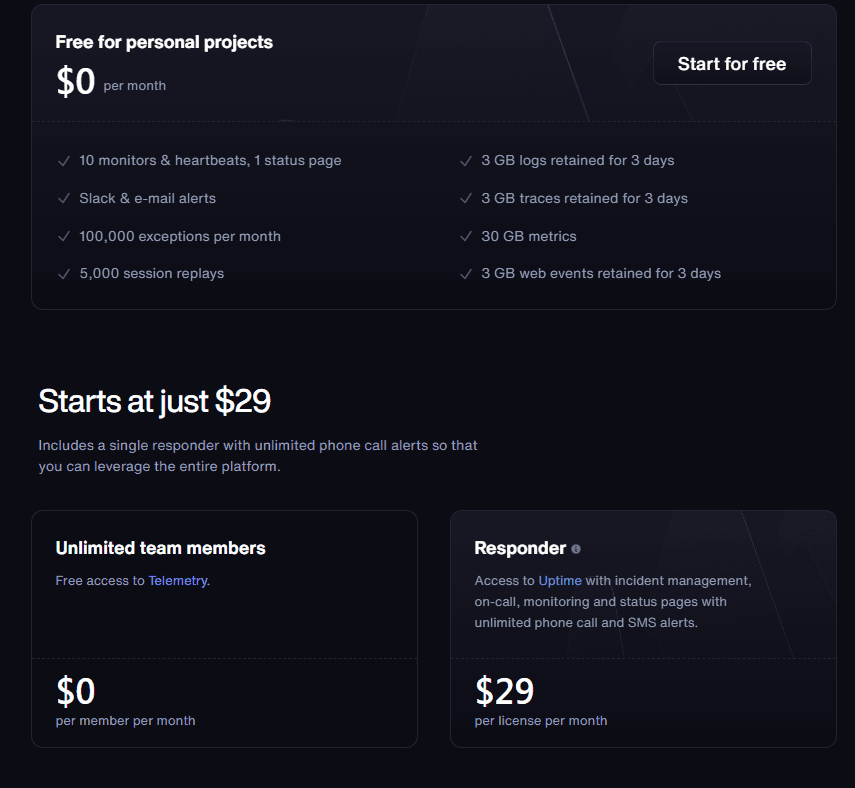
- Free: $0 for personal projects, with 10 monitors, one status page, and Slack and email alerts.
- Responder: $34 per month, or $29 per month billed annually.
- Team Members: Unlimited non-responder users are free.
- Responder licenses include on-call scheduling, incident management, monitoring, status pages, and unlimited phone and SMS alerts.
- Advanced Slack and Microsoft Teams workflows cost an extra $9 per responder monthly.
Pros
- Connects schedules directly to monitoring alerts
- Supports backup and global coverage
- Works with common external calendars
Cons
- Costs increase with each responder license
- Teams needing only scheduling still pay for the wider platform
7. SolarWinds Incident Response
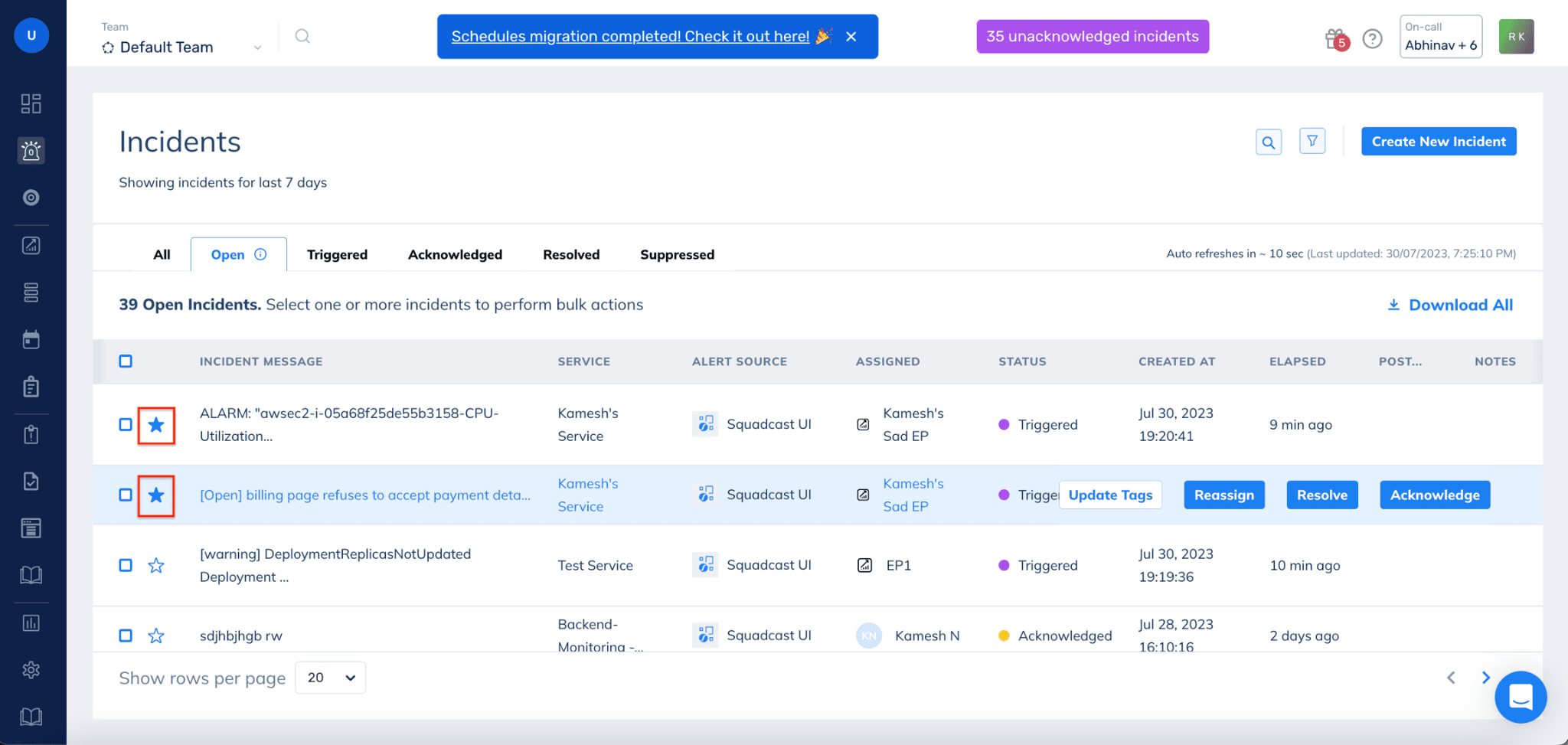
SolarWinds Incident Response, formerly Squadcast, suits teams that need repeatable rotations without PagerDuty's higher starting price. Admins can clone existing schedules, export shifts to calendar apps, and add temporary overrides without rebuilding the underlying rotation.
Key Features
- Flexible Rotations: Create recurring schedules for working hours, weekends, or continuous coverage.
- Schedule Overrides: Replace the assigned responder during leave, holidays, or unexpected absences.
- Calendar Export: Add schedules to external calendar tools so responders can see upcoming shifts outside the incident response platform.
- Schedule Cloning: Copy participants and settings when several teams need similar coverage.
- Round-Robin Policies: Distribute alerts across responders instead of repeatedly paging one person.
Pricing
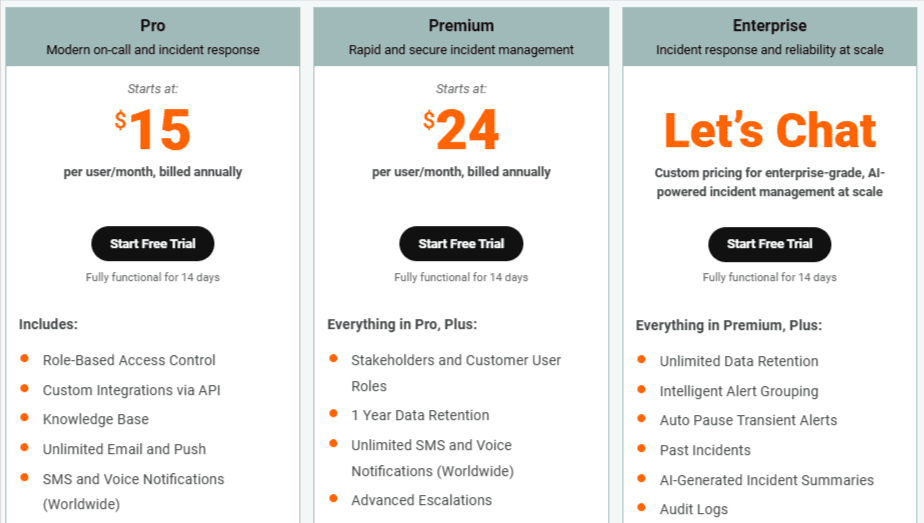
- Pro: From $15 per user per month, billed annually.
- Premium: From $24 per user per month, billed annually.
- Enterprise: Custom pricing.
- All plans include a fully functional 14-day trial.
Pros
- Lower starting price than PagerDuty
- Cloning speeds up multi-team setup
- Supports calendar exports and round-robin coverage
Cons
- No permanent free plan is advertised
- Some documentation still uses the Squadcast name
What to Look For in On-Call Scheduling Software
The right tool should make coverage easier to trust, not give someone another calendar to maintain. Before choosing one, check how well it handles the situations that usually break an on-call rota:
- Rotation Flexibility: The tool should support weekday, weekend, overnight, split-shift, and follow-the-sun rotations without forcing admins to create a new schedule for every exception.
- Fast Overrides: Responders should be able to swap or cover shifts without changing the recurring schedule underneath.
- Backup Coverage: The schedule should connect to fallback responders or escalation policies, so missed alerts do not sit with one unavailable person.
- Time-zone Handling: Global teams should be able to view shifts in local time while admins keep one reliable source of truth.
- Calendar Access: Engineers should be able to add upcoming shifts to Google Calendar, Outlook, Apple Calendar, or another calendar feed.
- PTO and Holiday Cover: Absences should be visible early, so teams can arrange coverage before a gap appears.
- Who-is-on-call Visibility: Anyone should be able to see the current and next responder without asking in Slack.
- Escalation Handoffs: Schedules should connect to escalation rules or an incident response workflow, so an unacknowledged alert moves to the next responder.
- Pricing Structure: Check whether on-call is included, sold as an add-on, or charged per responder. Also confirm limits on schedules, SMS, phone calls, and stakeholders.
Build a Clearer On-Call Schedule With Instatus
Instatus is strongest when scheduling needs to connect to response. It brings on-call schedules, routing, escalations, monitoring, and status pages into one workflow, so alerts reach the right responder and can escalate when needed.
Start with Instatus for free and connect scheduling, incident response, and customer updates from one account.

Get ready for downtime
Monitor your services
Fix incidents with your team
Share your status with customers