

Splunk Cloud Pricing (2026): Models, Real Costs, and a Simpler Alternative
Quick Summary
Splunk Cloud Platform uses ingest- and workload-based pricing models, while Splunk Observability products use host- and activity-based pricing. Core Cloud prices are quote based, so costs depend on data volume, workload demand, storage, add-ons and contract terms. If you mainly need uptime monitoring and customer updates, Instatus offers a simpler, flat-plan alternative.
What You Are Paying For with Splunk Cloud
Splunk Cloud is an enterprise data platform for log analytics, security monitoring, and observability at scale, and it is very good at it. You pay for the compute and data behind your searches, so the bill grows with volume and complexity, not headcount.
That earns its keep when a security team works in it daily, less so when you just need to watch a few endpoints and post updates.
This Instatus guide breaks down Splunk Cloud pricing, the factors that shape your final quote, and when a focused tool does the same job for far less.
Why Listen to Us?
We build Instatus, the tool teams use to track services and keep customers posted during downtime. Companies like Sketch, Airbyte, Harvard, Deno, Wistia, and Modern Treasury run their status pages on it, rated 4.8 on Capterra. We work the uptime side of an incident, and that gives us a clear view of where a data platform is worth its price and where it is overkill.

How Splunk Cloud Pricing Works
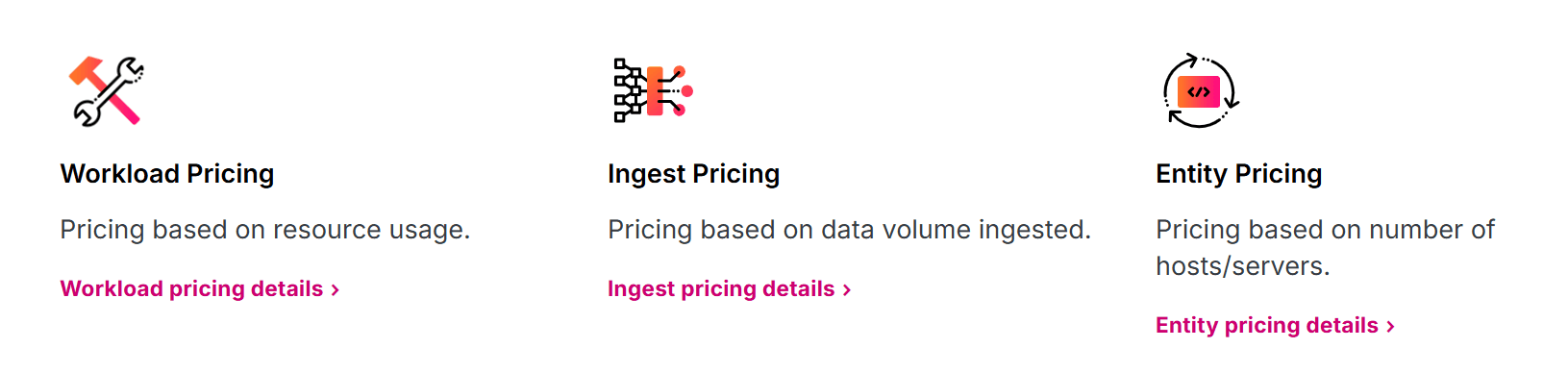
Splunk's pricing varies by product. Splunk Cloud Platform primarily uses workload or ingest pricing, while Splunk Observability Cloud also offers host- and activity-based pricing.
Ingest Pricing
Ingest pricing is based on the daily volume of data indexed in Splunk. It is a simple model where you pay based on daily ingest volume rather than search activity. Under this model, Splunk Cloud Platform includes storage equal to 90 days of indexed data. Extra storage requires a separate discussion with Splunk.
Workload Pricing
Workload pricing is based on the compute your Splunk workloads need. Splunk defines workloads as activities such as searching, investigating, monitoring, machine learning, data streaming, indexing and processing.

These are measured in Splunk Virtual Compute units, or SVCs. Your SVC allocation reflects the compute capacity required for Splunk workloads, so heavy searches, frequent investigations, indexing and complex analytics can affect the capacity you need.
Entity and Activity Pricing
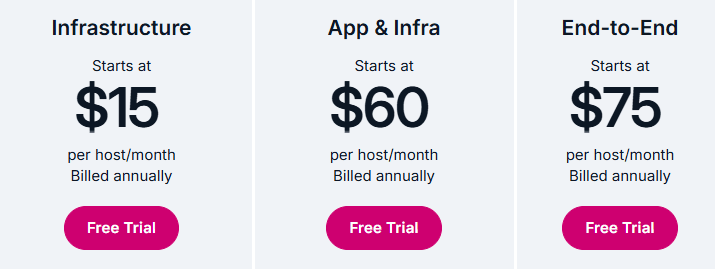
Splunk Observability Cloud is priced differently from the core Splunk Cloud Platform. Its public packages are host based, starting at $15 per host/month for Infrastructure, $60 per host/month for App & Infra and $75 per host/month for End-to-End, billed annually.
Splunk also supports activity-based pricing for observability usage such as metric time series, traces analyzed per minute, sessions and uptime requests. For example, Real User Monitoring starts at $14 per 10,000 sessions, while Synthetic Monitoring starts at $1 per 10,000 uptime requests.
Add-Ons and Premium Products
The base platform is not always the full bill. Splunk says premium solutions such as Enterprise Security and IT Service Intelligence can be purchased individually with Splunk Cloud Platform. Security and SOAR offerings may use separate licensing and pricing models, so they should be counted separately when comparing total cost.
What Splunk Cloud Costs in Practice
The quote depends on more than the platform name. Watch these cost drivers:
- Daily Data Volume: Ingest pricing grows with the amount of data indexed each day.
- Search and Workload Demand: Workload pricing depends on the SVC capacity needed for searches, investigations, dashboards, indexing and processing.
- Storage Needs: Ingest pricing includes 90 days of indexed data storage, but longer retention or different storage needs can change the quote.
- Observability Usage: Hosts, sessions, traces, metric activity and uptime requests can add separate Observability costs.
- Premium Products: Enterprise Security, ITSI, SOAR and support upgrades can increase total spend.
That is the concern for uptime and status page teams: Splunk costs follow data, workload and platform usage, while your daily need may only be to know when a service is down and tell customers what is happening.
Instatus: A Simpler Alternative for Uptime and Status Pages
Keep Splunk for log analytics, SIEM and investigations when your team needs that depth. For the customer-facing incident layer, Instatus is lighter. It monitors services, alerts the right people and gives customers a branded place to check current status without paying for a broader data platform.
What You Get With Instatus
Instatus monitors can check services from multiple locations every 30 seconds, track availability and performance and alert teams when something fails. Teams can monitor websites, APIs, Ping, TCP/UDP and DNS, with conditions such as status codes, response time and keywords.
Alerts work through email, SMS, Slack, Discord, Microsoft Teams, phone calls, webhooks and push notifications. Teams can also use public, private or select-audience status pages to keep customers updated during incidents and maintenance.
Instatus Pricing
Instatus uses flat monthly plans, with three months free on yearly billing.
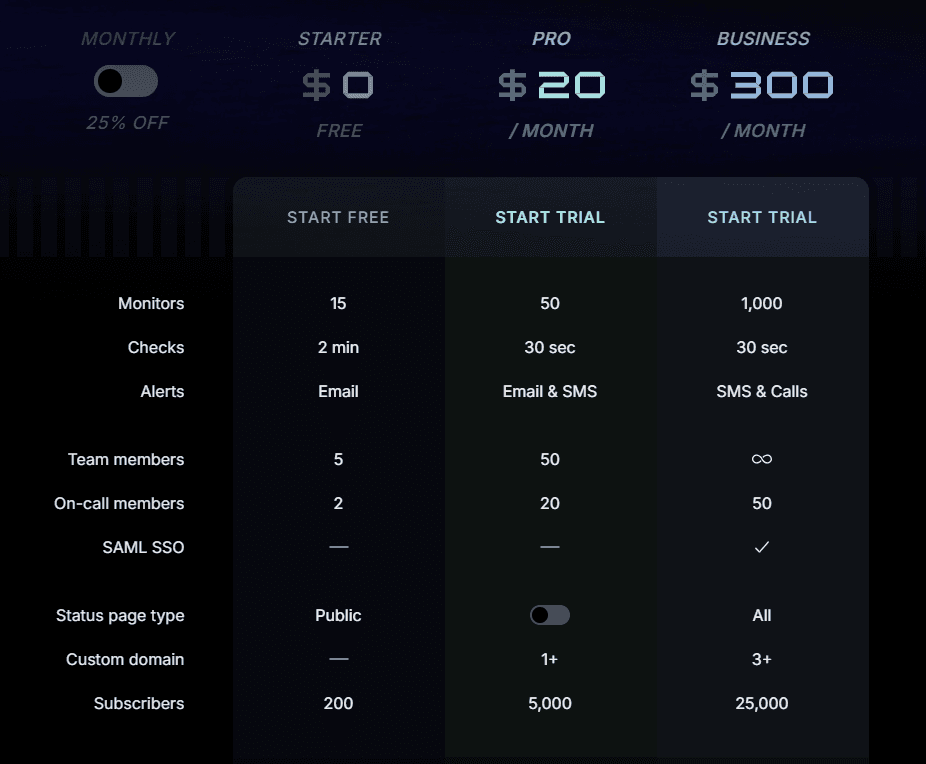
- Starter, Free: 15 monitors, 2-min checks, email alerts, 5 members, 2 on-call, public page, 200 subscribers.
- Pro, $20/month: 50 monitors, 30-sec checks, email/SMS alerts, 50 members, 20 on-call, 1+ custom domain, 5,000 subscribers.
- Business, $300/month: 1,000 monitors, 30-sec checks, SMS/call alerts, 50 on-call, SAML SSO, all page types, 3+ custom domains, 25,000 subscribers.
- Enterprise, Custom: SCIM sync, priority support, 99.99% uptime SLA, multiple SSO, custom contracts, custom policies.
Instatus vs. Splunk Cloud
| Capability | Splunk Cloud | Instatus |
|---|---|---|
| Core job | Log analytics, SIEM and observability | Uptime monitoring, incident response, on-call, and status pages |
| Uptime monitoring | Via Observability Cloud / Synthetic Monitoring | Website, API, ping, TCP/UDP, and DNS monitoring with 30-second checks |
| Customer status pages | Not a dedicated customer status page product | Branded public, private, and select-audience pages with subscriber updates |
| Pricing model | Ingest, workload, entity or activity based | Flat plans covering monitoring, on-call, and status pages |
| Published prices | Limited for Cloud Platform, public starts for Observability | Public plan pricing |
| Free option | Cloud Platform free trial, Observability Cloud free for up to 15 hosts | Forever free plan with 15 monitors, a public page, and on-call |
When to Choose Instatus Over Splunk Cloud
Splunk Cloud is built for deep log analytics, security operations and observability at scale. But if you mainly need uptime monitoring, alerts and customer updates, Instatus gives you that workflow on a simpler, predictable plan.
Start for free with Instatus and get your status page ready before the next outage.

Get ready for downtime
Monitor your services
Fix incidents with your team
Share your status with customers