

New Relic Pricing Explained: Plans, Costs, and When a Status Page Tool Pays Off
Quick Summary
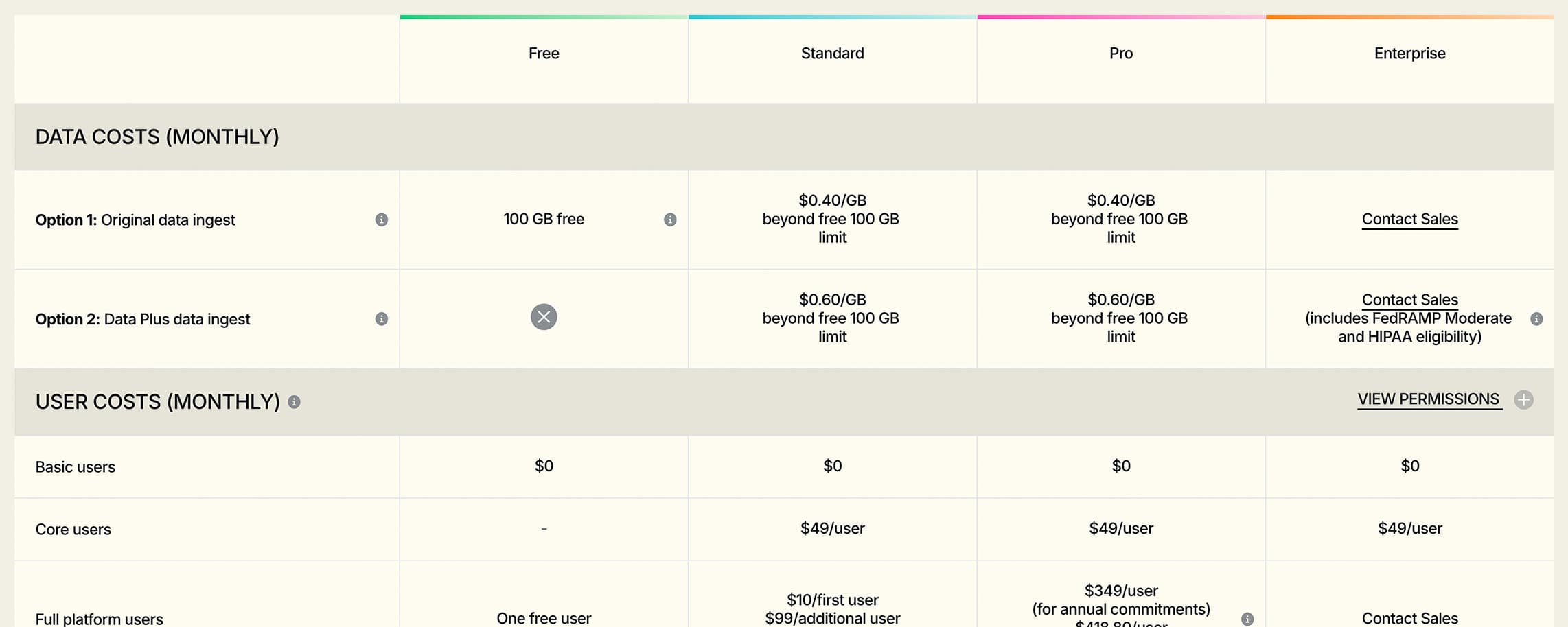
New Relic charges based on data ingest, user types, and Advanced Compute. Costs increase as data ingest, paid users, and Advanced Compute usage grow beyond the free tier. Teams using New Relic mainly for uptime checks and customer status updates often pay observability prices for an incident-comms job. This guide breaks down the plans and shows when Instatus fits better.
Is New Relic Pricing the Right Fit for Your Team?
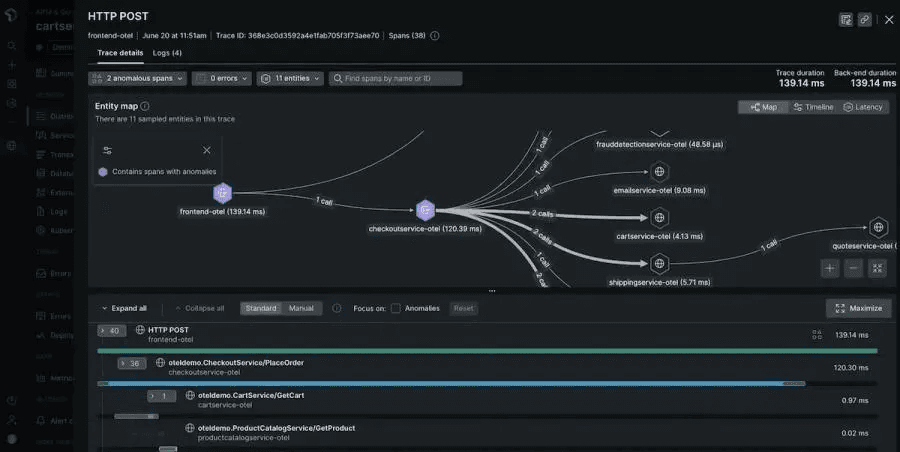
New Relic covers apps, infrastructure, logs, traces, errors, user experience, and AI systems. That breadth is useful when engineers debug production. It is also why pricing is hard to predict.
Costs shift with data ingest, user counts, Advanced Compute, and add-ons. Many teams sign up for the full observability suite, then use a small slice of it for uptime checks and status updates. That mismatch is where bills get painful.
This Instatus guide breaks down New Relic's plans, what drives the real cost, and when teams using it mainly for incident communication are better off on Instatus.
Why Listen to Us?
We build Instatus, a status page and incident communication tool, for teams that need to stay reliable when something breaks. Organizations like Sketch, Airbyte, Harvard, Deno, Wistia, and Modern Treasury rely on us during real incidents. That has shown us which situations need full observability and which need a focused incident management tool.

How Much Does New Relic Cost?
New Relic uses usage-based pricing across its Free, Standard, Pro, and Enterprise plans.
Your plan affects support, security, and user access. Your total cost depends on data ingest, user types, and Advanced Compute. Hosts are unlimited, with 50+ capabilities and 780+ integrations included.
Free Plan
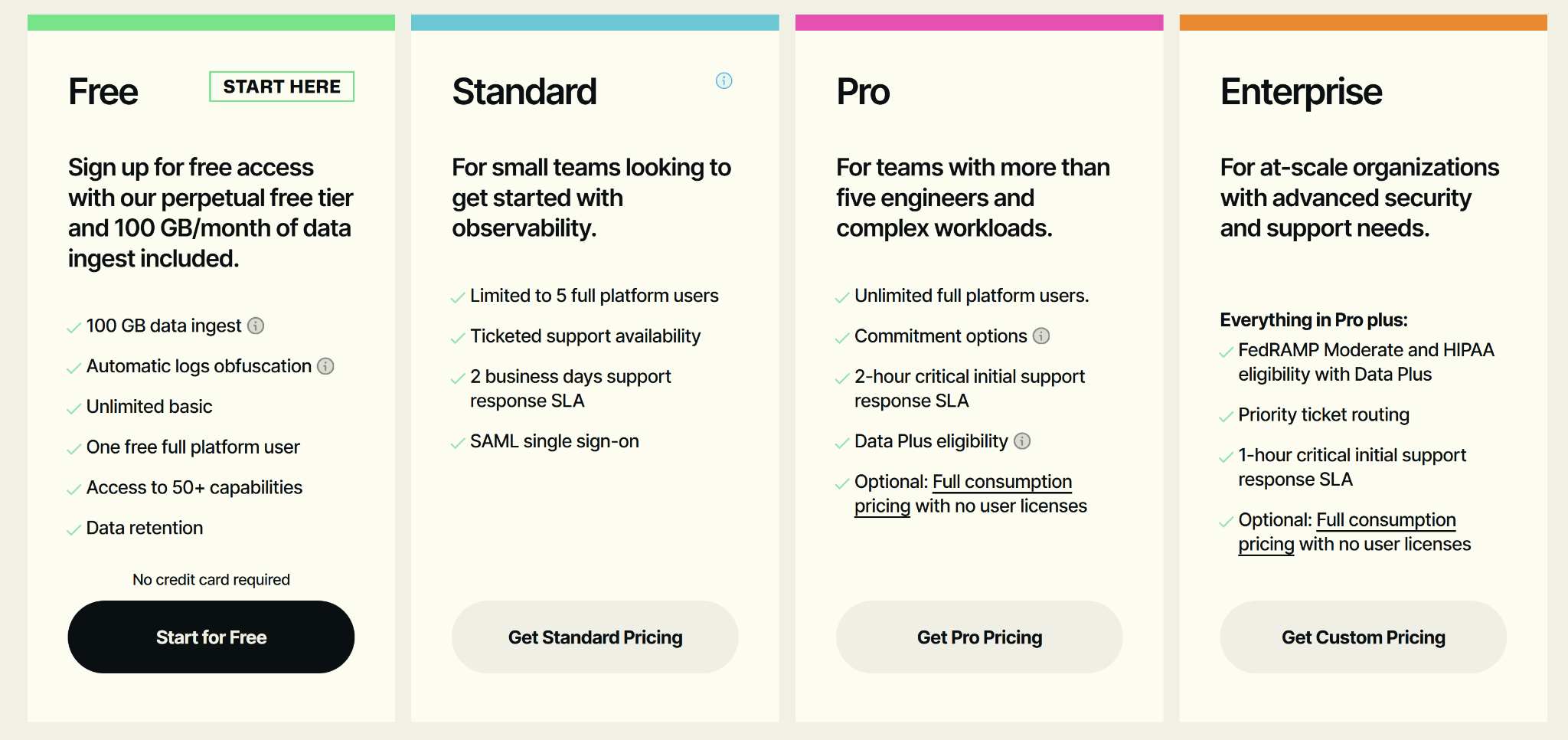
Built for developers, students, and small teams testing the platform. You get 100 GB of free data ingest per month, automatic log obfuscation, unlimited Basic users, one Full Platform user, access to 50+ capabilities, and included data retention. No credit card needed.
Standard Plan
Fits small teams getting started with observability. Includes up to five Full Platform users, SAML single sign-on, ticket-based support, and a two-business-day response SLA. Good for shared access with light support needs.
Pro Plan
Built for larger teams with complex production workloads. Includes unlimited Full Platform users, flexible commitments, Data Plus eligibility, a two-hour critical response SLA, and optional consumption-based pricing without user licenses.
Enterprise Plan
Fits regulated and large organizations. Everything in Pro, plus FedRAMP Moderate and HIPAA eligibility with Data Plus, priority ticket routing, and a one-hour critical response SLA. Pricing is custom.
Why Is New Relic Expensive for Some Teams?
New Relic's cost climbs because three things stack up on your final bill:
- Data ingest: Every account gets 100 GB free each month. Extra ingest costs $0.40 per GB.
- User types: Basic users are free. Core and Full Platform users are paid based on edition.
- Advanced Compute: Features like Transaction 360, Security RX, and New Relic AI use Advanced Compute. Admins manage spend through Feature Control Manager.
Your bills grow with telemetry volume, paid user counts, and advanced features turned on. The catch is that many teams adopt New Relic for full stack observability, but their day to day incident workflow is much simpler.
They monitor uptime, send alerts through Slack or PagerDuty, and keep customers informed through a status page. Advanced capabilities like distributed tracing, APM, and detailed log analysis are only used during major incidents, which makes the cost harder to justify.
If most of your real usage is detecting outages, alerting responders, and keeping customers informed, you do not need a full observability platform for that job.
Instatus: A Focused Alternative for Incident Communication
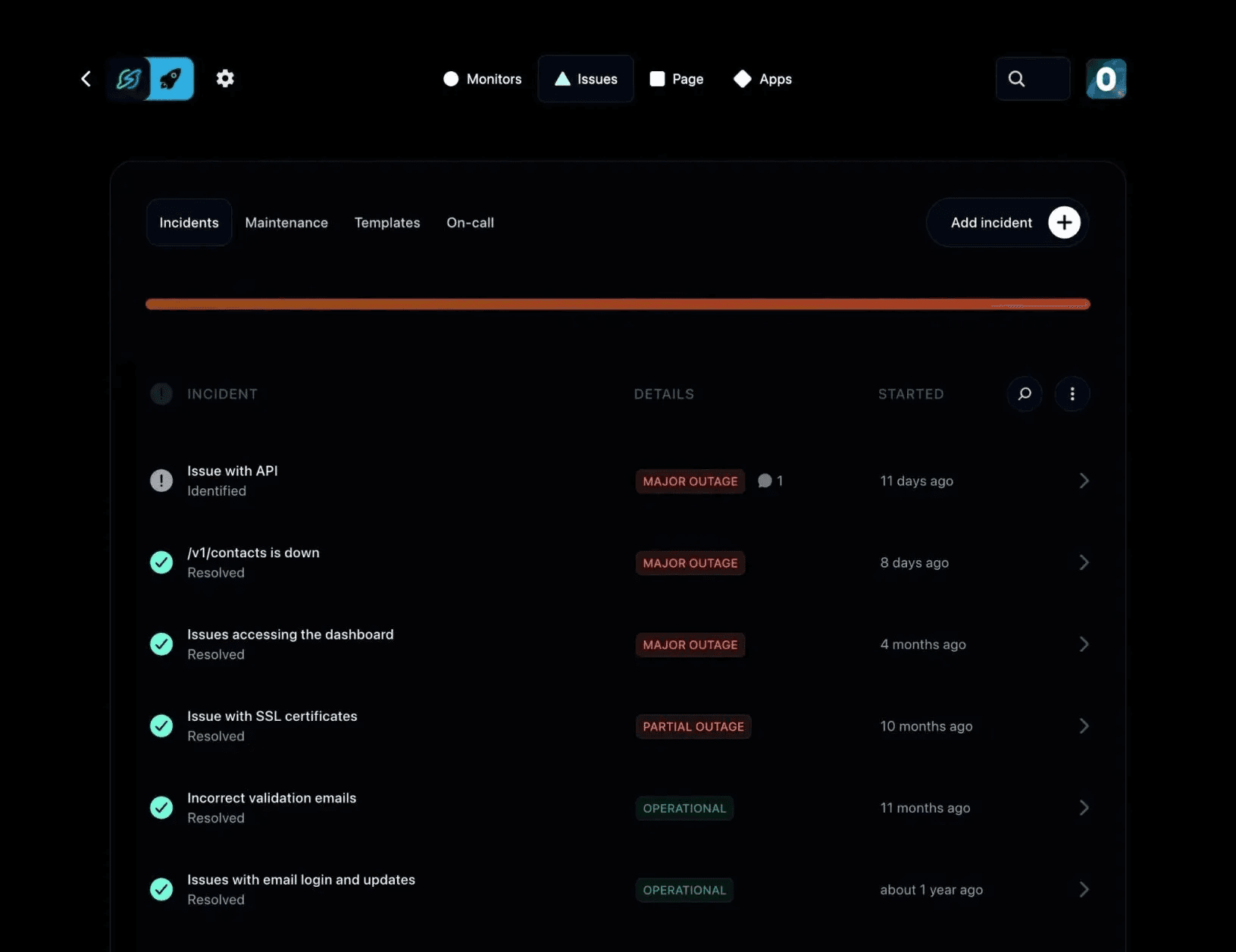
A dedicated status page and incident communication tool can handle the detect-alert-update workflow without the same observability pricing model. You keep New Relic for the engineering diagnostics that actually need it, or drop it entirely if the incident-comms layer is the real driver of the bill.
That is the slot Instatus fills.
Why Teams Choose Instatus for the Incident-Comms Job
Instatus runs the workflow most teams actually use during downtime. We monitor websites, APIs, SSL, TCP, ping, DNS, and keywords. We route alerts through email, SMS, calls, Slack, Discord, and Microsoft Teams. We publish updates through branded public, private, or audience-specific status pages.
One bill covers monitoring, alerting, on-call, incident management, and customer communication. No ingest meter. No Advanced Compute charges. No pricing model tied to telemetry spikes.
Instatus Pricing
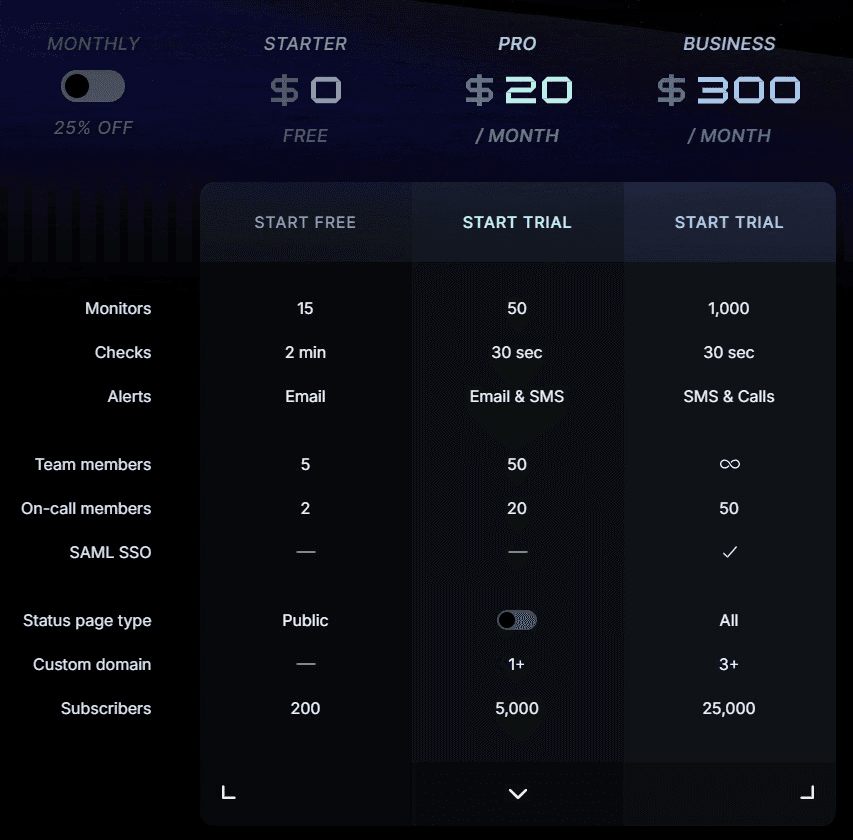
Each tier is a flat monthly rate, not per user. You know the bill before the month starts.
| Plan | Monthly Cost | Best For | What You Get |
|---|---|---|---|
| Starter | $0 | Small teams starting free | 15 monitors, 2-minute checks, email alerts, 5 team members, 2 on-call members, public status page, 200 subscribers |
| Pro | $20 | Growing teams needing faster checks | 50 monitors, 30-second checks, email and SMS alerts, 50 team members, 20 on-call members, 1+ custom domain, 5,000 subscribers |
| Business | $300 | Larger teams with broader needs | 1,000 monitors, 30-second checks, SMS and call alerts, 50 on-call members, SAML SSO, all status page types, 3+ custom domains, 25,000 subscribers |
| Enterprise | Custom | Advanced security and support | SCIM directory sync, priority support, 99.99% uptime SLA, multiple SSO connections, custom contracts |
Every plan includes uptime monitoring and status pages, while higher tiers increase monitor limits, alerting options, team capacity, and enterprise features. That makes monthly costs predictable as your monitoring needs grow.
Instatus vs. New Relic for Uptime Monitoring and Status Pages
For incident communication, Instatus covers the full workflow on one predictable bill.
| Capability | New Relic | Instatus |
|---|---|---|
| Uptime monitoring (HTTP, APIs, SSL, Keywords, DNS, TCP, and ICMP) | HTTP/API, keyword, and SSL checks through Synthetics. DNS, TCP, and ICMP require separate network-monitoring configurations. | Yes, included across all plans. |
| Check frequency | Configurable | 30 seconds on paid plans |
| Customer-facing status pages | Not a core capability | Yes, with custom domains |
| Private and audience-specific status pages | Not a core status page use case | Yes |
| Alert channels | Available across New Relic alerts/integrations | Email, SMS, calls, Slack, Discord, and Microsoft Teams |
| Pricing model | Ingest, users, Advanced Compute | Flat plan pricing |
| Free tier | 100 GB ingest, 1 Full Platform user | 15 monitors, 5 team members, 200 subscribers |
Skip Full Observability Overhead with Instatus
New Relic is built for deep observability, but many teams spend most of their time monitoring uptime, alerting responders, and updating customers.
If that sounds like your workflow, Instatus provides those capabilities in a simpler, more predictable package. Use Instatus for everyday incident management, and reserve New Relic for the engineering diagnostics that truly require it.
Start free with Instatus and get your status page, monitoring, and incident response workflow ready before the next outage.

Get ready for downtime
Monitor your services
Fix incidents with your team
Share your status with customers